A monitor checks a public account or search on a schedule and sends a webhook when it sees items it has not seen before. A webhook is a request to your server containing the event. You can inspect one in a test inbox before writing a receiver or exposing a public URL.
This guide watches Reuters on X. The screenshots use an existing monitor and its saved deliveries. It is paused to stop further scheduled spending; the delivery history remains available. They do not show a fresh baseline producing new-post events.
Before you start
Use a Social Fetch workspace with a recorded credit-pack purchase or subscription, and credits for checks. Free signup credits alone do not unlock monitors. For API requests, create an API key and keep it privately in SOCIALFETCH_API_KEY.
Creating and editing a monitor is free. Each successful check costs the source's normal request price, including the first check and a check that finds nothing new. A completed lookup reporting a private or missing account can also be charged. Skipped checks and temporary lookup failures cost zero. Deliveries, retries and Send test are free.
For the X profile source used here, a successful check costs 1 credit. Start with the default hourly schedule unless you need more frequent checks. See Billing for monitors for estimates, plan limits and spendCapCredits, an API setting that caps one monitor's monthly spend.
Create a test inbox
- Open Monitors and click Webhook endpoints.
- Reuse a test inbox if you already have one. Otherwise click Create endpoint.
- Choose Test inbox and enter
quickstartin Description. - Click Create endpoint and store the signing secret privately when it is shown.
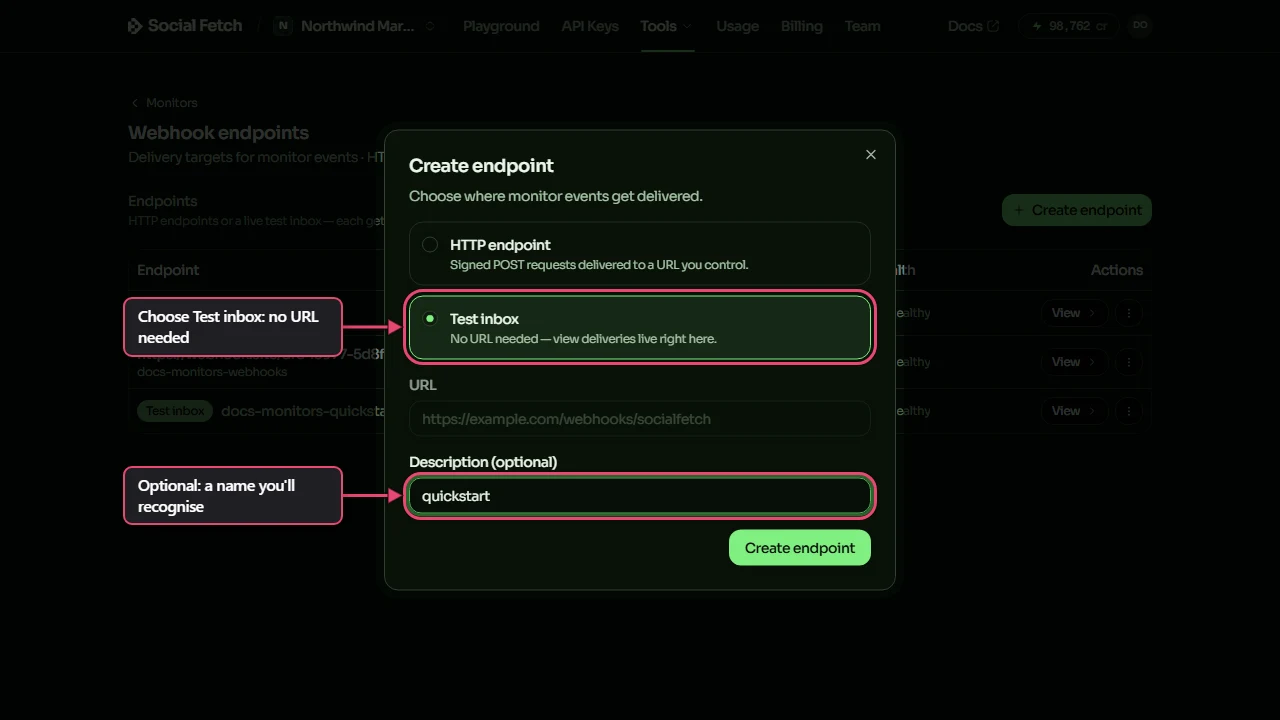
The secret is returned only on creation or rotation. A workspace can have at most two test inboxes, so reuse one instead of creating another for every monitor. A signing secret belongs to the endpoint; several monitors can share it.
Choose what to watch
- Return to Monitors and click New monitor.
- Under What to watch, choose Twitter/X, then Profile tweets.
- Type
Reutersin Twitter/X handle.
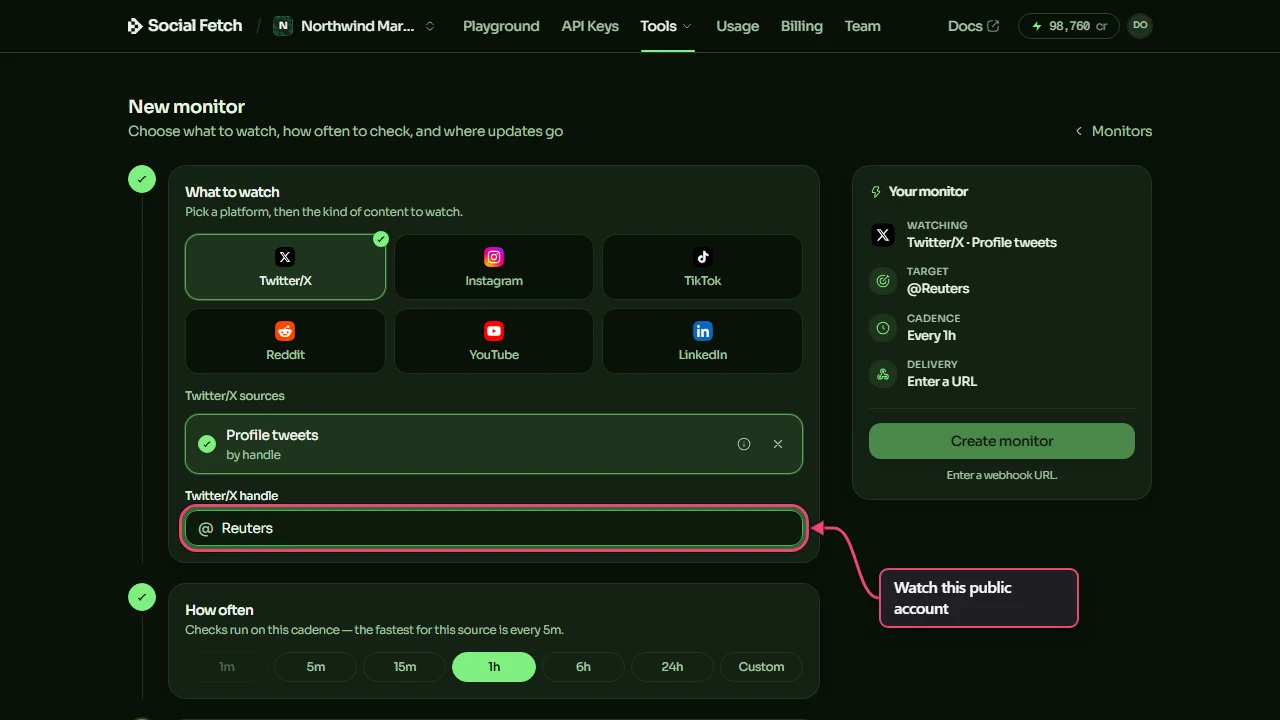
Other platforms offer their own account, feed or search sources. A monitor's operationId is the source's contract ID, not its display label. For this source it is twitter.profile.tweets.list; new-item events use twitter.profile.tweets.list.new_items.
For API integrations, read the live source list instead of copying a fixed platform catalogue:
GET /v1/monitors/sources lists the supported operationId values, defaultIntervalMinutes, minIntervalMinutes and sampleEvent. The sample explains the shape; it is not evidence of a real check. Use the matching API reference for each source's parameters rather than reusing X's handle everywhere.
Choose a schedule and destination
- Under How often, choose your interval. The form shows the source's minimum; X sources cannot check more often than every 5 minutes.
- Under Where to send it, click Existing endpoint and select your test inbox.
- Check the summary, then click Create monitor.
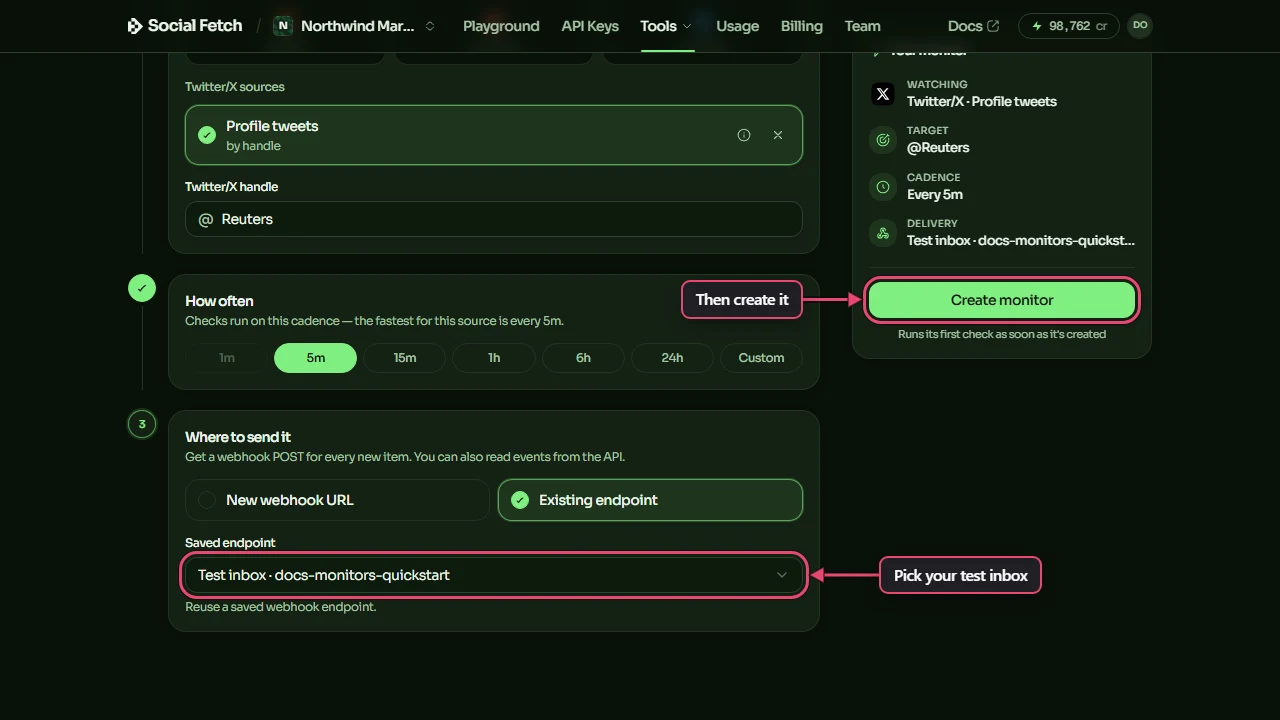
API users can preview the same choice without creating a monitor or fetching posts. Replace YOUR_ENDPOINT_ID with the inbox's data.id before running this Bash command:
Read data.costPreview for the estimated check, daily and monthly cost. The preview costs zero. Remove ?dryRun=true only when you want to create and start the monitor; reuse your dashboard monitor if you already made it. The API quickstart covers endpoint creation and the returned IDs.
Understand the first check
In the dashboard, creation queues the first check. Wait for Last check to show its result. The REST create request attempts the first check before returning and includes its outcome in baseline.
The first successful, usable check establishes a baseline: the starting set of items. It is charged but does not send new-item events for those existing posts. If the first attempt fails or is skipped, a later successful check establishes that baseline.
Run now queues a check on an active monitor; the trigger itself is free and the check bills normally. Acceptance means queued, not completed, and does not guarantee a new event. It is available once a minute per monitor. Check Last check, Health and the delivery log to see what happened.
Each check reads the latest page, not every page of a platform's history. A busy feed can publish more than fits between checks. Search can discover older posts newly matching the query, and finite seen-item history means this is not a permanent archive or a guarantee of never seeing an item again.
To stop scheduled spending when you finish testing, open your monitor and click Pause. A paused monitor cannot run a manual check. Resume starts checks again subject to eligibility and credits; verify the resulting status and latest check. Pausing does not retract existing events and deliveries, and a check already in flight may still be charged.
Inspect a signed delivery
- Open Monitors, then Webhook endpoints.
- Select your test inbox.
- Click a successful
.new_itemsrow in Delivery log.
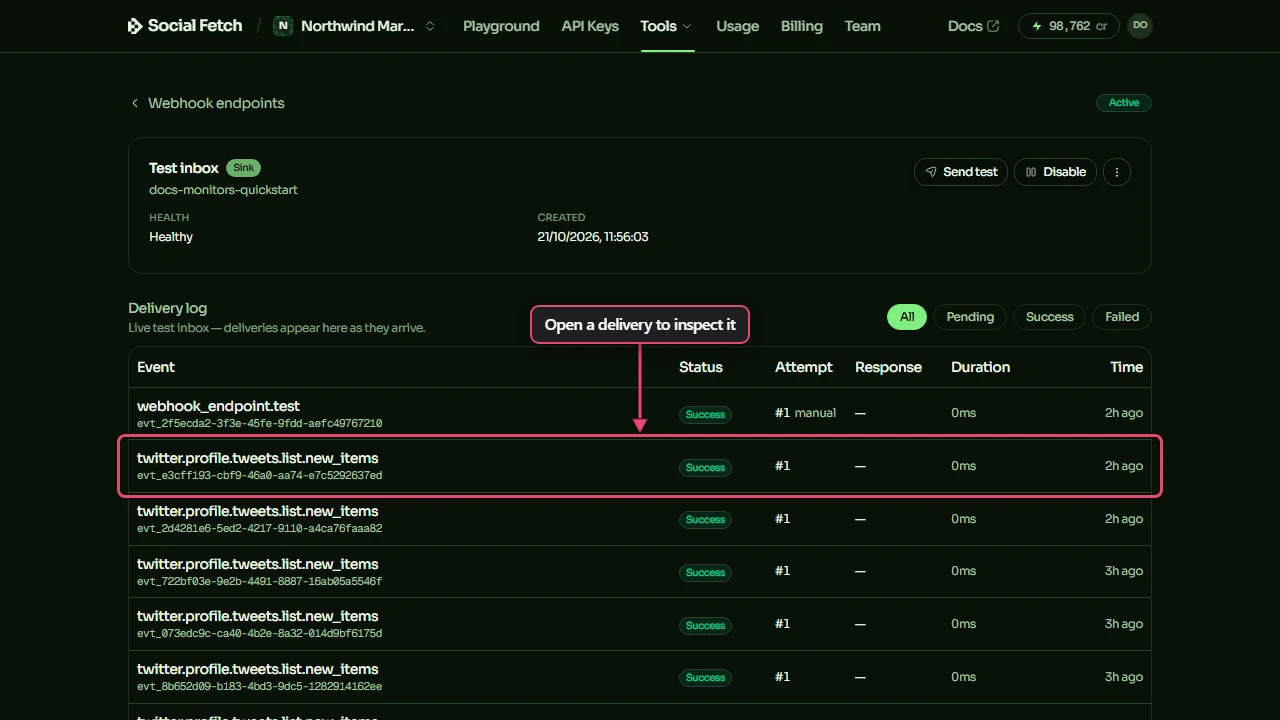
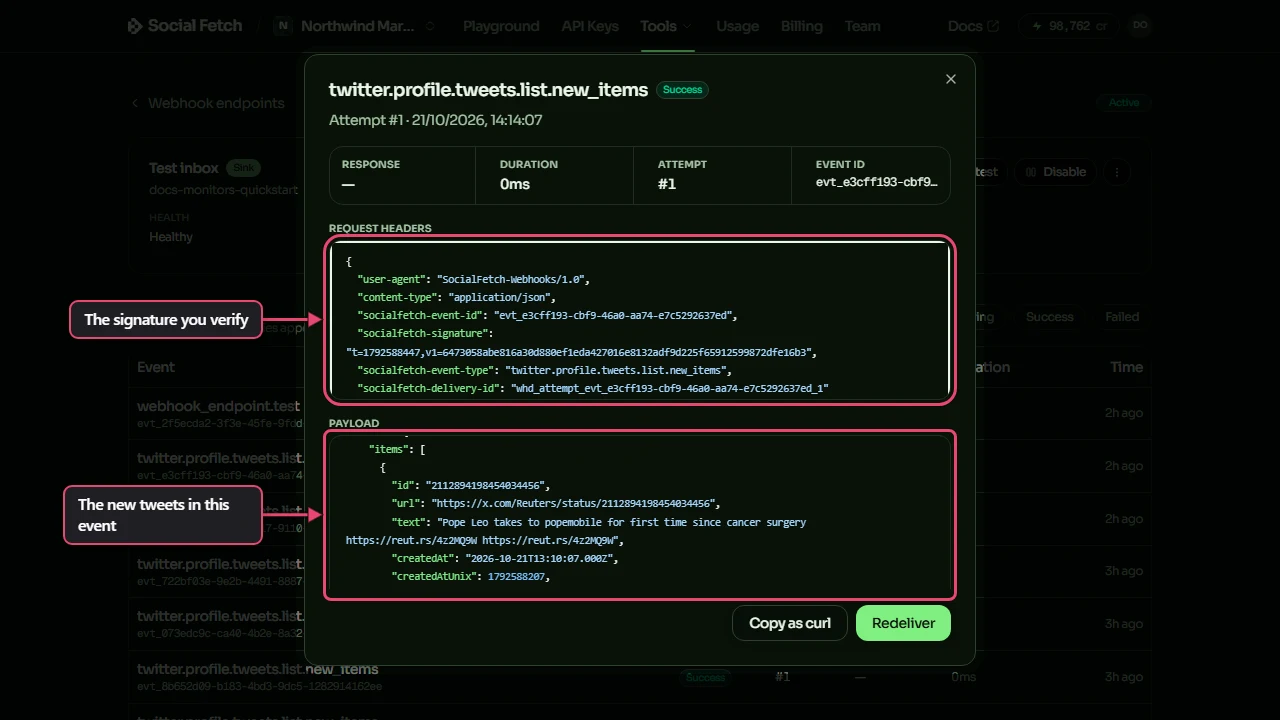
The body has id, type, createdAt, monitor, source, data and billing. For a .new_items event, data.items contains the new items in that source's item shape. data.count is the number in this event; it is not the total number of posts on the platform. data.truncated signals an event item limit. billing.creditsCharged describes the check, not a delivery fee.
Nothing new yet? Send test on the inbox page creates a free webhook_endpoint.test sample without fetching the watched source. A successful sample tests delivery, not new-post detection. It does not complete a baseline.
Verify requests in your own code
Read the exact body before parsing JSON. The socialfetch-signature header signs the timestamp and that body with your endpoint secret. Rebuilding JSON with JSON.stringify can change the signed text and break verification.
Install @socialfetch/sdk in a Node project:
Save this as webhook.mjs. It is a local receiver that verifies requests and prints only the event ID and type. Set SOCIALFETCH_WEBHOOK_SECRET privately to your inbox's signing secret before running it.
Use a test inbox and the local listener to forward signed deliveries to http://localhost:3000/webhooks/socialfetch. Never paste a localhost URL into a public HTTP endpoint. The SDK rejects stale timestamps by default; replaying an old saved signature later can therefore fail even when its body is unchanged.
For Next.js, Hono and Express, use the framework handlers. In Express, put express.raw() on this route before any global express.json() middleware.
Handle retries without repeating work
The receiver above acknowledges verified events without doing business work. Before adding database writes or notifications, make that work idempotent: receiving the same event again must have the same effect as receiving it once.
Use the verified body's id as the event key; it corresponds to socialfetch-event-id. Do not use socialfetch-delivery-id, which changes on every attempt. Event-ID deduplication handles repeated deliveries of one event, not overlapping items under different event IDs. If your application stores each post once, also use a unique source/platform and post-ID key.
For database effects, insert a unique event claim and apply the changes in one transaction. Concurrent copies must wait for the winning transaction. Acknowledge the duplicate only after that transaction commits. Roll back both the claim and changes on failure so a later delivery can retry. A separate in-memory set loses state on restart and races when two attempts arrive together.
For longer work, durably enqueue a job keyed by the event ID before acknowledging, and make the worker retry failed work. External effects need an idempotency key the destination honours, or a transactional outbox with an idempotent consumer. Marking an event processed before failed work, or separately after an external effect, can lose work or repeat it after a crash.
A public receiver must return a 2xx within the delivery timeout. Failures use a bounded automatic retry ladder, not an exact arrival-time promise. Manual Redeliver sends one attempt; a failed manual redelivery is not automatically retried. See Delivery, retries and idempotency for the schedule, endpoint health and retention.
Connect your real destination
- Deploy your verified, idempotent handler to an internet-accessible HTTPS URL on port 443. Use the final URL; redirects are not followed.
- In Webhook endpoints, create an HTTP endpoint for that URL and save its new signing secret privately. Configure your receiver with that endpoint's secret, rather than the test inbox's secret.
- Open your monitor, click Change under Webhook endpoint, and select the new endpoint.
- Check delivery results before leaving the monitor running.
A disabled endpoint stops delivery but does not pause its monitors or stop their paid checks. Enable it before redelivering an existing attempted event. Events generated while it was disabled have no delivery-log row; recover stored events with the events API, then process them separately. Re-enabling does not replay that interval.
Troubleshooting
"Unlock to create monitor"
The workspace has no recorded purchase. Use the workspace where you bought credits. The REST API reports 403 with payment_history_required; free signup credits alone do not unlock monitors.
"No changes detected yet."
Check Last check first. The first successful baseline intentionally sends no new-item event. Quiet checks are still billed. Use Send test for a sample delivery, or wait for unseen content before an active monitor's next check.
"Monitor is not active."
The monitor cannot accept Run now while paused or otherwise inactive. Review its status, credits and any skip reason before resuming. See monitor billing or contact support.
Signature verification fails
Check the endpoint's secret, your server's clock and raw-body handling. Verify the saved payloadText exactly rather than a reformatted object. Do not turn off timestamp checks to accept old captured deliveries in production.
FAQ
Is this an instant notification of every post?
No. Monitors check on a schedule and observe a page of results. Lookup availability, queueing and delivery retries can delay an event. For complete long-term records, save the items you receive and design for gaps.
Can several monitors share an endpoint?
Yes. The endpoint owns the signing secret and delivery log. Use separate endpoints for destinations that need independent secrets or rotation.
Should I poll search myself?
Use monitors when a supported source and schedule fit your workflow. Write your own polling and storage when you need custom pagination, retention or comparisons. The social listening guide covers that approach.