Delivery, retries & idempotency
When Social Fetch retries a failed webhook, how to read the delivery log and redeliver an event, when an endpoint is switched off, and how to ignore duplicates using the event id.
Social Fetch delivers each webhook event at least once. If your endpoint doesn't confirm it, the event is sent again, so your handler can see the same event more than once. Build it so that a second copy does no harm.
What counts as delivered
A delivery succeeds when your endpoint replies with any 2xx status within 10 seconds. Anything else is a failure: another status code (redirects included, since they aren't followed), a timeout, a connection error or a hostname that doesn't resolve.
Retries
A failed delivery is tried again on a fixed schedule:
| Attempt | Sent |
|---|---|
| 1 | as soon as the event happens |
| 2 | 30 seconds after attempt 1 |
| 3 | 2 minutes after attempt 2 |
| 4 | 10 minutes after attempt 3 |
| 5 | 30 minutes after attempt 4 |
| 6 | 2 hours after attempt 5 |
| 7 | 6 hours after attempt 6 |
| 8 | 12 hours after attempt 7 |
That's eight attempts over about 21 hours. Retries stop as soon as one attempt succeeds. If attempt 8 fails too, Social Fetch stops trying, and only a manual redelivery sends the event again. Events are delivered independently, so they can arrive out of order; sort by the envelope's createdAt if order matters.
Delivery is free. Only the monitor's check costs credits, however many attempts its event takes (see Billing for monitors).
Watch retries in the delivery log
Every attempt is its own row in the endpoint's delivery log (Monitors → Webhook endpoints → your endpoint), newest first. Retries of one event share its event id and count up in Attempt, and Response shows the status code your server returned. While failures are adding up, the endpoint's Health shows how many deliveries in a row have failed.
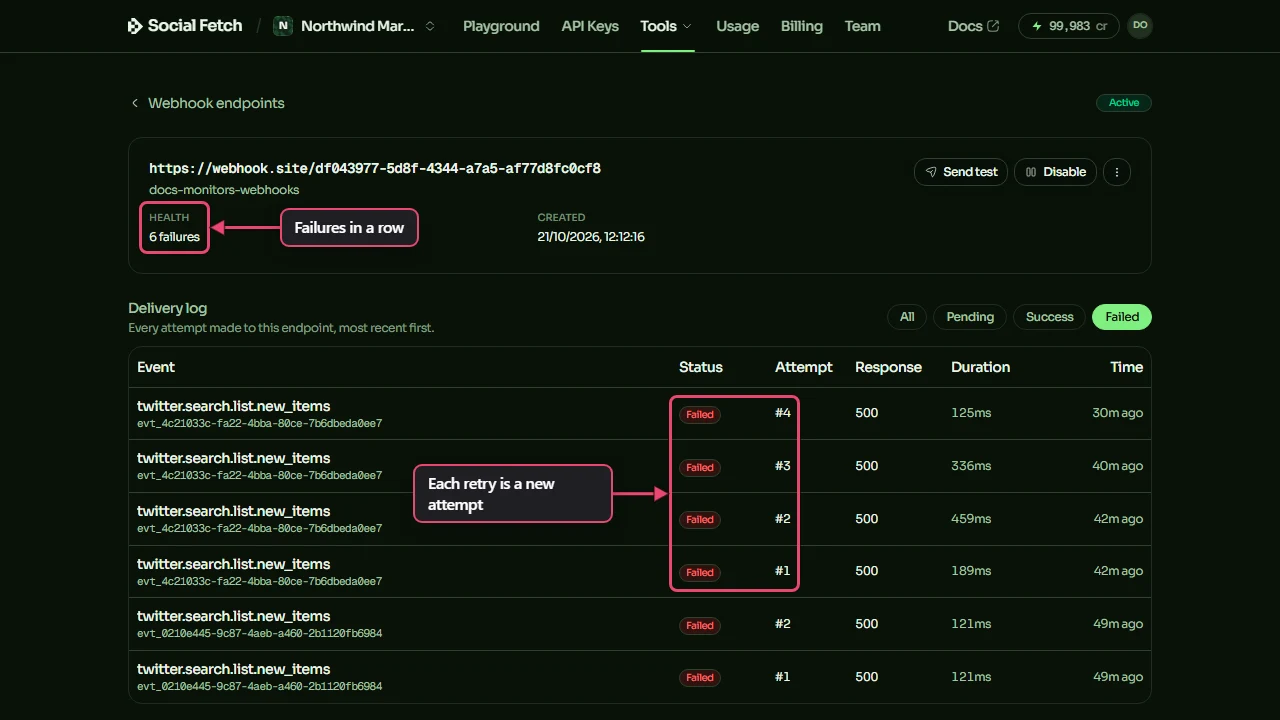
The Success and Failed buttons above the table filter the log; All shows everything.
Redeliver an event
Once you've fixed your endpoint, you don't have to wait for the next retry:
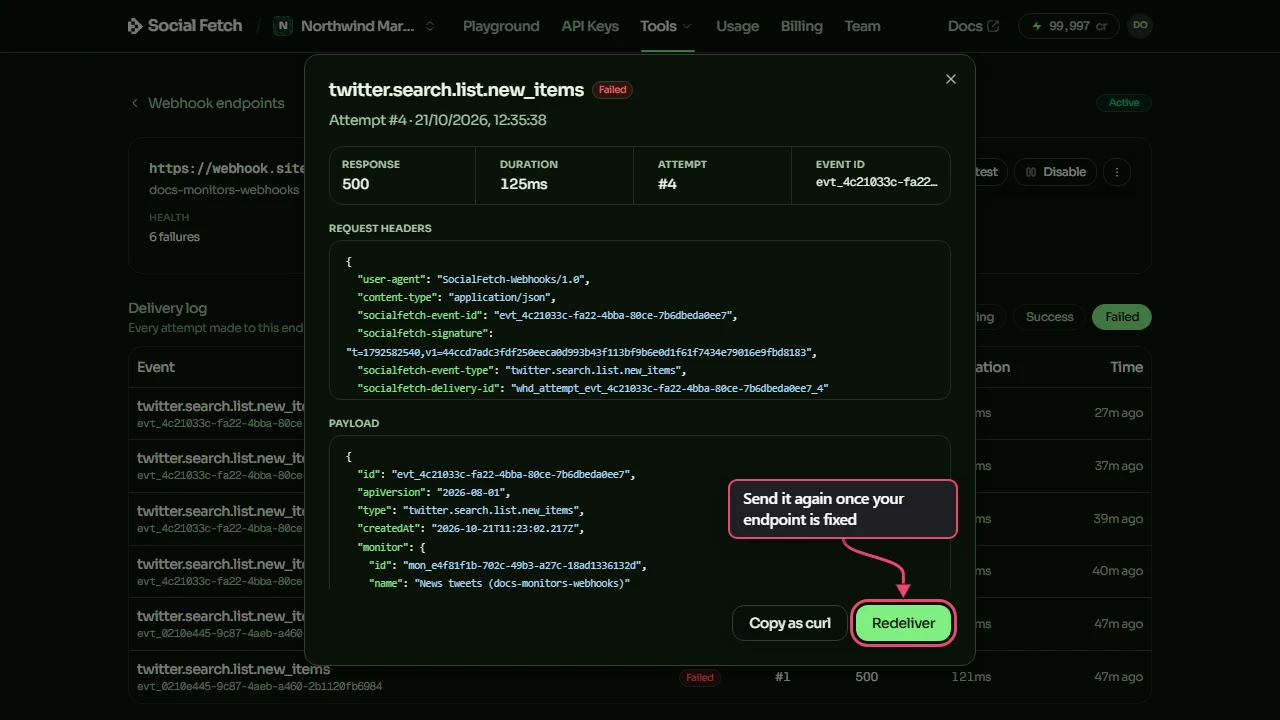
- Click a row in the delivery log. The window shows the request headers, the payload and your server's reply.
- Click Redeliver.
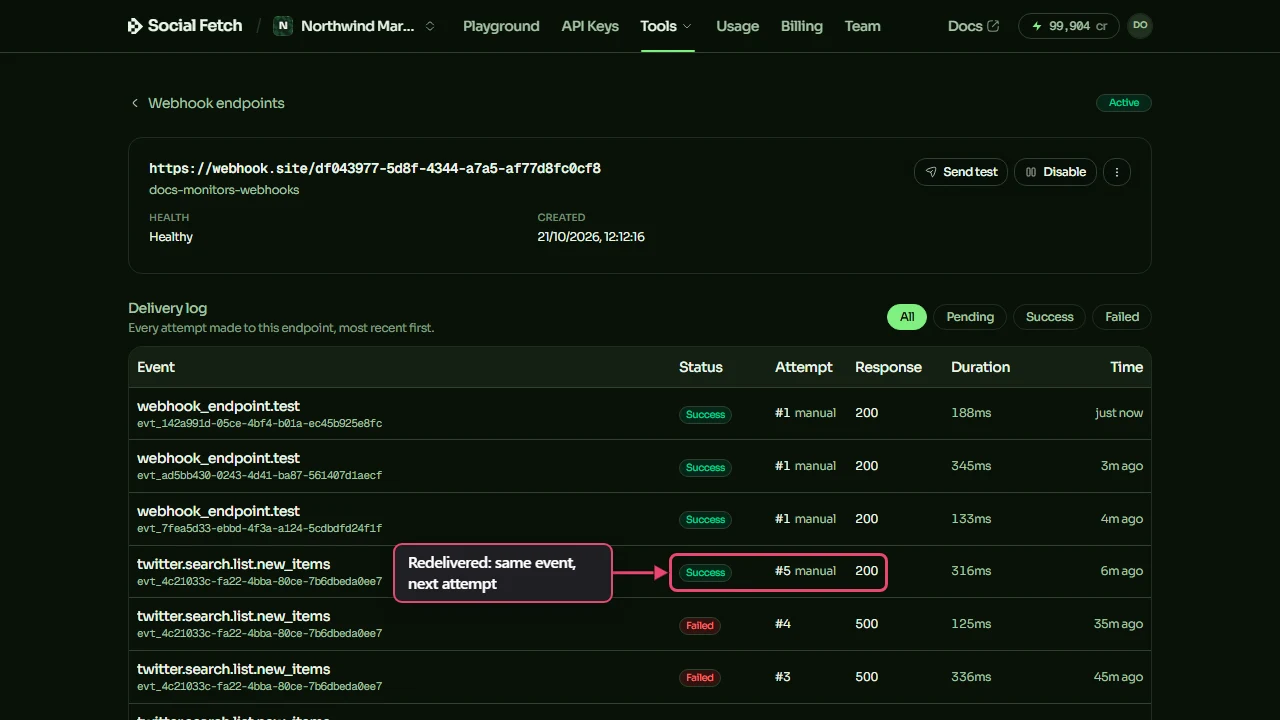
The redelivery appears in the log as the next attempt, marked manual. It's a single attempt: if it fails, it isn't retried, so check your endpoint and redeliver again. You can also redeliver with POST /v1/webhook-deliveries/{id}/redeliver.
Redeliver only works while the endpoint is switched on. Redeliveries to a disabled endpoint are dropped, so Enable it first.
Ignore duplicates with the event id
Every attempt at an event, including manual redeliveries, carries the same socialfetch-event-id header and the same id in the body. Use that to spot an event you've already handled:
processEvent is your application function. If it fails, return a non-2xx response so the delivery can be retried. The id stays unprocessed, so the next attempt can do the work. Reply 200 only after the work succeeds.
This in-memory set is lost on restart and doesn't coordinate concurrent requests: two attempts can both pass has before either finishes. In production, use a unique event id claim and commit that claim together with the database changes in one transaction. Concurrent attempts must wait for that transaction; acknowledge a duplicate only after the first transaction commits successfully. Roll back the claim and changes on failure so a later attempt can retry.
For longer work, durably enqueue an idempotent job keyed by the event id before replying 200. The worker must retry failures and record completion only after successful work. If the work calls another service, pass an idempotency key that service honours, or use a transactional outbox with an idempotent consumer. A separate processed marker cannot make an external effect atomic: a crash after the effect but before the marker can repeat it.
When an endpoint is switched off
A failing endpoint is switched off automatically, so Social Fetch stops sending to a URL that isn't listening:
- A
410 Gonereply switches it off at once. Reply410if you want deliveries to stop. - Otherwise it's switched off after 100 failed deliveries in a row, or once deliveries have been failing for 3 days, whichever comes first. Any
2xxreply resets the count.
When that happens, you get an email, and the endpoint shows Auto-disabled on the Webhook endpoints page. Retries that were still waiting are dropped. You can also switch an endpoint off yourself with Disable.
To start again, fix the endpoint, open its page and click Enable (or send PATCH /v1/webhook-endpoints/{id} with "status": "active"). Delivery resumes for new events only. After enabling, you can redeliver an existing attempted event from its delivery-log row.
Events generated while the endpoint was disabled have no delivery row, so they cannot be redelivered from the log. Fetch them with GET /v1/monitors/{id}/events through the events API and process them separately, using each event's id to avoid duplicates. Re-enabling does not replay that interval.
Monitors keep running while an endpoint is off
Switching an endpoint off doesn't pause the monitors attached to it. Their checks still run, still cost credits and still record events; only the webhook delivery stops. Pause a monitor separately if you want its checks to stop too.
The events API as a backstop
Every event is stored whether or not its webhook was delivered, so you can read a monitor's events through the API at any time. That's useful if you can't host an endpoint, or want a record that doesn't depend on your server being up:
Results come in pages of up to 100 (25 by default), with a cursor for the next page. A monitor with no webhook endpoint is fine: it records events, and you read them from this API instead.
The response's data.events contains records with id, type, payload, creditsCharged and createdAt; payload holds the event envelope. Follow data.page.nextCursor while data.page.hasMore is true, passing it as cursor on the next request. Use createdAt to find events from the disabled interval and send their payloads through your own event-processing code. This API reads stored events; it does not create webhook delivery attempts.
How long events are kept
Events and delivery logs (headers, payload, your server's response, timing and attempt number) are kept for 30 days. After that you can't redeliver an event or read it from the events API, so save anything you need for longer.
Where to go next
Receiving & verifying webhooks
Check the signature before you act on any event.
Testing webhooks locally
Send events to a test inbox or your own machine before you go live.
Billing for monitors
What a check costs. Deliveries and retries are free.
Webhook deliveries API reference
List deliveries, filter by status and redeliver.
Testing webhooks locally
Build a webhook handler without a public URL: a test inbox that keeps signed deliveries for you to read, socialfetch listen to forward them to localhost, and checks or test events on demand.
Ad Tracker events
Get the Competitor Ad Tracker's new ads, stopped ads, briefs and weekly digest as signed webhooks: payloads, typing and Slack.