Make
Pull live social and web data into Make scenarios with the Social Fetch app and your API key: install it, connect your key, run a module and watch for new posts.
Social Fetch has an app for Make. Add one of its modules to a scenario, pick a platform and fill in a handle, URL or search, and it returns live public data (profiles, posts, comments, transcripts, ads, web pages) that you can send on to Google Sheets, Airtable, Slack, an AI step or anything else in Make. You don't need to set up HTTP requests.
The app isn't in Make's public app list yet. You install it from an invite link, once per Make organization.
What you'll need
- A Make account, with permission to install apps in your organization.
- A Social Fetch API key. It starts with
sfk_. Step 1 shows how to make one. - Credits on your Social Fetch account. Every module run that fetches data uses credits, including the runs you do while testing. See Credits and billing.
Step 1: Create an API key
Give Make its own key, so you can tell its calls apart and revoke it without breaking anything else.
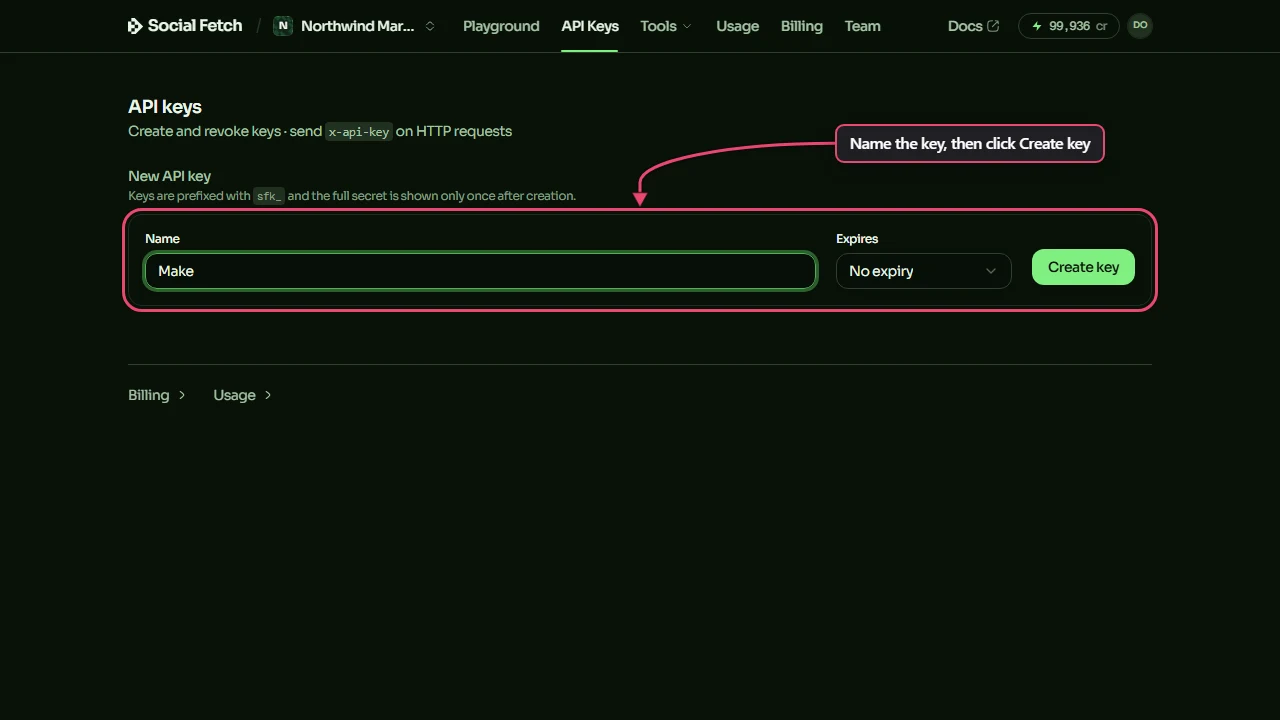
- Open API Keys in the Social Fetch app.
- Under New API key, type a name such as
Make, then click Create key.
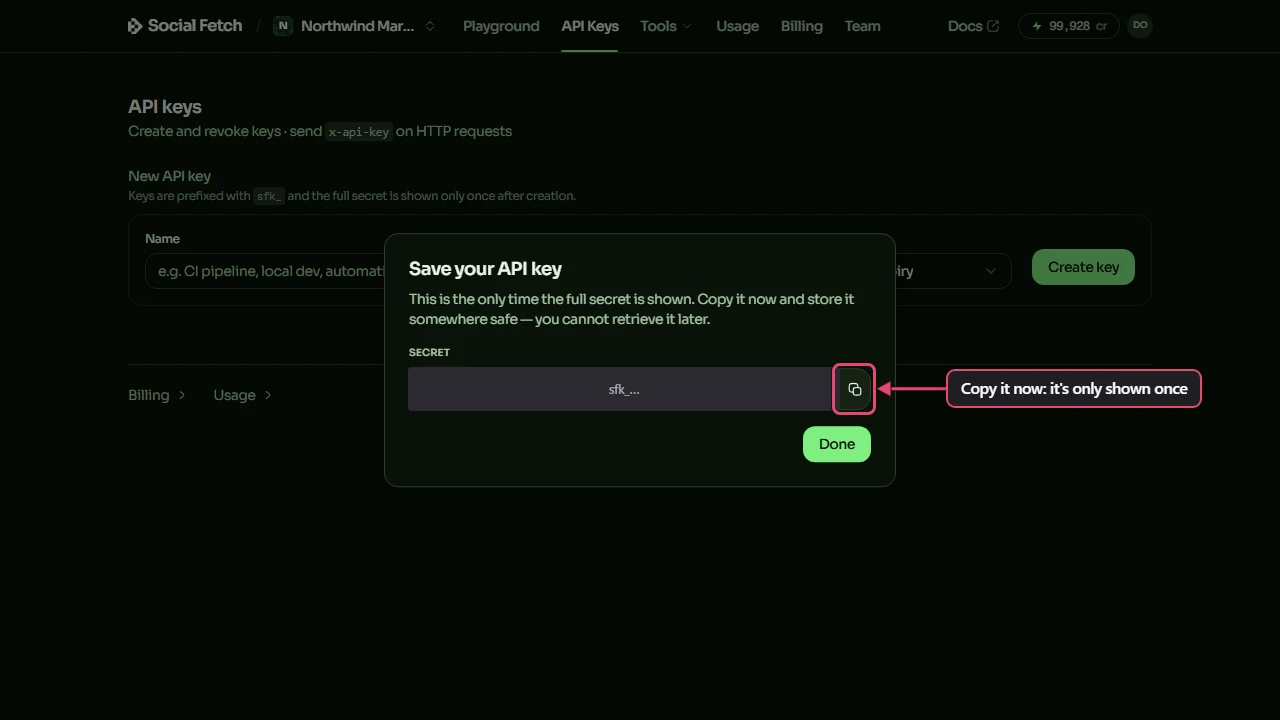
- Copy the key from the Save your API key window. It's only shown once; if you lose it, create another.
Step 2: Install the app in Make
- Open the invite link and sign in to Make.
- Install Social Fetch in the organization where you build scenarios.
Everyone in that organization can then use it in their scenarios.
Step 3: Add a module and connect your key
- Open a scenario in Make and click the + to add a module.
- Search for Social Fetch and pick a module, for example Get a profile. The module catalog lists them all.
- In the module, click Create a connection next to Connection.
- Paste your
sfk_key into API key and save.
Make checks the key with Social Fetch when you save, and the check is free. If the key is wrong, Make shows Invalid API key and doesn't save the connection. You only do this once: every Social Fetch module in your organization can use the same connection.
Step 4: Run a module
Most modules start with Platform. Pick it first, and the fields below it change to match.
- In Get a profile, set Platform to TikTok and Handle to
nasa. - Click OK, then Run once at the bottom of the scenario editor.
- Click the bubble above the module to see what came back.
What a module returns depends on its type:
- Actions, such as Get a profile or Get a post, return one bundle: the
datapart of the API response. - Searches, such as List posts or Search content, return one bundle per result, so the next module runs once for each post or comment. They keep fetching pages until they reach Limit, which is 10 unless you change it. Each page is a separate call that costs credits, so raise Limit only as far as you need.
- Make an API call sends a request to any Social Fetch API path, such as
/v1/tiktok/profiles/nasa, with your connection's key. It returns the whole response:body,headersandstatusCode.
Every module calls an endpoint from the API reference. That endpoint's page lists every field the output can have and what a call costs.
See each run in Social Fetch
Modules return the data without the response's meta, so Make doesn't show what a run cost. Social Fetch does. Open Request history and type part of the path, such as /tiktok/profiles/nasa, into Path contains. Each call is listed with its status and what it cost, newest first, and failed calls are there too; a search that fetched three pages shows three rows. The free connection check isn't listed.
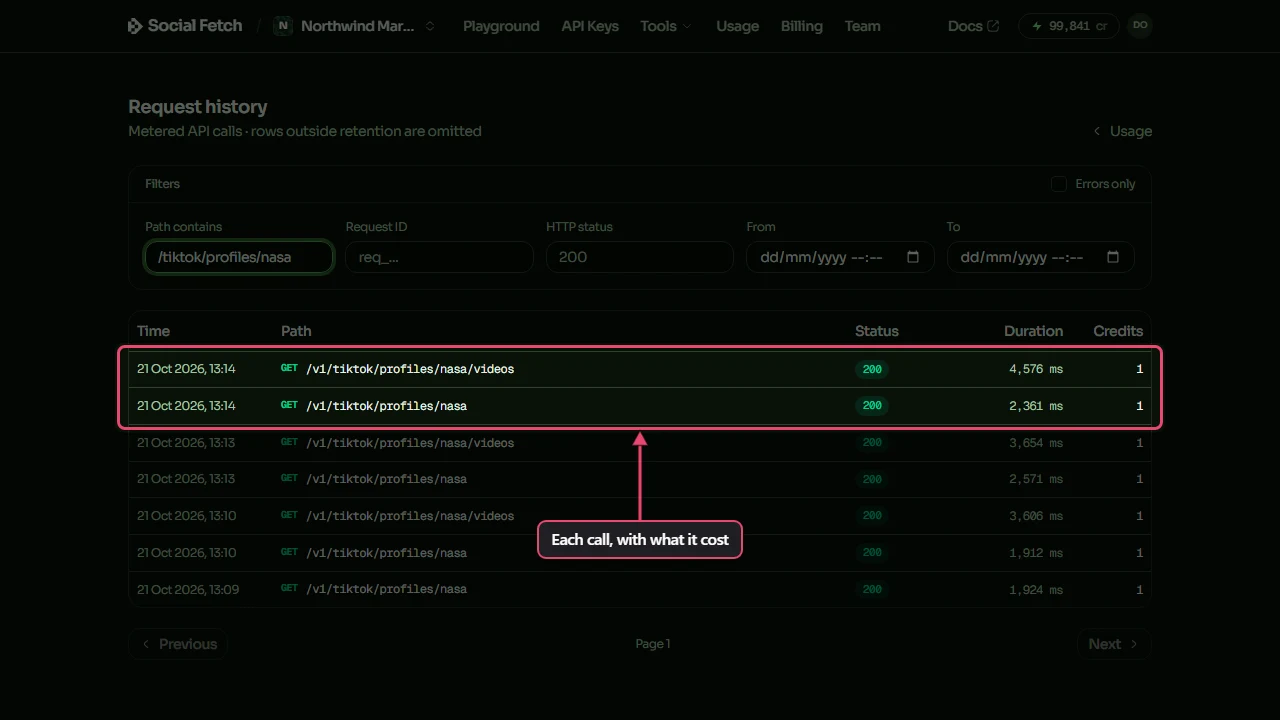
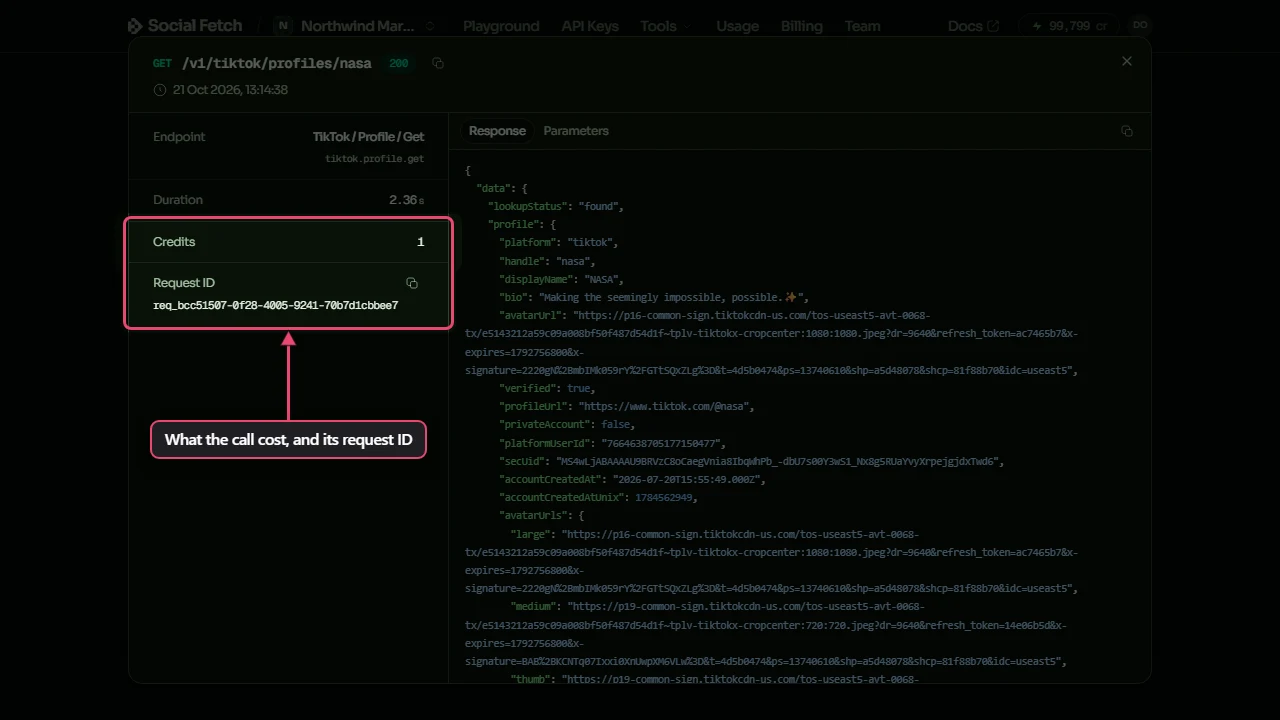
Click a row to see the details: the endpoint, the credits it cost, the parameters Make sent and the response. The Request ID is the one Make shows in its error messages, so it's the thing to send to support if a run goes wrong.
To read your balance inside a scenario, use the Get a credit balance module.
Watch for new posts
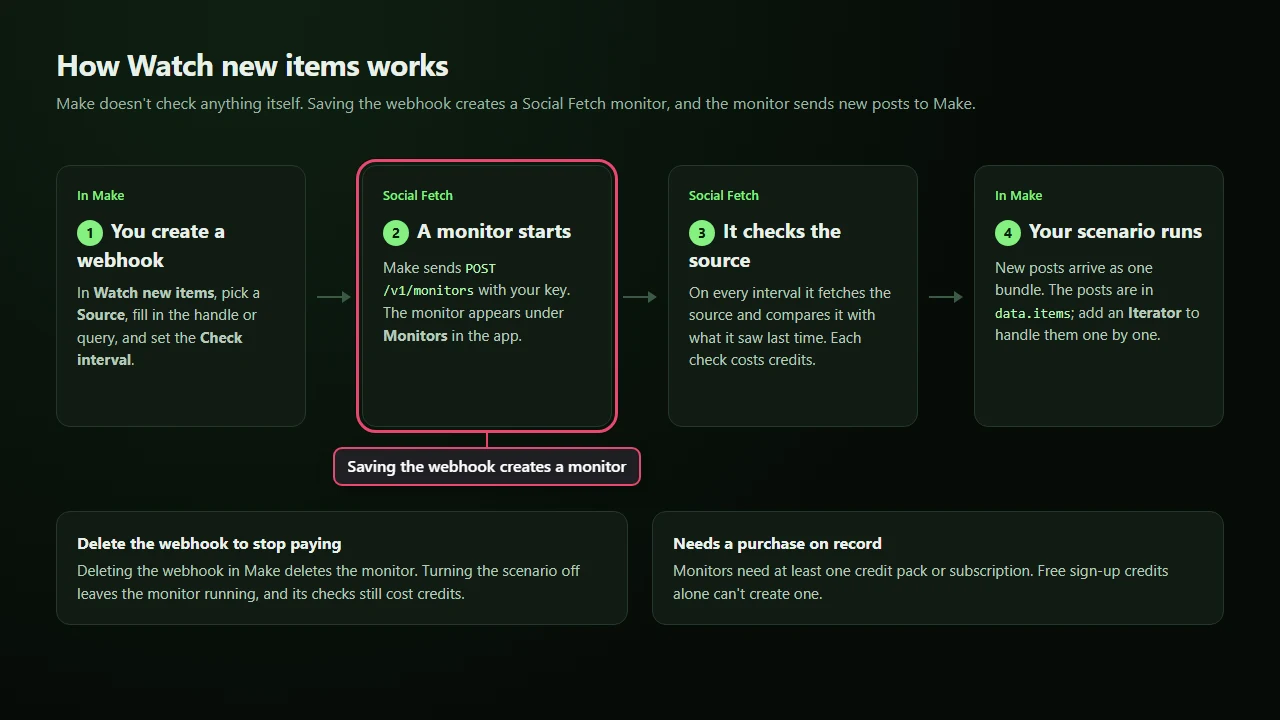
The Watch new items module starts a scenario when an account, search, hashtag or subreddit has something new. Make doesn't do the checking: when you save the trigger's webhook, Social Fetch creates a monitor that checks the source on a schedule and sends what's new to Make.
- Add Social Fetch > Watch new items as the first module of a scenario.
- Click Create a webhook, pick a Source (for example New videos from a profile), fill in the handle or query, and set Check interval (minutes).
- Save the webhook. The monitor appears under Monitors in the Social Fetch app, named after what it watches, such as Profile videos · @nasa.
- Turn the scenario on.
Things to know before you rely on it:
- Each check costs credits, at the price of the endpoint it watches, whether or not it finds anything. The first check runs as soon as the monitor is created and records what's already there, so older posts don't start the scenario. Billing for monitors shows how to work out the cost of an interval.
- New posts arrive together. Each delivery is one bundle, with the new posts in
data.items. Add an Iterator ondata.itemsto handle them one at a time. The other fields follow the monitor event format. - Delete the webhook to stop the checks. Deleting the webhook in Make deletes the monitor. Turning the scenario off doesn't, so the monitor keeps checking and spending credits. You can also pause or delete the monitor in the Social Fetch app.
- Monitors need a purchase on record. An account that has only ever used free sign-up credits gets "Monitors requires at least one credit pack purchase or subscription" when it saves the webhook.
Troubleshooting
Make shows the message from Social Fetch, followed by the request ID, such as (requestId=req_…). Find that ID in Request history to see the whole call.
Invalid API key. The key in the connection is wrong, revoked or expired. Create a new key, then edit the connection in Make (or create a new one) and paste it in.
Not enough credits (HTTP 402). Your Social Fetch balance can't cover the call, or the key has a monthly spend limit and has reached it. Make treats this as a configuration error and may turn the scenario off. Add credits under Billing or raise the key's limit, then turn the scenario back on.
Rate limited (HTTP 429). Too many calls at once. Space the runs out, or lower Limit on searches.
The run is green but returned nothing. The profile or post may be private, deleted or misspelled, or a search found no matches. Check the row in Request history: the response shows what Social Fetch found.
Watch new items didn't start the scenario. Check that the scenario is on, then open the monitor in Monitors: its page shows the last check and any new items it found. The first check only records what's already there, so the scenario runs only when a later check finds something new. If the monitor found something, open Monitors > Webhooks and the endpoint with Make's webhook address: its delivery log shows whether Make accepted each event.
Still stuck? Contact support with the request ID.
Next steps
Module catalog
Every Social Fetch module in Make and the platforms it covers.
API reference
The fields, output and price of each endpoint behind the modules.
Monitors
How the checks behind Watch new items work, and how to manage them.
Credits and billing
What each call costs and what happens when credits run out.
Errors
Every error code the API returns and what to do about it.