Receiving & verifying webhooks
Add a webhook endpoint, keep its signing secret, and verify Social Fetch webhook signatures in Next.js, Hono, Express or any language, including the raw-body mistake that breaks verification.
When a monitor finds something new, Social Fetch sends the event to your webhook endpoint: a URL on your server that accepts a POST request. Each request is signed with a secret that only you and Social Fetch know. Check the signature before you act on the body. Anyone who finds your URL can send it a request; only Social Fetch, or someone holding your signing secret, can sign one.
Add an endpoint
- In the app, open Monitors, then Webhook endpoints.
- Click Create endpoint, keep HTTP endpoint selected and paste your URL. Description is optional; it's a label for you.
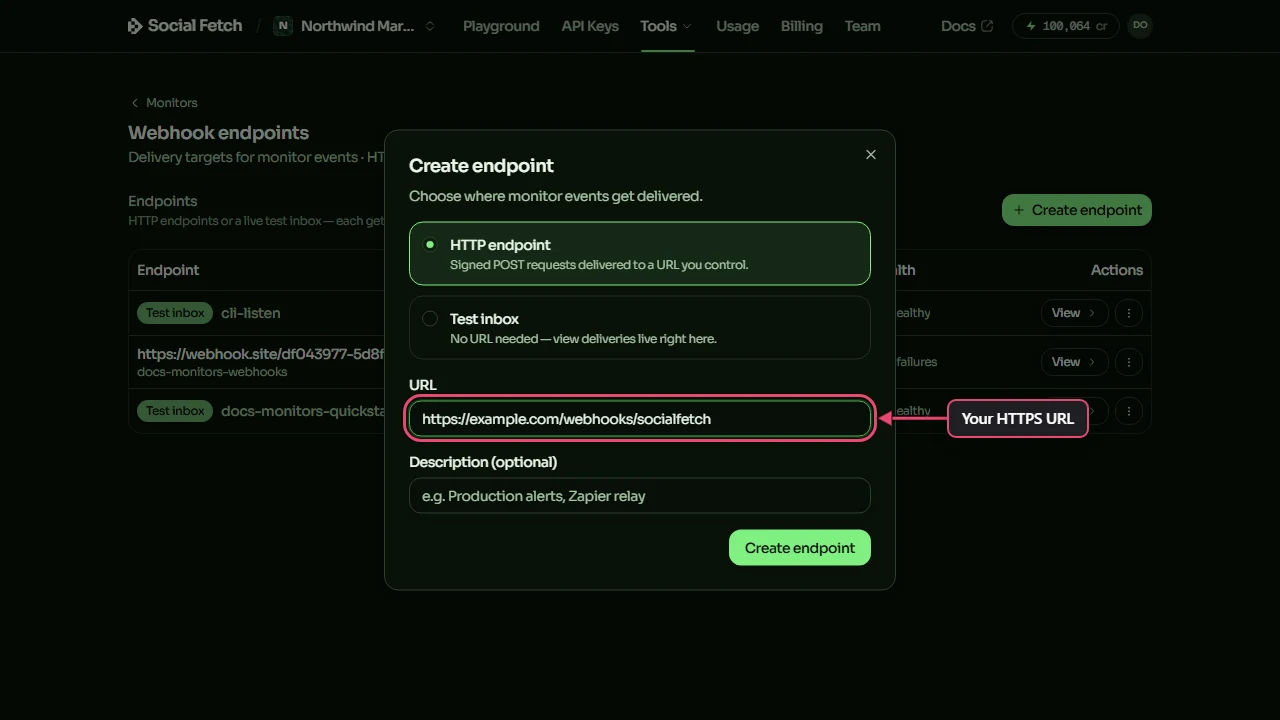
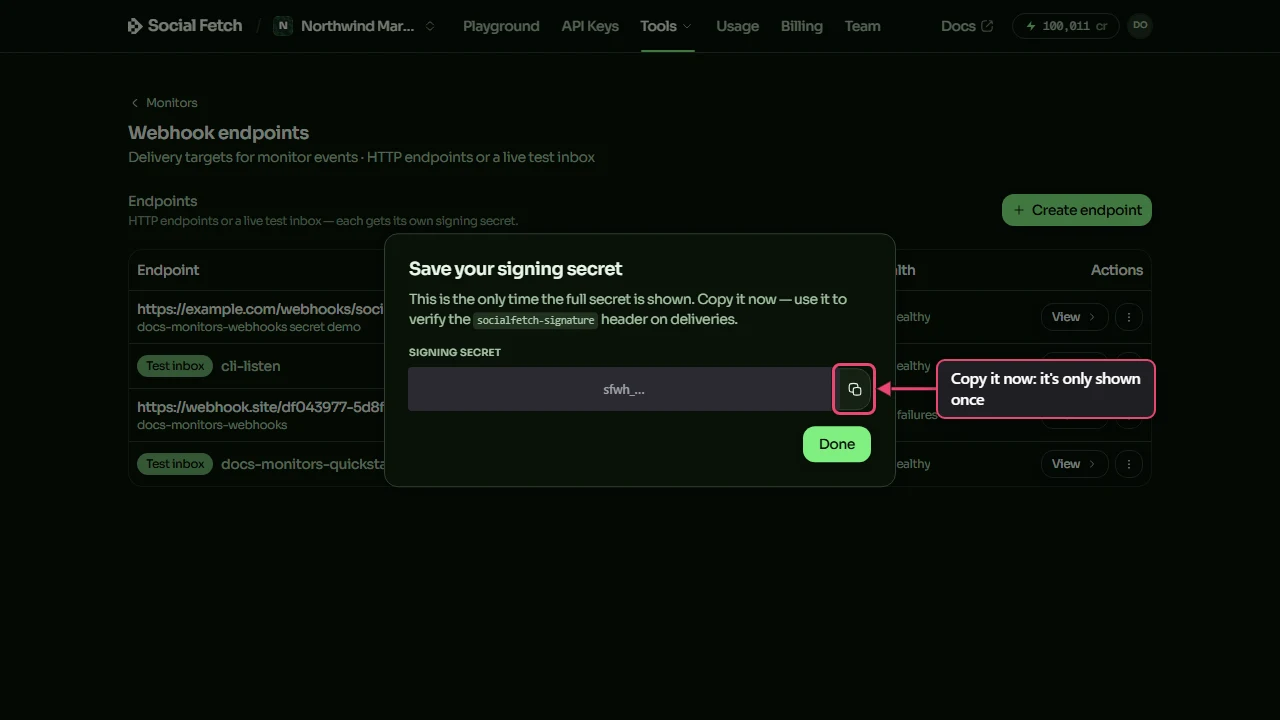
- Click Create endpoint. The next window shows the endpoint's signing secret, which starts with
sfwh_. Copy it into your server's environment, for example asSOCIALFETCH_WEBHOOK_SECRET. This is the only time the full secret is shown; if you lose it, rotate it (see Rotate the secret).
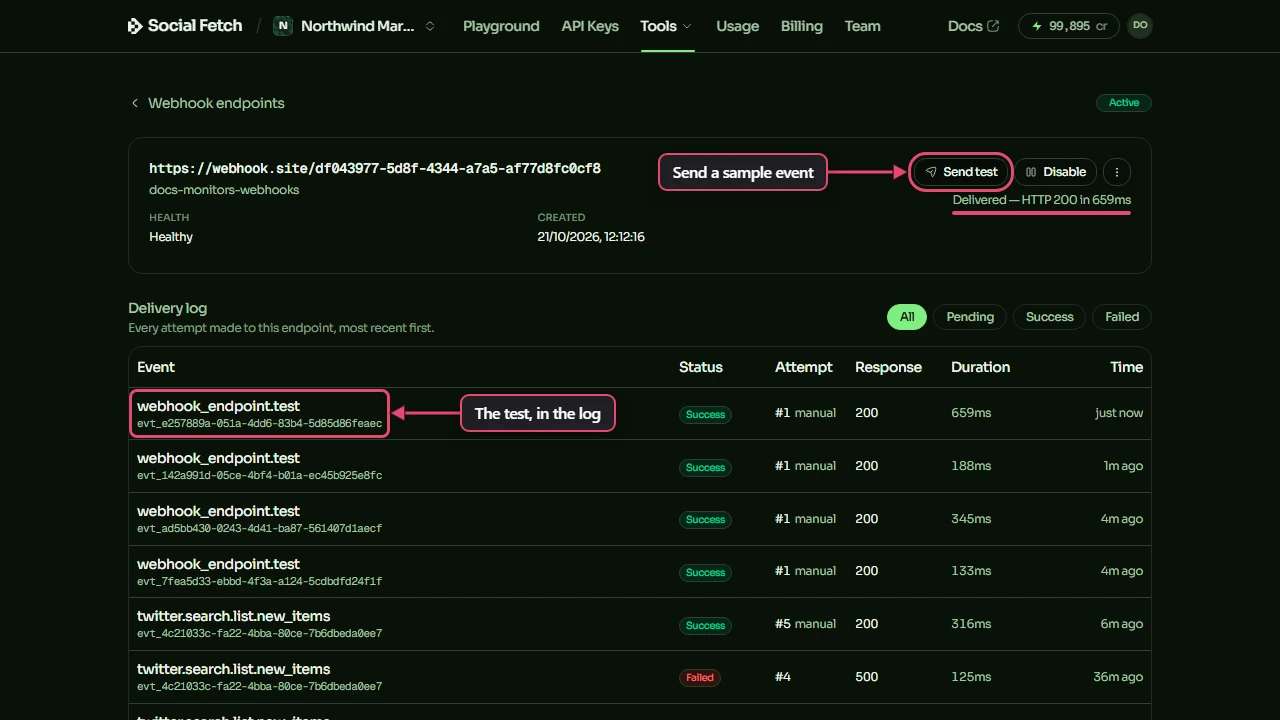
- Click View on the endpoint to open its page, then click Send test. Social Fetch sends a sample event of type
webhook_endpoint.teststraight away and shows the result under the button, such as Delivered — HTTP 200 in 188ms. The test appears in the delivery log as attempt #1 manual. Sending a test is free.
Then attach the endpoint to a monitor: pick Existing endpoint in the monitor's destination step, or paste a URL under New webhook URL to create the endpoint there. The monitoring quickstart walks through it. The same endpoints are used for Ad Tracker events.
What the URL must be
- It must start with
https://and use the standard port (443). - It must be reachable from the internet. Addresses on a private network, such as
localhostor192.168.x.x, are refused, both when you create the endpoint and on every delivery. To receive events on your own machine, use a test inbox andsocialfetch listen. - Redirects aren't followed. A
301or302counts as a failed delivery, so use the final URL.
What your endpoint receives
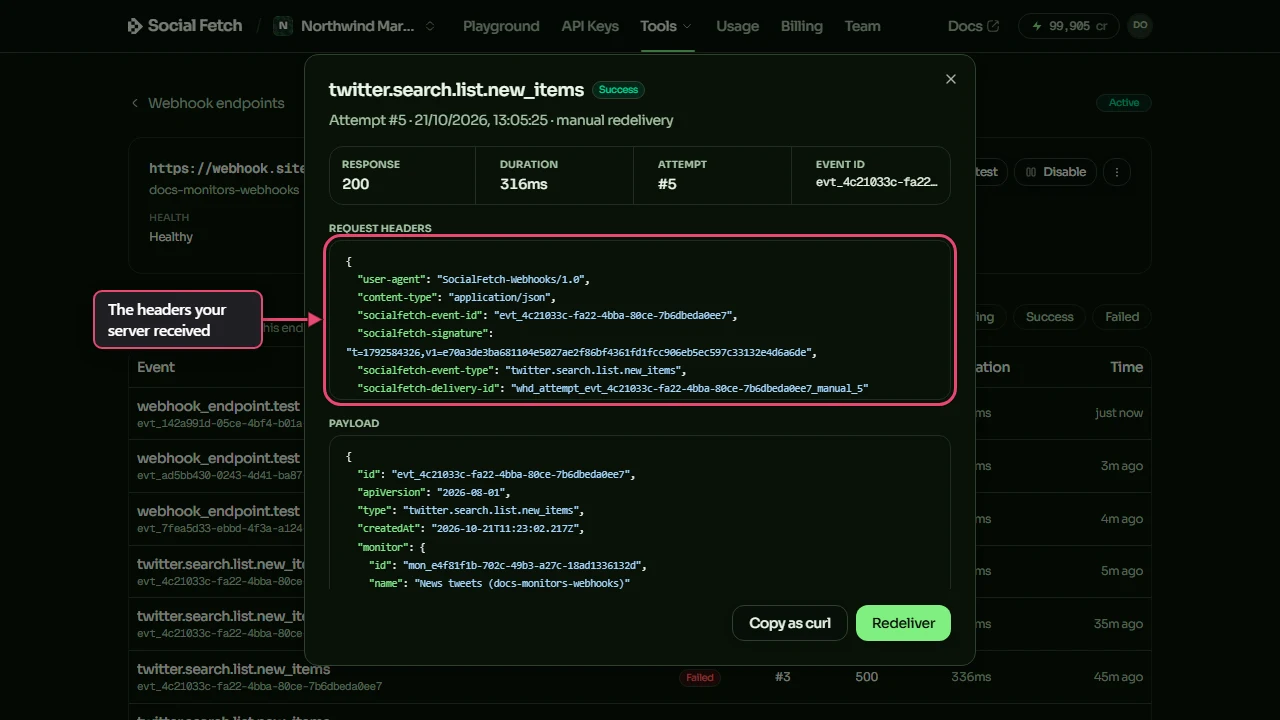
Each event arrives as one request:
socialfetch-event-idis the same on every attempt at the same event, including retries and manual redeliveries. Use it to ignore duplicates (see Delivery, retries & idempotency).socialfetch-delivery-idis different for every attempt. Quote it to support; don't use it to spot duplicates.socialfetch-signatureist={unix seconds},v1={hex signature}. A secondv1=appears for 24 hours after you rotate the secret. The request is genuine if either one matches.
The body is a JSON event:
The type is the monitor's source (its operationId) followed by .new_items. Each entry in data.items has the same shape as an item from that source's API endpoint, so if you already read GET /v1/twitter/search, you already know it. count is the number of entries in items. One event carries at most 100 new items; truncated is true when the check found more, and the extra items aren't sent. billing.creditsCharged is what the check cost. A monitor's other event is monitor.status_changed, sent when its status changes (for example from active to broken), with from, to and reason in data. The reason is user_paused or user_resumed when you pause or resume the monitor, target_unavailable or another code saying why when it breaks, insufficient_credits, spend_cap_reached or api_key_limit when it's exhausted, api_key_revoked when its API key stops working, and workspace_closed or workspace_restored when its workspace is closed or restored. Closing a workspace turns its webhook endpoints off, so its workspace_closed events are kept in each monitor's events (GET /v1/monitors/{id}/events) but not sent. This event is free: its billing.creditsCharged is 0.
To see exactly what was sent, click any row in the endpoint's delivery log. The window shows the request headers, the payload and your server's response, with Redeliver and Copy as curl buttons.
Reply quickly
Reply with any 2xx status within 10 seconds. Anything else, including a timeout, counts as a failure and is retried. If your work takes longer, save the event, reply 200, and do the work afterwards.
The raw-body mistake
Verify the exact bytes you received
The signature covers the request body exactly as it was sent. If your framework parses the JSON before your code runs and you verify JSON.stringify(parsedBody), the check fails, because key order and spacing don't survive the round trip. Read the raw body, verify it, then parse it (constructEvent does both).
Verify with @socialfetch/sdk/webhooks
The SDK's webhook helpers have no dependencies and use Web Crypto, so they run on Node 18.10 or later, edge runtimes, Deno and Bun.
npm install @socialfetch/sdkThere are two functions:
verifySignature({ payload, signatureHeader, secret, toleranceSeconds? })returns{ ok: true }or{ ok: false, reason }. It never throws for a bad signature.constructEvent({ payload, signatureHeader, secret, toleranceSeconds? })verifies, then parses and returns the typed event. It throwsSocialFetchWebhookVerificationErrorfor a bad signature.
toleranceSeconds defaults to 300. A signature whose timestamp is further than that from your server's clock is rejected as stale_timestamp, so an old request can't be replayed. Keep your server's clock in sync.
reason is one of "malformed_header", "stale_timestamp" or "signature_mismatch".
Framework handlers
request.text() gives you the raw body before Next.js does anything else with it — that's the one rule that matters here.
If express.json() runs for every route
If app.use(express.json()) runs before your routes, register the webhook route (with express.raw()) before that line, or set express.json() up to skip the webhook path. Once express.json() has read the request, the original bytes are gone.
Check a result instead of catching an error
Use verifySignature when you'd rather branch than catch:
Verify in another language
The scheme is the same one Stripe uses, so any HMAC library works:
- Split
socialfetch-signatureon commas. Take the number aftert=and every value afterv1=. - Build the signed string: the
tvalue, a full stop, then the raw body:{t}.{raw body}. - Compute an HMAC-SHA256 of that string, keyed with your whole signing secret (including
sfwh_), as lowercase hex. - Accept the request if it equals any of the
v1values (compare in constant time) andtis within 300 seconds of now.
In Python, for example:
Rotate the secret
Rotate the secret if you've lost it or think someone else has it: on the endpoint's page, open the ⋮ menu and choose Rotate secret, or call POST /v1/webhook-endpoints/{id}/rotate-secret. The new secret is shown once and starts signing straight away. For the next 24 hours every request is signed with both secrets (two v1= values), so your server keeps working while you swap the new secret in. verifySignature and constructEvent accept a request if any v1= matches.
Where to go next
Testing webhooks locally
Use a test inbox, and socialfetch listen to forward signed events to localhost.
Delivery, retries & idempotency
When failed deliveries are retried, and why the event id is the one to dedupe on.
Monitoring quickstart
Create a monitor and see a signed delivery end to end.
Webhook endpoints API reference
Create, test and rotate endpoints, and read their deliveries.
Monitoring quickstart
Create a monitor, send its events to a test inbox and open a signed delivery, in the dashboard or with the API. No public URL needed.
Testing webhooks locally
Build a webhook handler without a public URL: a test inbox that keeps signed deliveries for you to read, socialfetch listen to forward them to localhost, and checks or test events on demand.