Documentation
Quickstart, API reference, TypeScript SDK, MCP server, credits, monitors, and the no-code Follower and Ad Trackers. Start with the quickstart or the capability matrix.
Social Fetch is a REST API for normalized social media data. Look up profiles, posts, and engagement metrics across Instagram, TikTok, X/Twitter, YouTube, and more, with one JSON shape and one API key. The same data powers trackers in the Social Fetch app that need no code.
Start with your AI tool
Paste this prompt into Cursor, Claude Code, or any AI IDE. It will read the docs and integrate Social Fetch for you.
Start with your AI tool
Paste this prompt into Cursor, Claude Code, or any AI IDE. It will read the docs and integrate Social Fetch for you.
The essentials
Base URL https://api.socialfetch.dev. Authenticate with the x-api-key: sfk_... header. The spec is at /openapi.json. New here? Start with the Quickstart.
Pick your path
Quickstart
Make your first authenticated request and learn the response envelope.
Recipes
Copyable workflows: brand monitoring, transcripts, ads, creator scoring, Reddit research.
TypeScript SDK
Typed client methods and Result-based error handling instead of raw HTTP.
API reference
Every operation, with parameters, examples, and response schemas.
Credits & billing
Which routes cost credits, how to read creditsCharged, and what 402 means.
Integrations
SDK, MCP, n8n, Apify, x402: connect Social Fetch to your stack.
Monitors
Check a source on a schedule and get a signed webhook when something new appears.
X Follower Tracker
Track an X account's followers, see who joined and left, and explore the audience. No code.
Ad Tracker
Keep every ad a competitor runs on Meta, LinkedIn, Google and TikTok, with weekly changes. No code.
Not sure where to begin? Match your setup:
- Calling the API directly: Quickstart, then Errors, Credits and the API reference.
- Building in TypeScript: Quickstart, then the SDK guide.
- Not writing code: use the trackers in the app, starting with the X Follower Tracker or the Ad Tracker, or build a workflow in n8n.
- Watching a source for changes: set up a monitor and receive webhooks.
- Handing this to a coding agent: connect MCP, or point it at
/llms.txt,/agents.txt,/llms.json, and/openapi.json.
The app
Everything above is managed from the Social Fetch app. Sign up free to get credits to try things out.
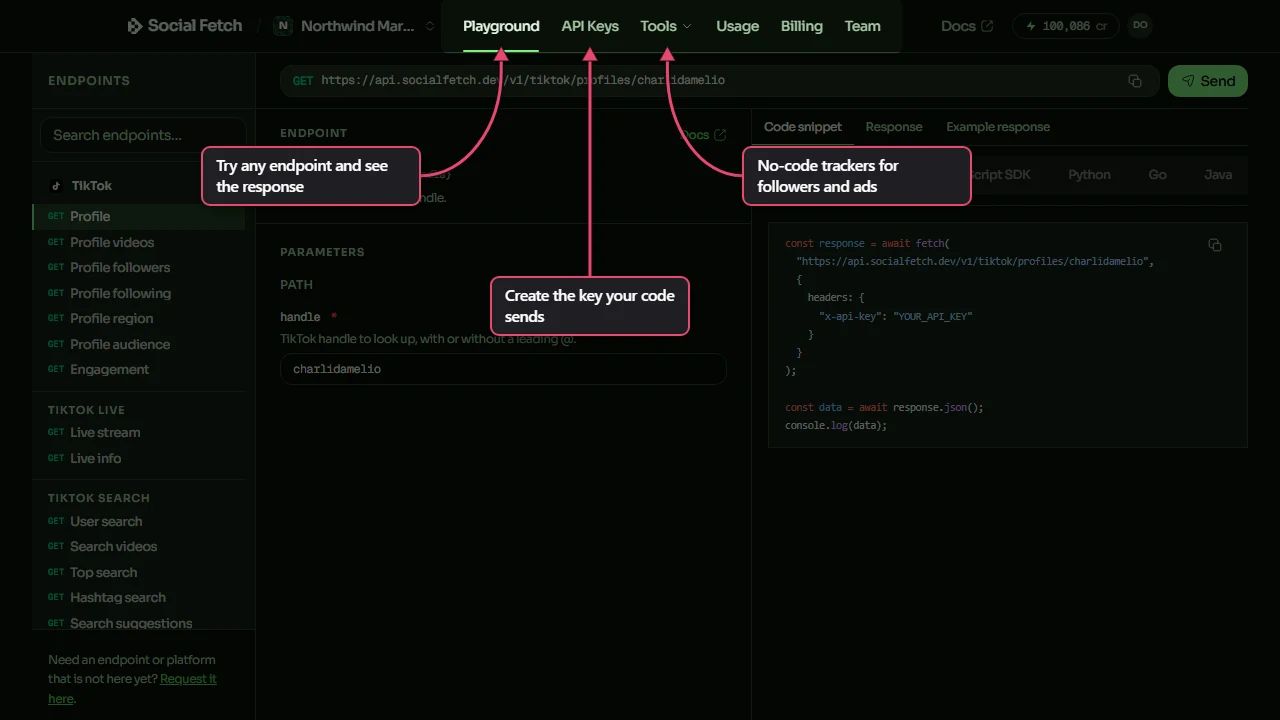
- Playground: try any endpoint with your own values and see the response before you write code.
- API Keys: create the key you put in the
x-api-keyheader. - Tools: the Follower Tracker and Ad Tracker, which run on your credits.
- Usage: your credit use and request volume. See Credits.
- Billing: your credit balance and top-ups.
- Team: invite people to your workspace. See Teams and workspaces.
Platform coverage
Every platform returns the same { data, meta } envelope.
- Instagram: profiles, posts, reels, highlights, search
- TikTok: profiles, videos, products, user search
- X/Twitter: profiles, tweets, communities, search
- YouTube: channels, videos, transcripts, playlists, search
- Yelp: paginated business reviews returned directly by the API (source availability varies by review category)
- Facebook, Reddit, LinkedIn, Pinterest, Threads, Bluesky, Twitch, GitHub, Rumble, Spotify, Apple Music, SoundCloud, Snapchat, Telegram, Linktree, Hacker News, Truth Social, Google, Amazon: profiles, posts, and platform-specific lookups
- Web: fetch any page as Markdown or HTML, or ask a question about it
- Monitors and webhooks: schedule recurring checks and receive signed deliveries
- Utilities:
whoami,balance, andhealth
See the API reference for every operation and its schema.
Docs for machines
Building with a coding agent or generating client code:
- Append
.mdxto any docs URL for the raw Markdown, e.g./docs/quickstart.mdx. /llms.txt: curated discovery index with coverage, why to use it, and workflow-oriented doc links./agents.txt: agent onboarding, auth and pagination rules, and the crawl allowlist./llms-endpoints.txt: every operation with a link to that route's markdown page./llms-{platform}.txt: per-platform files with parameters, credits, and example curls (from OpenAPI)./llms.json: structured route inventory with parameters, pagination, outcomes, credits, and SDK mappings./openapi.json: full schema for codegen, validation, and tooling.- Capability matrix: every operation in one generated table, with identifiers, pagination, outcomes, credits, and SDK method. Prefer
/llms.jsonfor agents.