Credits
How credits work in Social Fetch. What costs credits, where to see your balance and what each request cost, pay-as-you-go and plans, auto top-up, and balance checks for integrators.
Social Fetch charges in credits. Each lookup costs a set number of credits, listed on its page in the API reference; many cost 1. The app's tools, such as the Ad Tracker, spend the same credits. When a workspace runs out, metered requests return 402 insufficient_credits.
You pay as you go by default: buy a credit pack and spend it whenever you like. Pay-as-you-go credits never expire. A plan adds included credits each month on top. Plan names, pack sizes and prices are on the Pricing page.
Where to see your credits
Your balance
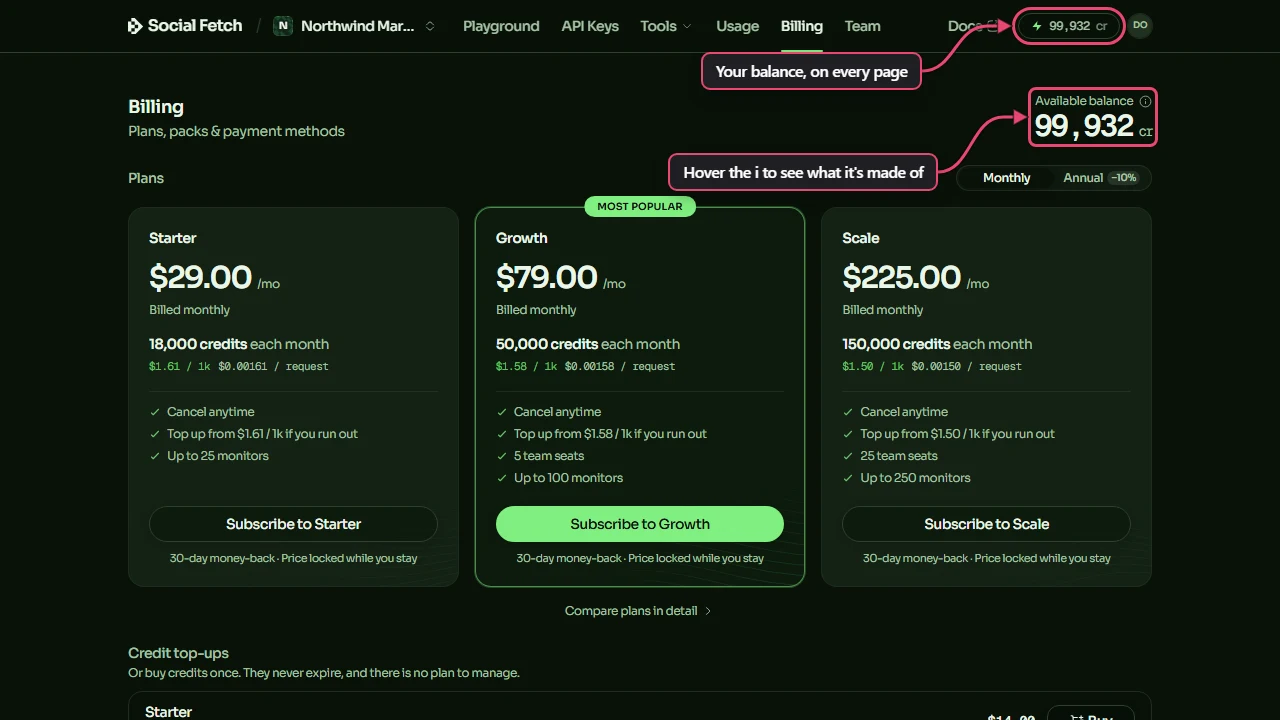
Your balance shows in the top bar of every page in the app, and on the Billing page as Available balance. Hover the i beside it to see what it's made of: plan credits (used first, and reset each month), pay-as-you-go credits (which never expire) and any grace credits (see Grace buffer).
What one request cost
Every successful response says what it cost in meta.creditsCharged. In the Playground, the same figure shows beside the status code once you click Send.
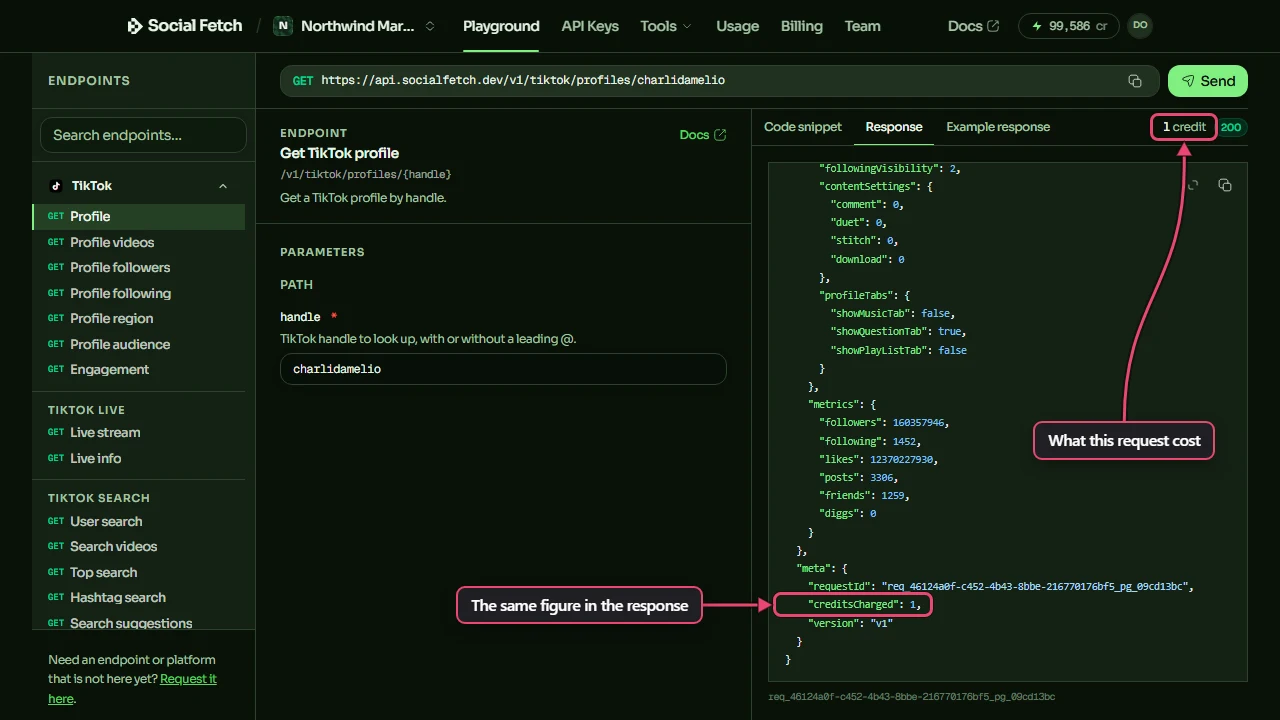
{
  "data": { "lookupStatus": "found", "profile": { "handle": "charlidamelio" } },
  "meta": {
    "requestId": "req_…",
    "creditsCharged": 1,
    "version": "v1"
  }
}
Every request
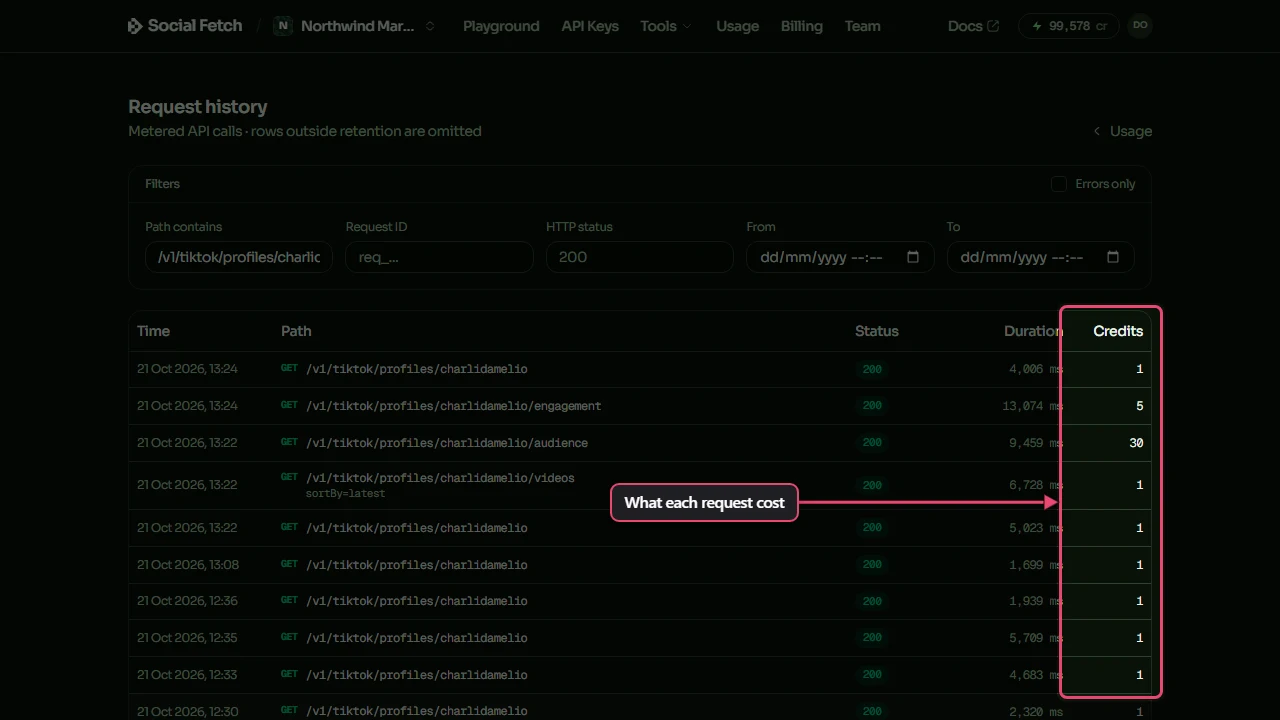
Request history (linked from Usage and Billing) lists each metered request with its status and the credits it used. Filter by path, request ID, status code or date, or tick Errors only. Click a row to see its parameters and response.
Spending over time
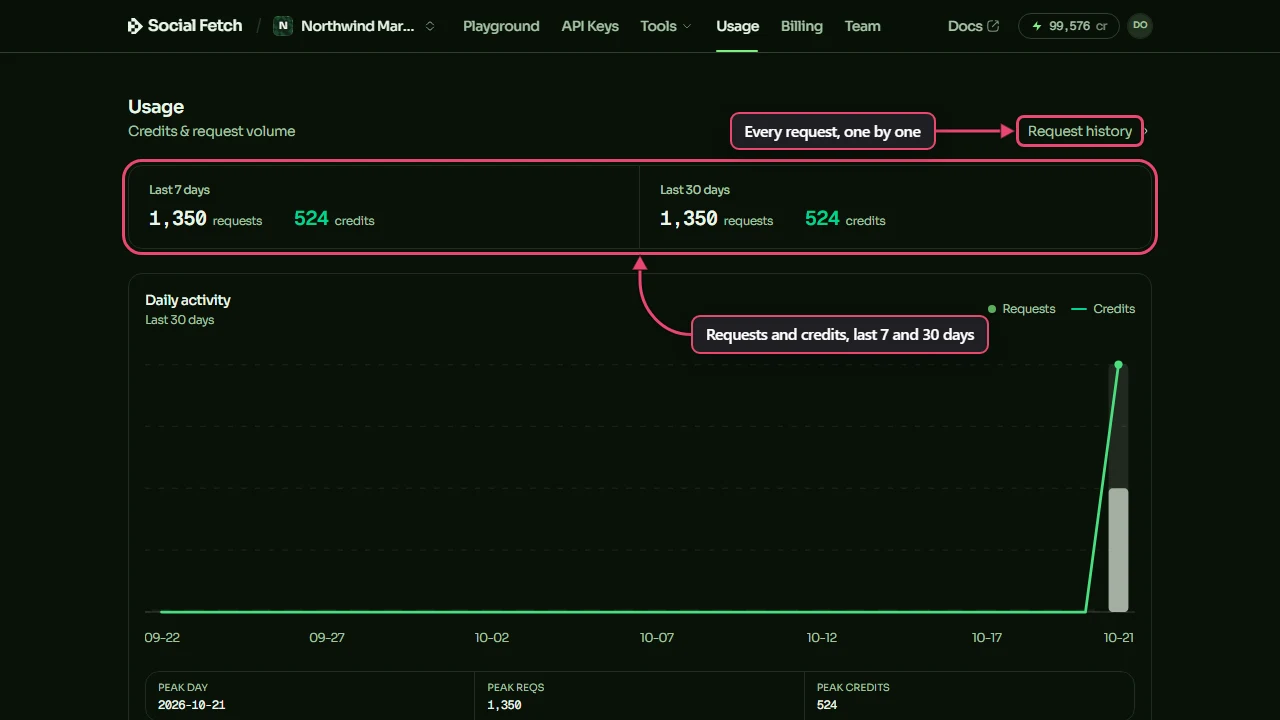
The Usage page shows requests and credits for the last 7 and 30 days, a daily chart, and your top endpoints with the credits each used. When more than one API key, or more than one teammate, has spent credits, it also breaks spending down by key and by teammate. Export CSV downloads it.
What costs credits
- A completed lookup is charged, even when it finds nothing. A private or not-found profile, or a
restrictedpost, comes back as a200withdata.lookupStatussaying what happened, and costs the normal price. See Errors and outcomes. - Service failures and requests rejected before a lookup aren't charged.
502 lookup_failedand503 temporarily_unavailablecost no credits. Neither do validation failures (400 bad_request), invalid, revoked or expired keys (401 unauthorized), or an insufficient-credit rejection (402 insufficient_credits). Some endpoint-specific outcomes, such as a video too long for transcription, can still be billed; check that endpoint's API reference. - A screenshot of a bot challenge isn't charged. When a page answers
GET /v1/web/screenshotwith a challenge or block page, the response islookupStatus: "restricted"with no image andmeta.creditsCharged: 0. - A missing key has different responses on paid and free routes. Without an API key or x402 payment, a paid route returns
402 payment_required. Include a validx-api-keyheader to spend workspace credits. Free routes that require a key, such asGET /v1/balance, return401 unauthorizedwhen the key is missing. These authentication and unpaid-payment rejections don't spend workspace credits. - Cached results are charged in full. Some endpoints return
meta.cached: true(and an HTTPAgeheader) when the result comes from our short-lived cache of completed lookups.meta.creditsChargedis still the full price. - Some endpoints charge for extras. Options such as Instagram's
include=recentMediaadd credits only when the extra is returned, someta.creditsChargedcan be lower than the most a request could cost. Each endpoint's page in the API reference says how it's priced. GET /v1/whoamiandGET /v1/balanceare free. Use them to check a key and read your balance.
Plan for it in your integration
- Check your balance with
GET /v1/balancebefore a large job. - For
402 insufficient_credits, read the message: a low workspace balance needs more credits, while an API key's monthly limit needs a workspace owner or admin to raise or remove it, or you must wait for the next calendar month. Buying credits doesn't raise a key's limit. - Add up
meta.creditsChargedif you need your own records to match what you were charged. - Owners and admins can cap what one API key spends in a calendar month: on API Keys, click Limit on the key's row. A key at its limit gets
402 insufficient_creditswith a message saying so; the workspace balance isn't touched. See API keys and spending.
Pay-as-you-go and plans
Without a plan, requests spend your pay-as-you-go balance. When it's empty, metered requests return 402 insufficient_credits.
With an active plan, requests use credits in this order:
- The plan's included credits for the current month.
- Your pay-as-you-go balance: credit packs, free credits and earlier refill packs.
- Refill packs, bought automatically when your balance drops below your refill threshold (see Auto top-up and auto-refill).
Included credits reset at the start of each monthly period, even on an annual plan. On a monthly plan, unused included credits don't roll over. On an annual plan, they carry into the next month, up to one month's allowance, so you can hold at most two months' worth. Pay-as-you-go credits, including refill packs, are separate and never expire. Cancelling a plan never removes them.
You can buy credit packs while on a plan. They're used after the plan's credits and before any refill.
Free credits for adding a card
If you haven't bought anything yet, save a card on the Billing page (Add a card, get 250 free credits) and we add 250 credits. Nothing is charged until you buy. There's one bonus per person and per card, and prepaid cards don't qualify.
Auto top-up and auto-refill
Auto top-up buys credits for you when your balance runs low, so requests don't stop. It's on the Billing page under Credit top-ups. It's called Auto top-up on pay-as-you-go and Auto-refill on a plan.
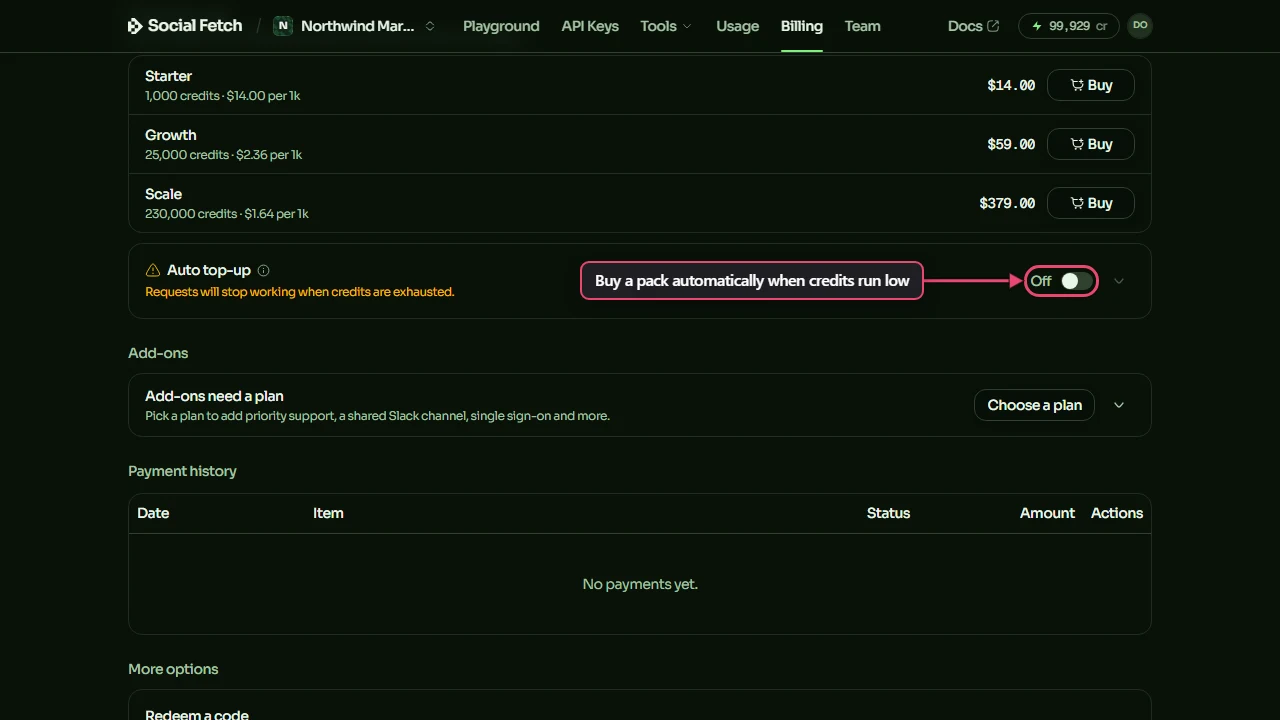
- Pay-as-you-go: auto top-up switches on after your first credit pack purchase. When your balance drops to 100 credits or below, we charge your saved card for the same pack. You can change the pack and the trigger threshold, or switch it off.
- On a plan: auto-refill is on by default when you subscribe. Once the plan's credits and your pay-as-you-go balance run low, it buys a refill pack (your plan's refill pack by default, or a credit pack you choose) when your spendable balance drops to 100 credits or below. You can raise the Trigger threshold, and set a Per-period spend cap (optional): once refills reach it, they stop and metered requests return
402until the next period or until you raise the cap.
Refill credits go into your pay-as-you-go balance and never expire. Switch auto top-up off if you'd rather requests stop at zero.
Grace buffer when a refill charge fails
If an automatic refill charge fails (a declined card or insufficient funds), we add a one-time grace buffer so your app keeps running while you fix the payment. You get it only if auto top-up is on with a saved card and you're a paying customer (you've bought credits or subscribed). Free credits alone don't qualify.
| Account | Grace buffer |
|---|---|
| Pay-as-you-go | 500 credits |
| Starter plan | 2,000 credits |
| Growth plan | 5,000 credits |
| Scale plan | 10,000 credits |
You get the buffer once per unpaid episode. When your next charge succeeds (a refill or a credit pack), the grace credits you received are taken back from it and the rest stays in your balance. If the buffer runs out while payment is still failing, requests return 402 and Billing shows a banner asking you to update your payment method.
This is separate from your plan's renewal. If the renewal payment fails at the start of a period, that month's included credits aren't added until the invoice is paid. You keep your pay-as-you-go balance. Update your card through Billing → Manage payment to restore it.
Credits belong to a workspace
Credits, plans and payment methods belong to a workspace, and requests made with that workspace's API keys spend its credits. You can own up to 5 shared workspaces as well as your personal one. Credits can't be moved between workspaces yourself; if you bought credits in the wrong one, contact us and we can move them. When a workspace is closed, its remaining credits are lost once its 30-day restoration window ends. See Teams and workspaces.
Add-ons
Add-ons are flat monthly extras on a paid plan. Prices are per workspace, and annual billing is 10% cheaper than twelve monthly payments.
| Add-on | Price | Sold on | Included with |
|---|---|---|---|
| Single sign-on and directory sync | $149 / month | Scale | Enterprise |
| Custom roles | $49 / month | Scale | Enterprise |
| Priority support | $19 / month | Any paid plan that doesn't include it | Growth and above |
| Shared Slack channel | $49 / month | Any paid plan that doesn't include it | Scale |
- You don't need an add-on to build Social Fetch data into your own product and sell it. Every plan allows it under our Terms.
- Workspace owners and people with the Billing role can buy add-ons, under Billing → Add-ons. An add-on starts straight away.
- An add-on is billed with your plan: same invoice, same renewal date. Adding one mid-period charges a prorated amount for the rest of the period. Removing one gives a prorated credit, and add-ons stop when the plan ends.
- Remove an add-on before moving to a plan it isn't sold on. Upgrading doesn't affect it.
- Add-ons need a paid plan (Starter or higher), so they aren't available on pay-as-you-go alone.
Cancelling or changing plans
- Cancel from Billing. It takes effect at the end of the period: your included credits last until then, and after that you're on pay-as-you-go.
- Upgrade takes effect straight away, with a prorated charge and the extra included credits added.
- Downgrade takes effect at the end of the period.
Payment methods and invoices are managed in the billing portal, which opens from the Billing page.
Checking your balance from code
GET /v1/balance is free. Call it before large jobs or on a schedule.
data.balanceis the credits you can spend right now, the same number that decides when requests return402. During a grace episode, grace credits aren't counted inbalanceuntil your included and pay-as-you-go credits are used up; after that,balancecounts down what's left of the grace buffer.data.billingAlertisnone,payment_action_requiredorsuspended. Check it even whenbalancelooks healthy: a refill may have failed while the grace buffer still has credits left.
The other fields (payg, paygSpendable, graceDebtCredits, refillState) break down the same state; the Balance API reference describes each one.
With an SDK client already configured (see TypeScript SDK), check result.ok before reading the response. Here notifyOps is your own alert function. A failed balance check needs attention too; it doesn't tell you that your balance is zero.
const result = await client.billing.getBalance();
const MIN_CREDITS = 1_000;

if (!result.ok) {
  console.error(result.error.code, result.error.message);
  notifyOps(); // investigate the failed balance check
} else {
  const { data } = result.value;
  if (data.billingAlert !== "none" || data.balance < MIN_CREDITS) {
    notifyOps(); // check Billing for low credits or a payment problem
  }
}
During a grace episode, after a failed payment, balance is what's left of the buffer and billingAlert is the warning:
{
  "data": {
    "balance": 1998,
    "billingAlert": "payment_action_required",
    "paygSpendable": 0,
    "refillState": "grace",
    "graceDebtCredits": 2000
  }
}
Throughput and concurrency
Credits are the only limit on paid metered /v1/* requests. There's no request quota and no requests-per-second cap; run requests in parallel as your product needs, up to 200 in flight per workspace.
Under heavy load, requests may be queued. Under extreme concurrency, or above the in-flight limit (reason concurrency_limit), the API returns 503 temporarily_unavailable with a Retry-After header. That means we're busy, not that you hit a rate limit: we don't use 429 for paid metered requests. These 503 responses aren't charged. Wait for Retry-After (or back off gradually) and retry.
The free routes (GET /v1/whoami, GET /v1/balance) have a per-key rate limit and can return 429. See Errors.