Errors
The success and error response shapes, every error code, request IDs, and when to retry
Every Social Fetch response has one of two shapes: { data, meta } when the request worked and { error } when it didn't. A lookup that finds nothing, such as a profile that doesn't exist, still worked: it comes back as HTTP 200 with the answer inside data. So check the HTTP status first, then the outcome fields.
You can see both shapes without writing code: send a request from the Playground and read the Response tab.
Success envelope
Successful responses use a { data, meta } envelope:
dataholds what you asked for. Its shape depends on the endpoint.metaholds the request ID (requestId), the credits charged (creditsCharged) and the API version.
Example (200):
{
  "data": {
    "lookupStatus": "found",
    "profile": {
      "platform": "tiktok",
      "handle": "charlidamelio",
      "displayName": "charli",
      "bio": "hey",
      "avatarUrl": "https://example.com/avatar-large.jpg",
      "verified": true,
      "profileUrl": "https://www.tiktok.com/@charlidamelio",
      "privateAccount": false
    },
    "metrics": {
      "followers": 150000000,
      "following": 123,
      "likes": 12345678901,
      "posts": 456
    }
  },
  "meta": {
    "requestId": "req_01example",
    "creditsCharged": 1,
    "version": "v1"
  }
}
Each endpoint's 200 schema is in the API reference.
Outcome semantics
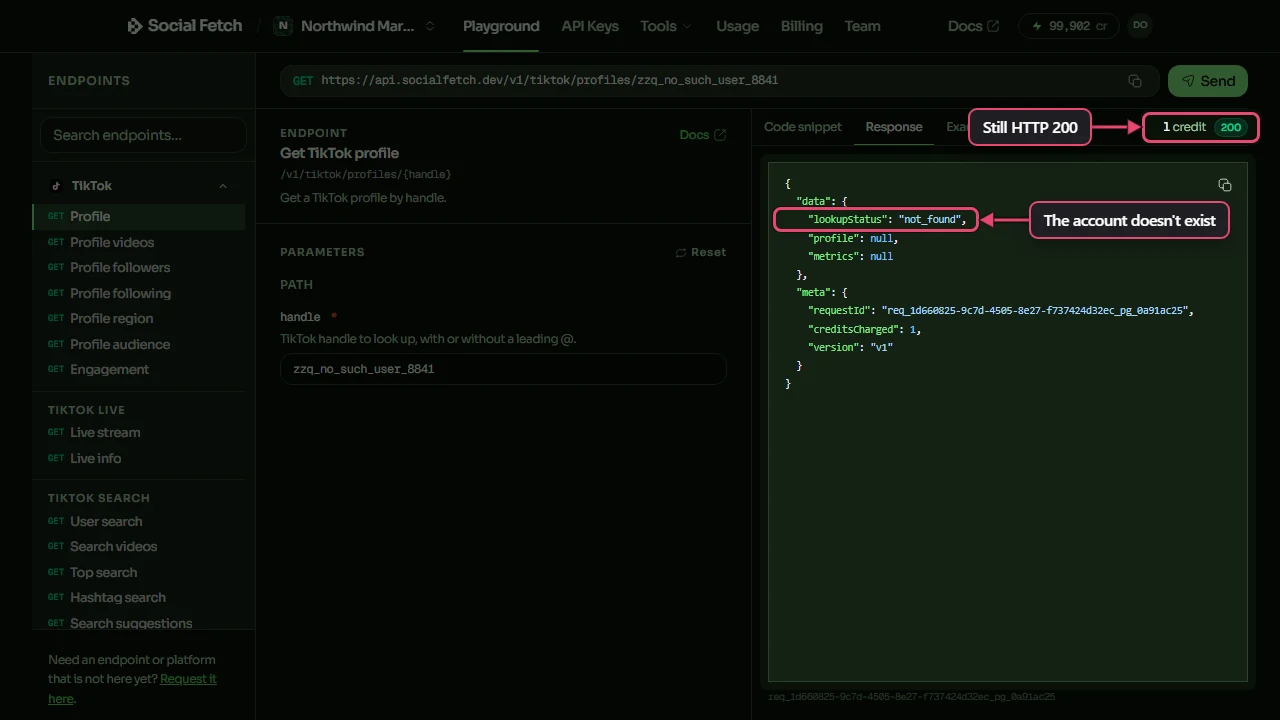
Some endpoints report what they found inside a 200 rather than as an error. Profile lookups use data.lookupStatus; here is a TikTok handle that doesn't exist:
{
  "data": {
    "lookupStatus": "not_found",
    "profile": null,
    "metrics": null
  },
  "meta": {
    "requestId": "req_01example",
    "creditsCharged": 1,
    "version": "v1"
  }
}
Instagram post lookups return lookupStatus: "restricted" when the URL is valid but the post isn't public (for example, it's age-restricted):
{
  "data": {
    "lookupStatus": "restricted",
    "post": null,
    "owner": null,
    "metrics": null,
    "media": null,
    "downloads": []
  },
  "meta": {
    "requestId": "req_01example",
    "creditsCharged": 1,
    "version": "v1"
  }
}
Outcome values
found: the target exists and the data is in the response.not_found: the target doesn't exist, or couldn't be identified from what you sent.private: the target exists, but its data isn't public.restricted: the target exists but can't be returned, such as an age-restricted post or a page that blocks automated access.
The web extraction routes (GET /v1/web/markdown, /html and /ask) return lookupStatus: "restricted" with HTTP 200 when a page blocks access. The content fields (markdown, html, answer) are null. Retrying won't help.
GET /v1/web/screenshot returns lookupStatus: "restricted" when a bot challenge or block page stands in front of the page. artifact is null, since a screenshot of the challenge isn't the page, and the request costs no credits.
Not every endpoint has every value. The endpoint's page in the API reference lists the ones it uses.
Empty results
An empty list doesn't always mean the target is missing. The profile may have no posts, or it may be private or restricted. Some list routes return HTTP 200 with an empty list in all of these cases and have no data.lookupStatus to tell them apart. When the difference matters:
- Call the platform's profile route for the same handle (
GET /v1/{platform}/profiles/{handle}). - Read
data.lookupStatusfrom that response. - Call the list route only if the profile was found.
If you only need "posts or nothing", skip the profile call.
In your code
- Check the HTTP status.
- On
200, read the outcome fields, such asdata.lookupStatus. - On anything else, read the error envelope below.
With the TypeScript SDK, that's result.ok, then result.value.data.
Lookups that complete are charged, including not_found, private and restricted outcomes. See Credits.
Error envelope
Error responses use an { error } envelope:
{
  "error": {
    "code": "unauthorized",
    "message": "Invalid API key.",
    "requestId": "req_01example"
  }
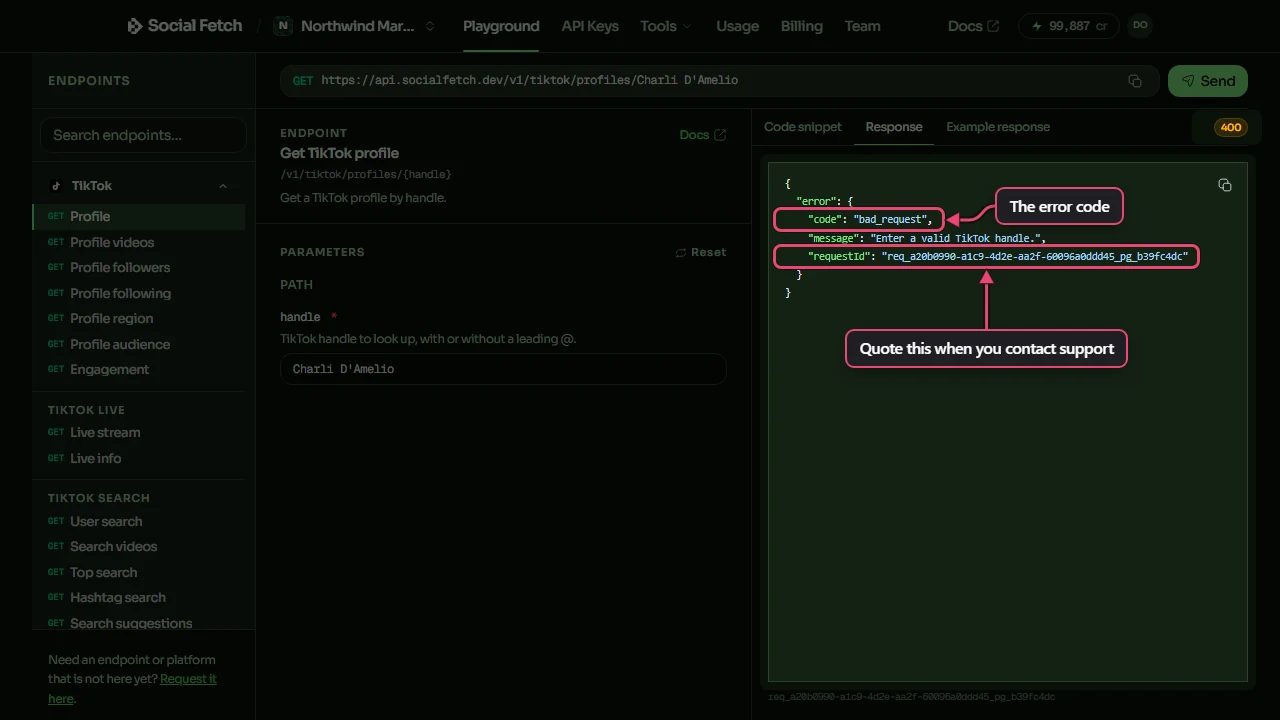
}codeis the machine-readable reason. Branch on this and the HTTP status.messageis for people. Its wording can change, so don't parse it.requestIdidentifies the request. See Request IDs.
Some errors add fields: insufficient_credits can carry checkoutUrl or upgradeUrl, and forbidden and some temporarily_unavailable errors carry a reason.
Here's the error you get for sending a display name instead of a TikTok handle:
Error codes
| HTTP status | error.code | What it means | Retry? |
|---|---|---|---|
400 | bad_request | A parameter is missing or invalid. message says which. | No. Fix the request. |
400 | transcript_target_not_video | The transcript endpoint was given a post that isn't a video. | No. |
400 | video_too_long_for_transcription | The video is longer than the transcript endpoint accepts. | No. |
401 | unauthorized | The API key is invalid, revoked or expired, or is missing on a route that requires key authentication. | No. Check the x-api-key header. |
402 | insufficient_credits | The workspace has too few credits, or the key reached its monthly spend limit. | Stop. Add workspace credits, or raise/remove the key limit or wait for its monthly reset, as appropriate. |
402 | payment_required | No API key was sent to a paid lookup route, so it offers an x402 payment. | Send a valid key to use credits, or complete the x402 payment. |
402 | payment_settlement_failed | An x402 payment was verified but couldn't be settled, so the result is withheld. | See x402. |
403 | forbidden | The key is valid but can't be used right now. reason says why. | No. |
403 | payment_history_required | Monitors need at least one credit purchase or subscription. | No. |
404 | not_found | A monitor, webhook endpoint or other item you named by ID doesn't exist, or the path isn't an API route. | No. |
410 | endpoint_retired | The route has been retired. message names the one to use instead. | No. Switch routes. |
413 | response_too_large | The response would be too large. Ask for less, such as fewer URLs. | No. Make the request smaller. |
429 | temporarily_unavailable | Rate limit on the free whoami and balance routes, or on requests sent without an API key. | Yes, after Retry-After. |
500 | internal_error | Something went wrong on our side. | Yes, with backoff. |
502 | lookup_failed | The lookup couldn't be completed. | Yes, with backoff. |
503 | temporarily_unavailable | The service is busy, or the workspace has too many requests in flight. | Yes, after Retry-After. |
The API reference lists the codes each route can return for each status. The SDK exports the full list as PUBLIC_API_ERROR_CODES.
402 responses
402 has three meanings, so read error.code before deciding what to do:
insufficient_credits: either the workspace has too few credits or the key has reached its monthly spend limit. Read the message to tell which. For a workspace balance refusal, add credits before restarting requests. The body can includecheckoutUrlto buy credits and, for subscribers with a bigger plan available,upgradeUrl, which opens the plan-change dialog. Repeated balance refusals can return a quick402withRetry-After; that header does not mean the balance will refill by itself. For a key-limit refusal, ask a workspace owner to raise or remove the cap, or wait for the next calendar month (UTC). A top-up does not change the key cap, and the refused request does not spend the workspace balance. See Teams: API keys and spending.payment_required: you sent no API key to a paid lookup route. Send a validx-api-keyheader to use workspace credits, or accept the route's offer of x402 pay-per-request. The details are in thePAYMENT-REQUIREDheader.payment_settlement_failed: the x402 payment was verified and the lookup ran, but settling the payment failed, so the result is withheld.
403 reasons
forbidden errors include a reason:
key_owner_removed: the person who created the key has left the workspace. Create a new key.key_owner_role: that person's role no longer allows API use. Create a key with a role that does.account_suspended: the account has been suspended.workspace_suspended: the workspace has been suspended.workspace_deleted: the workspace no longer exists.workspace_unavailable: the workspace can't be used right now. Contact support.
See Teams: API keys for how keys relate to people and roles.
429 and 503
Paid lookup requests with a valid API key skip the anonymous rate limit. Workspace credits and any key spend cap still apply, with up to 200 requests in flight per workspace. Above that, or when the service is very busy, you get 503 temporarily_unavailable (with reason: "concurrency_limit" for the in-flight limit) and a Retry-After header. 503 responses on metered lookup routes aren't charged. See Credits.
429 can occur on the free whoami and balance routes, and on requests sent without an API key. These are rate-limited exceptions, not a quota on authenticated paid lookups. Wait for Retry-After before retrying. A missing key on a route that requires key authentication returns 401; a paid lookup route instead offers the 402 payment_required challenge described above.
Request IDs
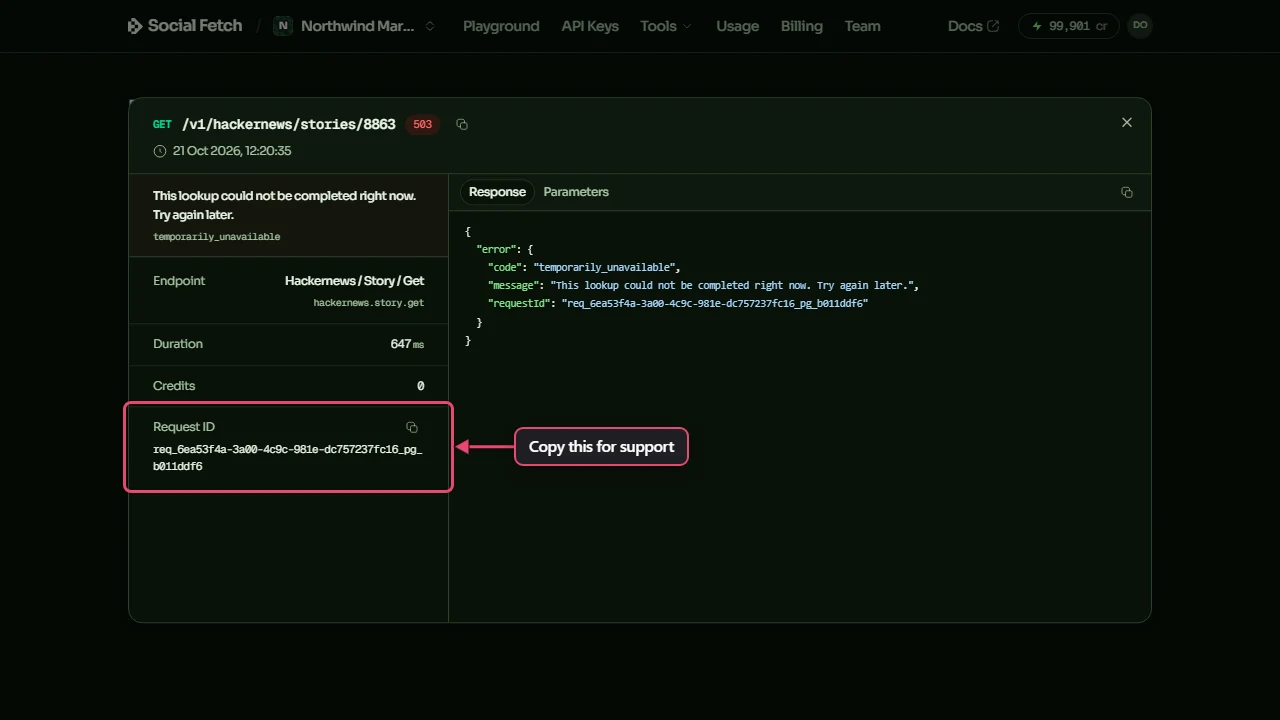
Every response has a request ID: meta.requestId on success, error.requestId on failure, and the X-Request-Id header on both. Log it when a request fails and include it when you contact support, so we can find the exact request.
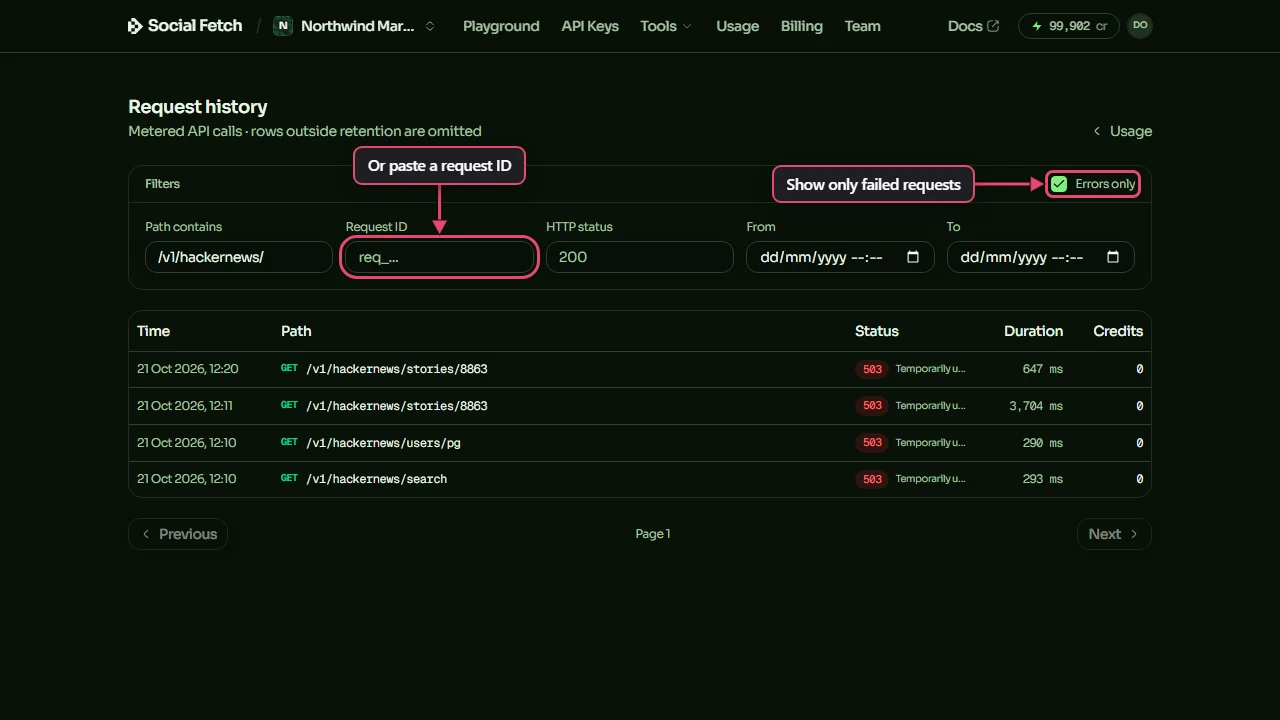
To find a request later, open Usage, then Request history. Tick Errors only to see failed requests, or paste a request ID into Request ID:
Click a request to see its details, including the error and the response body:
Requests the API turns away before running them, such as a 400 for an invalid parameter, aren't in the request log. Use the request ID from the response for those.
Retrying
Retry only what can succeed
Retry 429 and 5xx responses. Use Retry-After when it's there and backoff when it isn't. Don't automatically retry other 4xx errors. On 402 insufficient_credits, stop: add workspace credits for a balance refusal, or raise/remove the key cap or wait for its calendar-month reset for a key-limit refusal.
This wrapper retries 429 and 5xx responses with jitter and the API's Retry-After delay in seconds. It stops on 402 insufficient_credits and returns other 4xx responses for the caller to handle:
async function fetchWithRetry(url: string, init: RequestInit, maxAttempts = 5) {
  for (let attempt = 0; ; attempt++) {
    const res = await fetch(url, init);
    if (res.ok) return res;

    if (res.status === 402) {
      const body = await res.clone().json().catch(() => null);
      if (body?.error?.code === "insufficient_credits") {
        // Stop automatic requests; inspect the API message to choose the fix.
        throw new Error(
          "Requests stopped: check workspace credits or the key monthly limit. " +
          (body.error.message ?? ""),
        );
      }
      return res; // x402 challenge or settle failure: handle separately
    }

    const retryable = res.status === 429 || res.status >= 500;
    if (!retryable || attempt + 1 >= maxAttempts) return res;

    const retryAfter = Number(res.headers.get("retry-after"));
    const delayMs = Number.isFinite(retryAfter) && retryAfter > 0
      ? retryAfter * 1000
      : Math.random() * Math.min(30_000, 500 * 2 ** attempt); // full jitter
    await new Promise((resolve) => setTimeout(resolve, delayMs));
  }
}