Monitoring quickstart
Create a monitor, send its events to a test inbox and open a signed delivery, in the dashboard or with the API. No public URL needed.
A monitor checks an account, channel or search on a schedule and sends you a signed webhook when it finds something new. This page builds one that watches @Reuters on X and sends its events to a test inbox: an endpoint that lives inside Social Fetch, so you can see real deliveries before you've written any code to receive them.
Choose either the dashboard or the API walkthrough. A monitor made with the API appears in the dashboard too.
Before you start
- A workspace that has paid once. Monitors need a credit pack purchase or a subscription on the workspace. On free signup credits alone, the dashboard shows Unlock to create monitor and the API returns
403with the codepayment_history_required. - Credits for each check. Creating, editing, pausing and deleting monitors and endpoints is free. Each successful check costs that source's normal per-request price, including the first check and any you run by hand. A successful check that finds nothing new costs the same; a skipped check or a temporary lookup failure costs zero. A completed lookup that reports a missing or private account can still be charged. Watching an X profile costs 1 credit a check. See Billing for monitors.
In the dashboard
1. Create a test inbox
If you already have a test inbox, reuse it and go to step 2. Otherwise:
- Open Monitors and click Webhook endpoints.
- Click Create endpoint and choose Test inbox.
- Enter
quickstartin Description so you can find it later. - Click Create endpoint.
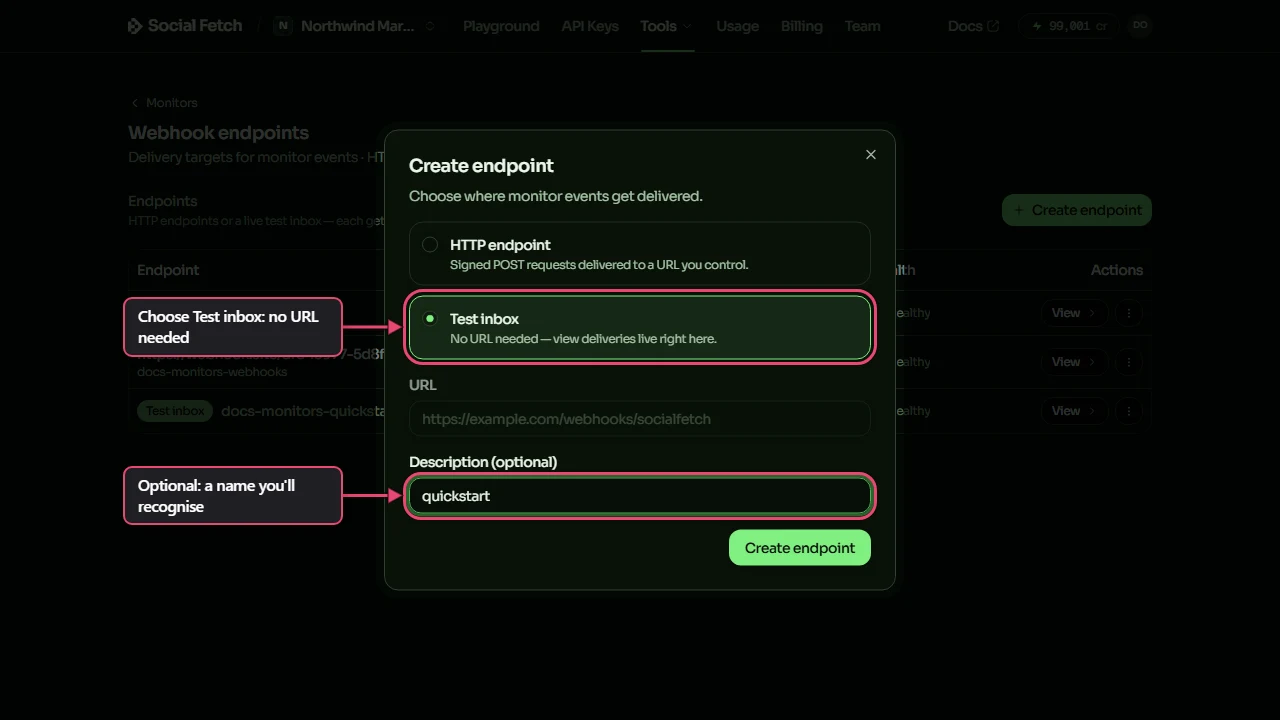
The app then shows the endpoint's signing secret once. Store it privately if you want to verify signatures in your own code. You can close it for this walkthrough and rotate it later if you did not save it.
2. Choose what to watch
- Back on Monitors, click New monitor.
- Under What to watch, click Twitter/X, then Profile tweets.
- Type
Reutersin Twitter/X handle.
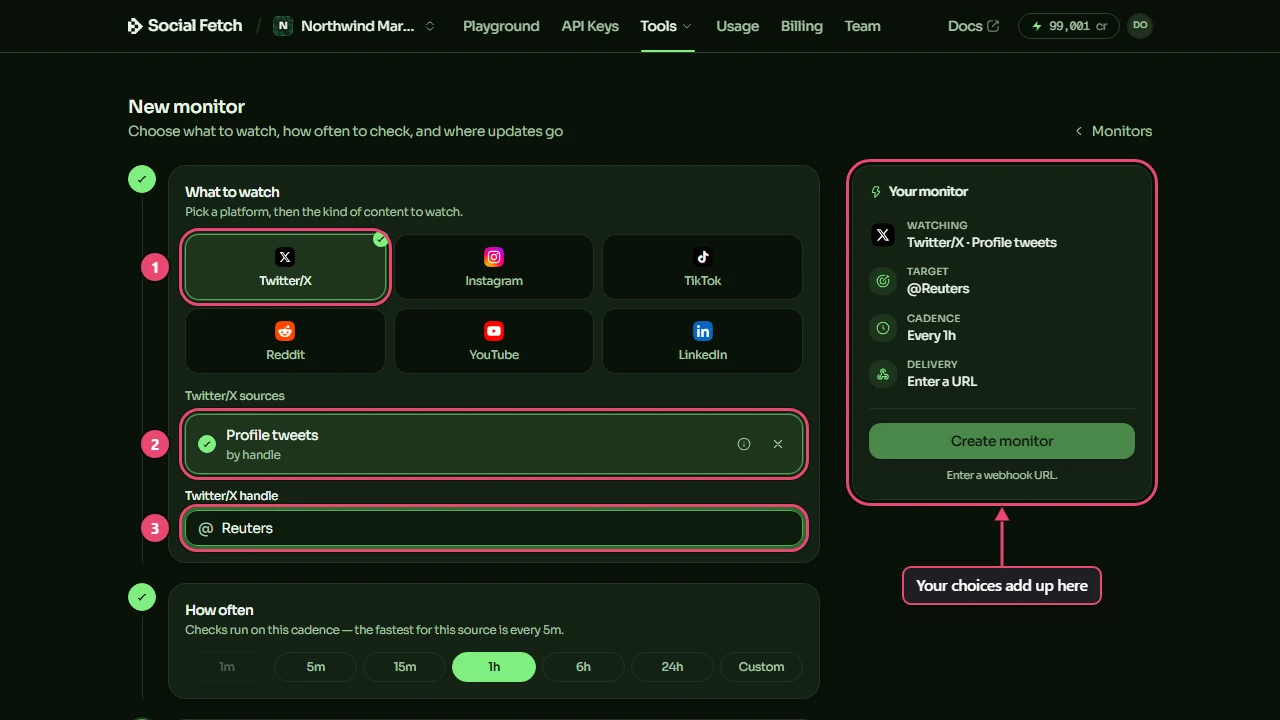
Each platform lists the sources it can watch. Hover the i next to a source to see what it watches.
3. Choose how often, and where to send it
- Under How often, click 5m. That's the fastest for X sources. The form shows the minimum interval for each source.
- Under Where to send it, click Existing endpoint and pick your test inbox.
- Click Create monitor.
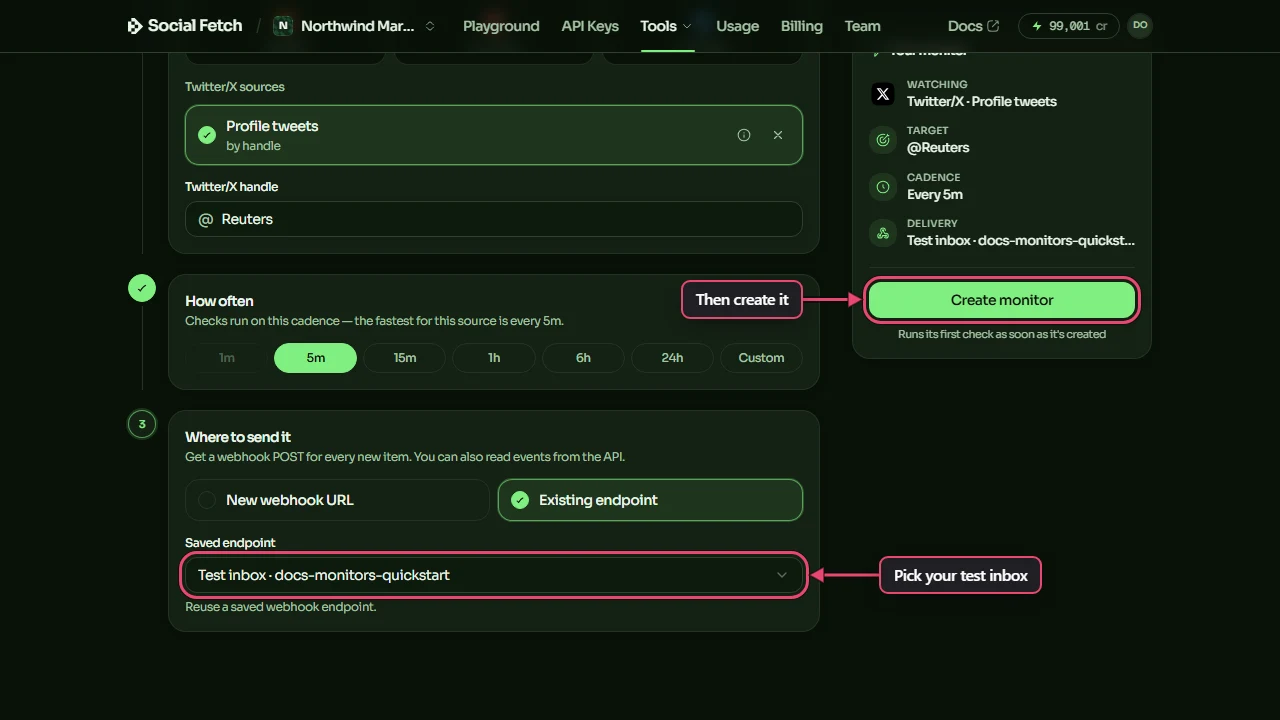
Choosing New webhook URL instead creates an endpoint for a URL you control, and shows its signing secret once when the monitor is created.
4. Watch the first check
The monitor's page opens and its first check is queued. Wait for Last check to show a result. A successful first check records what is already there without sending events for those tweets. Later checks look for tweets the monitor has not seen before.
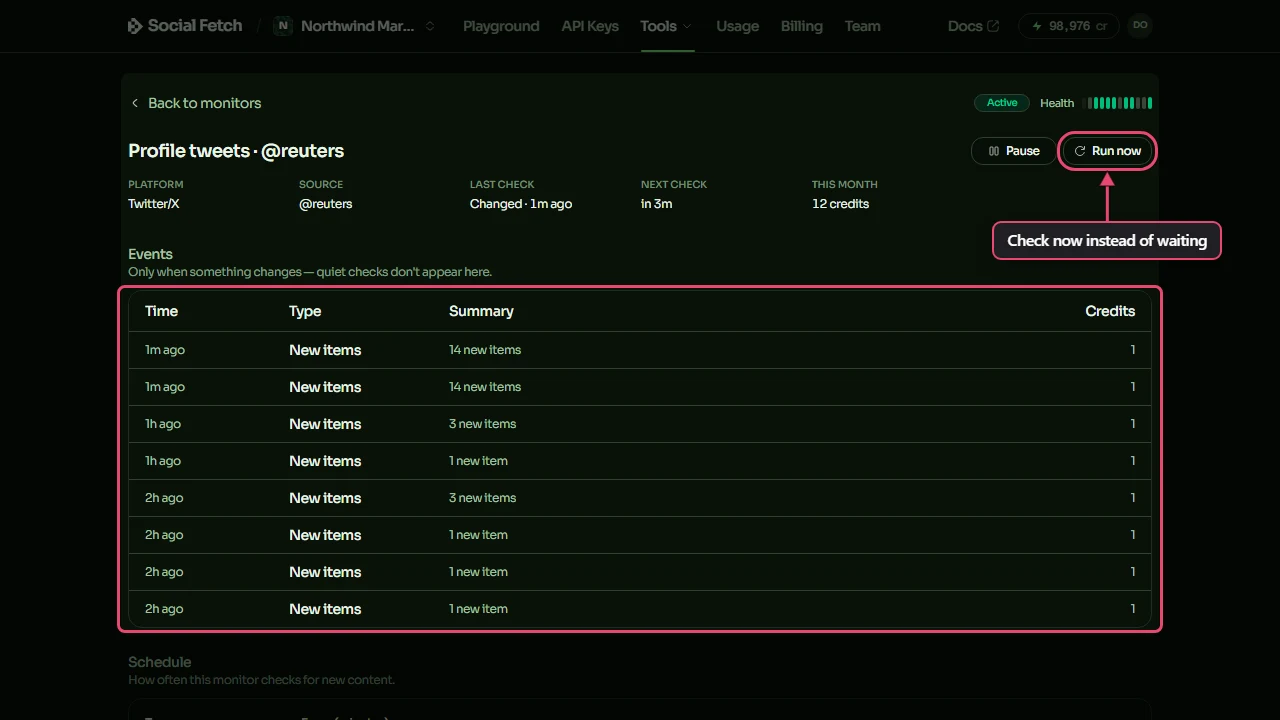
Run now checks without waiting for the schedule. It queues a check, which bills on success like a scheduled check. The monitor must be active, and you can use Run now once a minute per monitor.
5. Open the delivery
When a check finds new tweets, an event goes to your test inbox. Return to Monitors, open Webhook endpoints and click your test inbox.
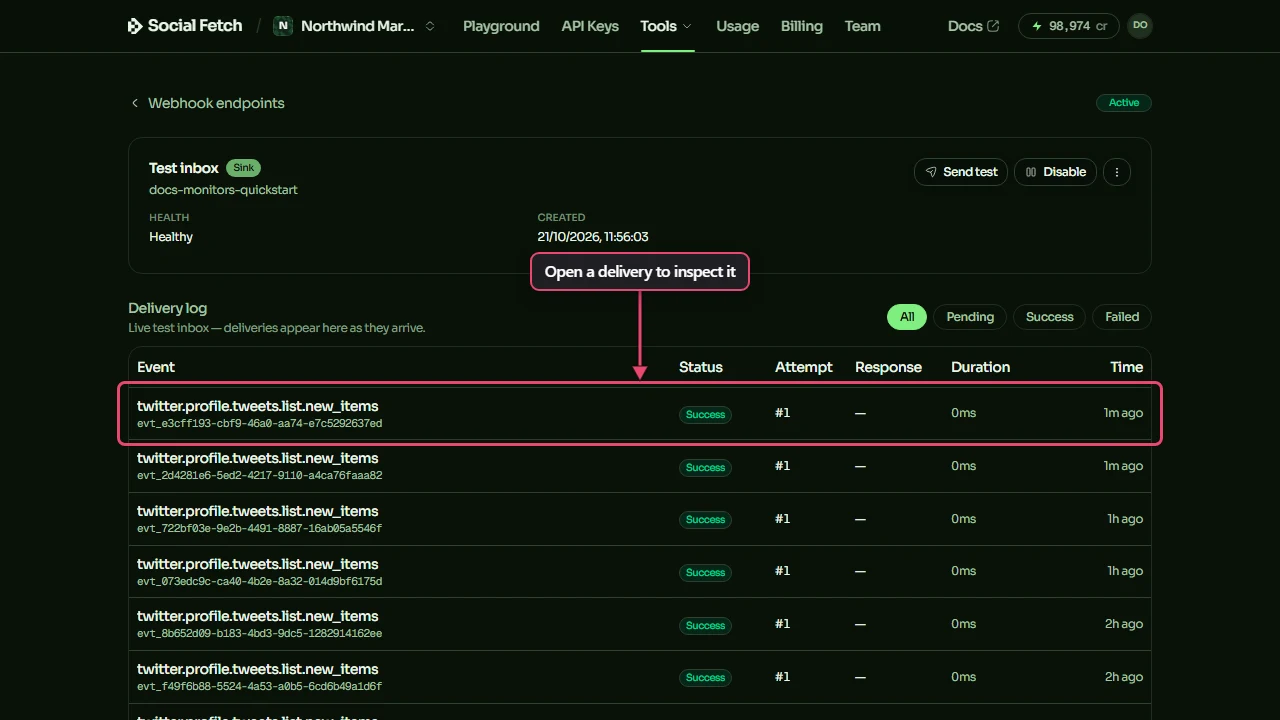
Click a delivery to see exactly what would have been sent to a real URL.
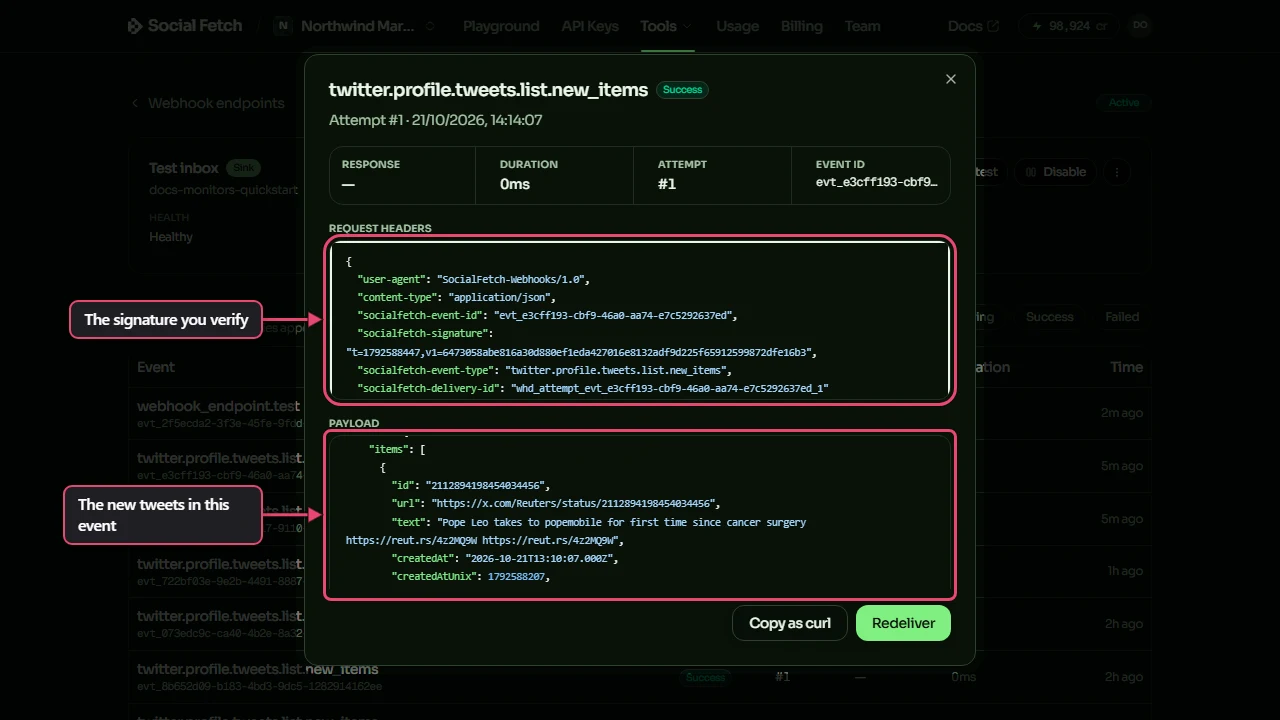
Nothing new yet? Send test on the test inbox page sends a sample event without checking a source, so it is free. A successful sample confirms the inbox can receive a delivery; it does not mean Reuters has posted or that the monitor has completed a check.
When you have finished trying it, open the monitor and click Pause to stop spending credits on scheduled checks. Click Resume when you want to start again.
With the API
1. Save your API key
Create a key in API Keys and put it in an environment variable. Use .env for app code, or export it in your shell for one-off requests. The Monitors API needs an API key; it does not support paying per request without a key.
All requests go to https://api.socialfetch.dev. The request examples use placeholder IDs: replace whe_01J9example with your endpoint ID and mon_01J9example with your monitor ID. Reuse an existing inbox and monitor if you already made them in the dashboard.
2. Find what you can watch
GET /v1/monitors/sources lists every source a monitor can watch:
For this walkthrough, use twitter.profile.tweets.list. Its minIntervalMinutes is 5, so the fastest schedule is one check every 5 minutes. The source list also gives each source's default interval and a sampleEvent showing its event shape.
3. Create a test inbox
A test inbox is an endpoint with kind: "sink". It has a signing secret and a delivery log like any endpoint, but it keeps each signed request for you to read instead of sending it anywhere:
The secret is shown once
secret comes back only when you create the endpoint or rotate its secret. Store it now: you need it to verify deliveries.
A workspace can have at most two test inboxes. Reuse one if you have reached that limit. Save the returned data.id for the next step.
4. Create the monitor
Send the source, its parameters, a schedule and the test inbox's id. Add ?dryRun=true to see the cost without creating anything:
Save the returned data.id as your monitor ID. The API attempts the first check before returning and reports its outcome in baseline. A successful check is charged and records what is already there without sending events for those posts. If it fails or is skipped, a later successful check establishes the starting point.
costPreview shows the estimated credits per check, day and month. At 5 minutes, this source costs 1 credit per successful check, with an estimate of 288 credits a day and 8,640 credits over a 30-day month if every check succeeds.
5. Check now instead of waiting
The trigger call itself is free; the check it queues bills like any other. You can trigger each monitor once a minute:
An active monitor returns data.triggered: true when the check is queued. If that check finds new items, it creates an event for your test inbox. A queued check does not guarantee a new event.
6. Read the delivery
Use your endpoint ID in the request. Each delivery has the exact requestHeaders and payloadText that would have been sent to a real URL, byte for byte, so you can check the signature the same way you will in production. See Receiving and verifying webhooks.
How new items are found
Each check reads the latest page of results and compares it with what the monitor has seen before. A busy account can post more than fits on one page between checks, so pick a schedule that suits how often it posts. Search monitors report results they haven't seen before, which can include older posts that have only just started matching.
Point it at your real endpoint
When your handler is ready, create an HTTP endpoint for its URL and switch the monitor to it. Nothing else about the monitor changes. In the dashboard, open the monitor and click Change under Webhook endpoint. With the API:
If you get stuck
"No changes detected yet."
This is normal after the first successful check, or when nothing new has appeared. Check Last check for its outcome. Use Send test in the inbox to try a sample delivery, or wait for new posts before using Run now.
"Unlock to create monitor"
The workspace has no recorded purchase. Switch to the workspace where you bought credits, or buy a credit pack or subscription. Free signup credits do not unlock monitors.
"Monitor is not active."
Open the monitor and click Resume before triggering a check. If checks still fail, see Billing for monitors or contact support.
Where to go next
Receiving and verifying webhooks
Handlers for Next.js, Hono and Express, and the raw-body mistake that breaks signature checks.
Testing webhooks locally
socialfetch listen forwards signed events to localhost, with no tunnel.
Delivery, retries and idempotency
The retry schedule, at-least-once delivery and removing duplicates by event id.
Billing for monitors
Credits per check times the schedule, dryRun previews and plan limits.
Monitors
Poll Social Fetch sources on a schedule and get a signed webhook when something new appears.
Receiving & verifying webhooks
Add a webhook endpoint, keep its signing secret, and verify Social Fetch webhook signatures in Next.js, Hono, Express or any language, including the raw-body mistake that breaks verification.