Testing webhooks locally
Build a webhook handler without a public URL: a test inbox that keeps signed deliveries for you to read, socialfetch listen to forward them to localhost, and checks or test events on demand.
Social Fetch only delivers to public https:// addresses, so it can't reach http://localhost:3000 on your machine. You don't need a public URL to build your handler, though. A test inbox keeps every delivery for you to read in the dashboard, and socialfetch listen forwards each one from the test inbox to your local server.
Test inbox
A test inbox is a webhook endpoint with no URL. Monitors attach to it like any other endpoint, and each delivery is signed and logged in the same way, but instead of sending the request anywhere, Social Fetch keeps it. You can read every request's headers and raw body, exactly as an HTTP endpoint would have received them.
- In the app, open Monitors, then Webhook endpoints, and click Create endpoint.
- Choose Test inbox and click Create endpoint. The URL and description fields aren't needed.
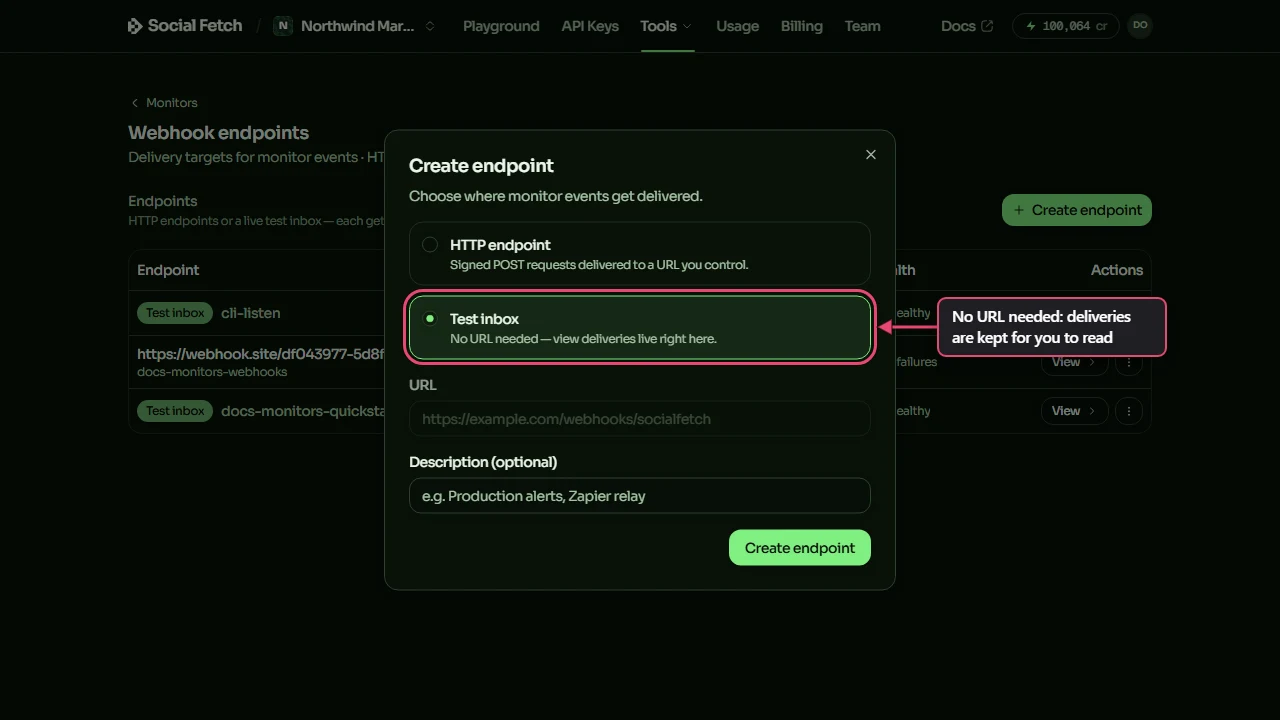
- Copy the signing secret from the next window, as for any endpoint. You'll need it to verify deliveries.
- When you create a monitor, choose Existing endpoint in its destination step and pick the test inbox.
Open the test inbox from the Webhook endpoints page to see its delivery log. While the page is open it checks for new deliveries every couple of seconds, so events appear without a reload. Click Send test to put a sample event in it, and click any row to see the full signed request.
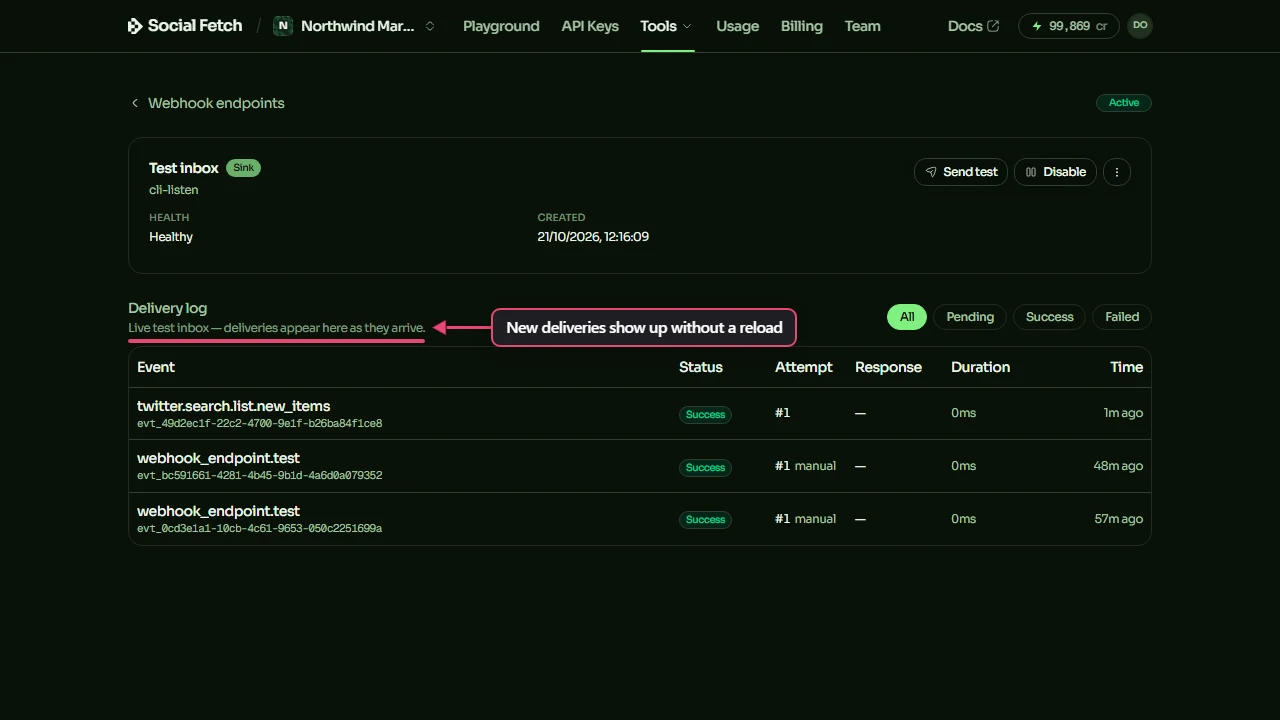
You can create a test inbox through the API too:
The response includes the secret. Store it: it's only shown once. Read the inbox's deliveries with:
Each delivery's requestHeaders and payloadText are exactly what an HTTP endpoint would have received. Verify them the same way you would in production (see Receiving & verifying webhooks).
A workspace can have up to 2 test inboxes. Creating a third fails with "At most 2 test-inbox endpoints per account."; delete one you no longer use from the ⋮ menu on the Webhook endpoints page. Deliveries are kept for 30 days, as for any endpoint.
Forward events to localhost with socialfetch listen
socialfetch listen comes with @socialfetch/sdk and works like stripe listen. It uses a test inbox, checks it for new deliveries, and sends each one to a URL on your machine, unchanged: the same raw body, the same socialfetch-* headers and the real signature. Your local handler verifies it exactly as it would in production.
It needs an API key, from SOCIALFETCH_API_KEY or --api-key:
The first run creates a test inbox described cli-listen and prints its signing secret once. Set it as your local SOCIALFETCH_WEBHOOK_SECRET:
Later runs reuse the same test inbox (Using existing test inbox whe_…) and don't print the secret again. If you've lost it, rotate the cli-listen inbox's secret on the Webhook endpoints page. The cli-listen inbox counts towards the limit of 2.
What it does:
- Finds the test inbox described
cli-listen, or creates it. - Every 2 seconds, asks for deliveries newer than the last one it saw (
GET /v1/webhook-endpoints/{id}/deliveries?after=…). Only deliveries that arrive after it starts are forwarded. Reading deliveries is free. - Sends each new delivery to
--forward-to, unchanged. - Prints the event type, event id, and your server's status and response time (or the error, if your server didn't answer).
There are no websockets or tunnels: it's a short loop over the same API calls shown above.
| Flag | Required | Description |
|---|---|---|
--forward-to <url> | yes | Local URL to forward events to. |
--api-key <key> | no | Defaults to SOCIALFETCH_API_KEY. |
--api-url <url> | no | Use a different API address. Defaults to production. |
--poll-interval-ms <ms> | no | How often to check for deliveries, in milliseconds. Defaults to 2000. |
-h, --help | no | Show usage. |
A forwarded event your server rejects isn't sent again: the test inbox already counts it as delivered. Fix your handler, then send another test event or redeliver the event from the inbox's log.
Run a check now
You don't have to wait for a monitor's schedule. Click Run now on the monitor's page, or call POST /v1/monitors/{id}/trigger:
The check is queued straight away. Triggering is free; the check itself costs the same as a scheduled one (see Billing for monitors). You can run a monitor's check once every 60 seconds; sooner than that, the API replies "This monitor was triggered moments ago. Try again in N seconds."
A monitor's first check only records what's already there, so it sends no event. An event is sent when a later check finds something new.
The whole loop
In one terminal, start forwarding:
In another, run a check on a monitor that's attached to the cli-listen test inbox:
If the source has anything new since the last check, an event is sent to the test inbox, and socialfetch listen forwards it to your local server a couple of seconds later.
Send a test event instead
To skip waiting for something new, send a test event: Send test on the endpoint's page, or POST /v1/webhook-endpoints/{id}/test. It sends a sample event of type webhook_endpoint.test and returns the result straight away. To shape the sample like a particular source's items, pass that source's operation id, such as { "sampleType": "twitter.profile.tweets.list" }; leave it out for a generic sample. It works with a test inbox or an HTTP endpoint, and socialfetch listen forwards test events like any other.
Where to go next
Receiving & verifying webhooks
Next.js, Hono and Express handlers, and the raw-body mistake to avoid.
Delivery, retries & idempotency
When failed deliveries are retried, and how to ignore duplicates.
Billing for monitors
What each check costs, dry-run previews and plan limits.
Webhook endpoints API reference
Endpoints, deliveries, test events and redelivery, with schemas.
Receiving & verifying webhooks
Add a webhook endpoint, keep its signing secret, and verify Social Fetch webhook signatures in Next.js, Hono, Express or any language, including the raw-body mistake that breaks verification.
Delivery, retries & idempotency
When Social Fetch retries a failed webhook, how to read the delivery log and redeliver an event, when an endpoint is switched off, and how to ignore duplicates using the event id.