This guide covers Truth Social profile and post lookups via /v1/truthsocial/**: profile by handle, cursor-paginated profile posts, and single post by URL. Truth Social's app is for posting and account management, not backend enrichment; DIY HTTP clients work for scripts but you own auth, pagination, and field drift. See Social Fetch vs DIY scraping for the broader comparison.
The shortest path is a single request:
curl -sS \
  -H "x-api-key: $SOCIALFETCH_API_KEY" \
  "https://api.socialfetch.dev/v1/truthsocial/profiles/realDonaldTrump"
You'll need an API key and curl or the TypeScript SDK. New to the API? Start with the Quickstart.
Using the Social Fetch API
Social Fetch exposes Truth Social under documented /v1/truthsocial/** routes. One header authenticates every call; responses share the same data + meta envelope as Instagram or Telegram.
- Open the Playground and select Truth Social, then Profile.
- Enter
realDonaldTrumpin handle. - Click Send, then check Response. Playground requests spend credits, just like calls from your code.
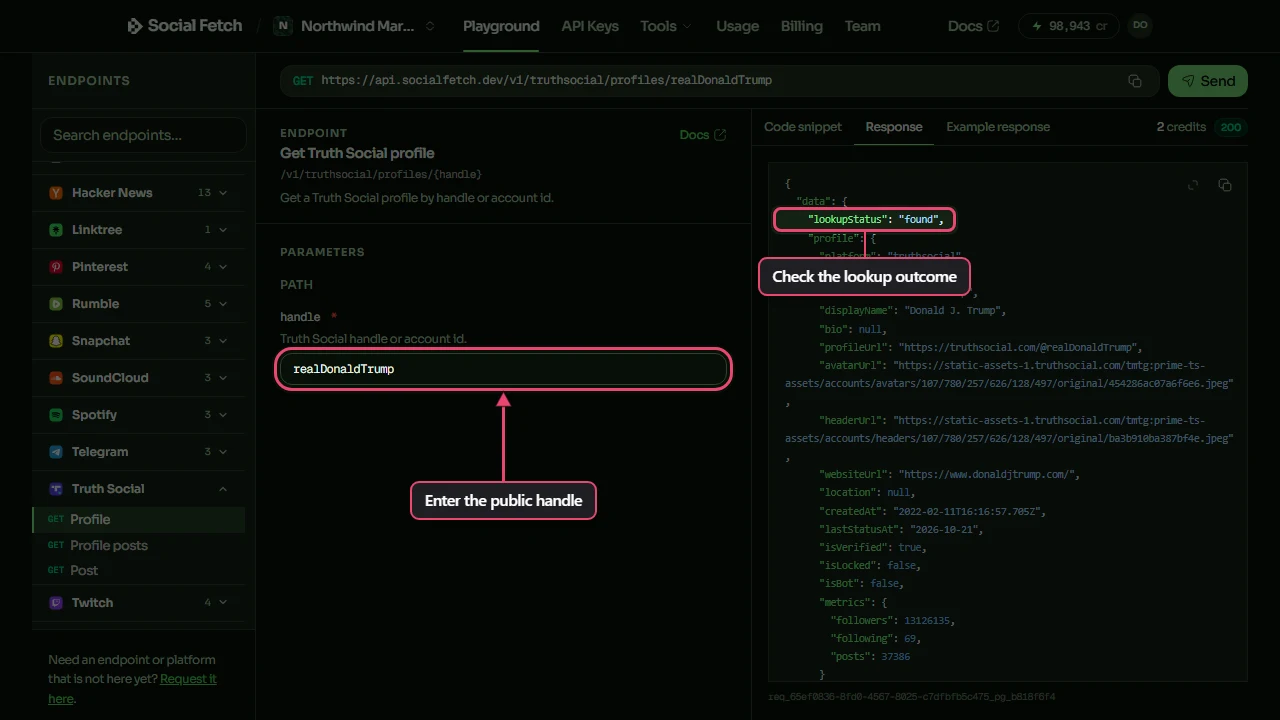
Get a profile
Switch tabs for cURL, TypeScript or Python:
const response = await fetch(
  "https://api.socialfetch.dev/v1/truthsocial/profiles/realDonaldTrump",
  {
    headers: {
      "x-api-key": process.env.SOCIALFETCH_API_KEY,
    },
  }
);

const body = await response.json();

console.log(response.status, body);
Truth Social profile lookups are credit-metered when the lookup completes (including not_found outcomes that still return HTTP 200). Trust meta.creditsCharged on every response. Pass the public username with or without @.
List a profile's posts
const response = await fetch(
  "https://api.socialfetch.dev/v1/truthsocial/profiles/realDonaldTrump/posts",
  {
    headers: {
      "x-api-key": process.env.SOCIALFETCH_API_KEY,
    },
  }
);

const body = await response.json();

console.log(response.status, body);
Full parameters: Get Truth Social profile and Profile posts. Each completed page is a separate credit charge.
In the Playground, select Profile posts, keep the same handle, and set limit to 5. Leave cursor empty for the first page, then click Send.
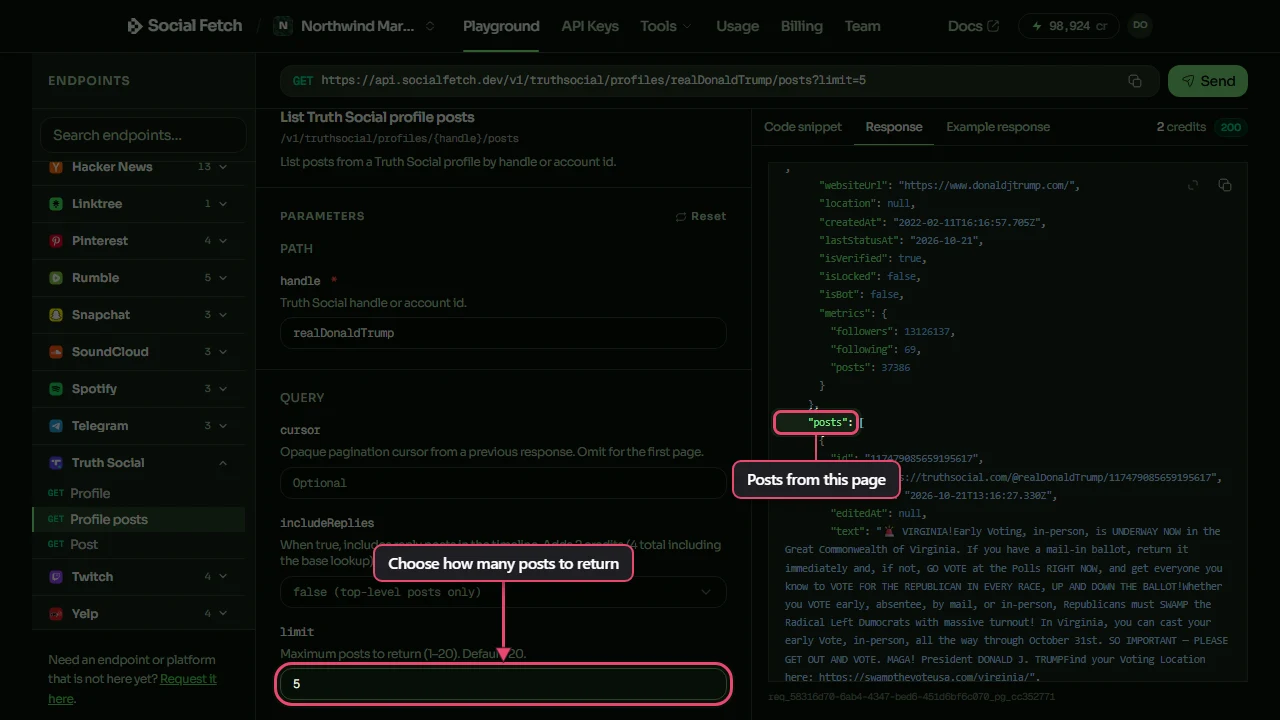
limit accepts 1 to 20 and defaults to 20. Replies are excluded by default. Set includeReplies=true if you need them; that costs 4 credits per completed page instead of 2.
Get a single post by URL
When you already have a public post link, pass it as the url parameter:
const params = new URLSearchParams({"url":"https://truthsocial.com/@realDonaldTrump/posts/114000000000000000"});

const response = await fetch(
  `https://api.socialfetch.dev/v1/truthsocial/posts?${params.toString()}`,
  {
    headers: {
      "x-api-key": process.env.SOCIALFETCH_API_KEY,
    },
  }
);

const body = await response.json();

console.log(response.status, body);
Docs: Get Truth Social post.
Paginate through posts
Profile post list endpoints return one page plus an opaque cursor. Pass the cursor back verbatim until hasMore is false:
Stop when data.page.hasMore is false or data.page.nextCursor is null. Pass nextCursor back as the next request's cursor, without changing it. Keep the same handle and reply setting across pages. Each page costs credits; the loop above stops after two pages even if more are available. Save post IDs if you need to remove duplicates across repeated collections.
Reading the response
A successful response wraps the payload alongside billing metadata. This is an excerpt from a real profile response captured on 21 October 2026. Counts can change:
An HTTP 200 does not guarantee that data was found. Check data.lookupStatus before using profile or post. A missing profile returns not_found and profile: null, and still costs credits.
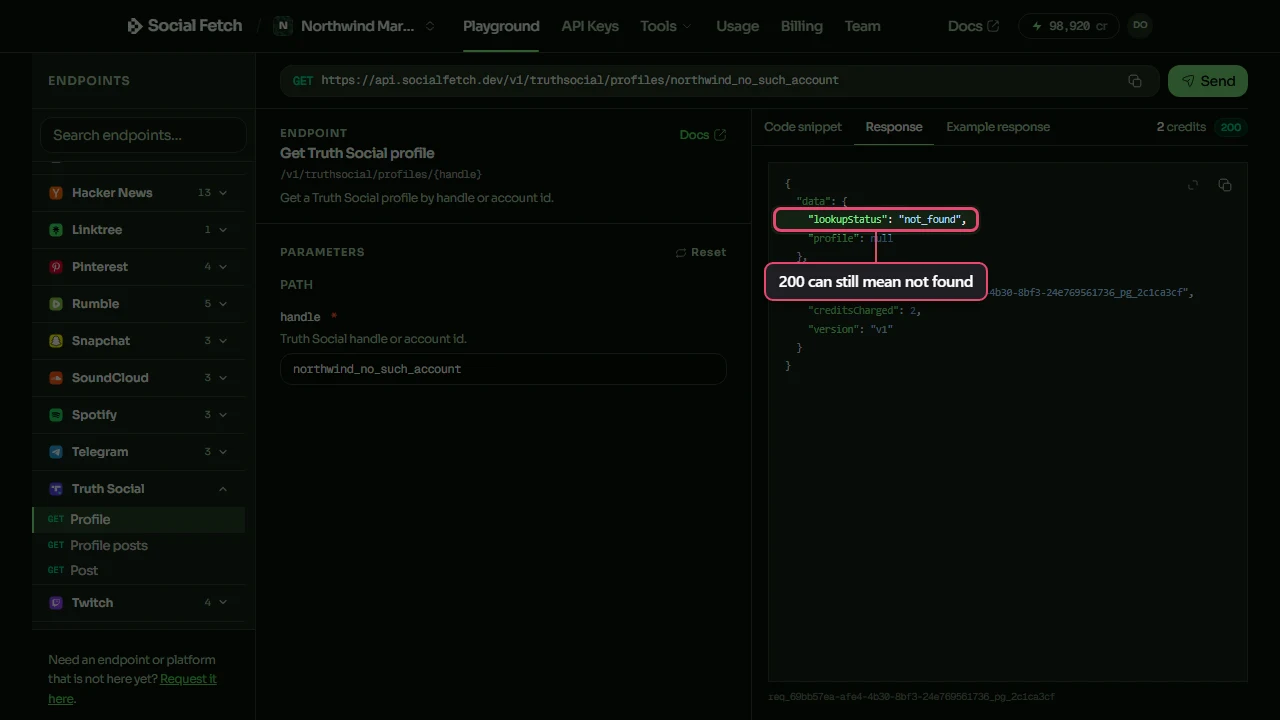
Keep meta.requestId with your logs so support can trace a lookup. Read meta.creditsCharged for the actual charge. Profile and single-post lookups cost 2 credits; profile-posts pages cost 2, or 4 with replies included. See Errors and Credits.
What you can build
- Save public posts from selected accounts for a news research archive.
- Record profile metrics alongside the date you collected them.
- Feed public profile and post data into an MCP workflow.
For vendor shopping without implementation detail, see Best Truth Social APIs & scrapers in 2026. For listening dashboards across networks, see Social listening dashboard.
FAQ
Is scraping Truth Social legal?
It depends on your jurisdiction, what data you collect, and how you use it. You remain responsible for Truth Social's terms, applicable privacy law, and your own contracts. This is a technical guide, not legal advice. Talk to counsel if you're collecting at scale.
Can't I just use Truth Social's app or scrape the site myself?
Use the official app for posting and account management. DIY HTTP or browser clients can work for personal scripts, but you own maintenance. For public enrichment in a multi-platform backend, a data API is the usual fit.
How fresh is the data?
Treat each response as a snapshot at lookup time. Save the collection time with your data. If a number looks off, meta.requestId lets support trace that lookup.
What happens if a profile doesn't exist?
Check data.lookupStatus. Don't treat a 200 alone as "data is present": a missing handle returns 200 with not_found. Details in Errors.
How are credits charged?
Credits charge when a lookup completes, including 200 outcomes like not_found. Each Truth Social profile, profile-posts page, and post lookup is credit-metered. Validation failures and lookup_failed / temporary unavailability do not bill the same way: see Credits. Always reconcile against meta.creditsCharged.
How does this compare to other providers?
See Best Truth Social APIs & scrapers in 2026, plus vs Apify, vs Bright Data, and the full compare hub.