For reading public social media data from Claude, ChatGPT or Cursor, Social Fetch's hosted MCP server is our pick. Add https://api.socialfetch.dev/mcp, sign in with OAuth, and your AI can look up public LinkedIn, Instagram, TikTok, X, YouTube and Reddit data, across 57 platforms in total. Tool calls cost the same credits as the REST API, and the docs tools are free. If you only need one network, add ?platforms=linkedin (or tiktok, twitter and so on) to keep the tool list small.
Last checked: 15 Nov 2026. Social Fetch is our product. Every Social Fetch detail below comes from our live MCP page and MCP docs, and every other server is described from its own page on the same date. Sources are listed at the end.
Two kinds of social media MCP server
Search for a social media MCP server and you'll find two different products under the same name. Some read public data: profiles, posts, comments, transcripts and search results from any public account. Others connect to your own accounts so an AI can draft, schedule and publish posts. If your question is about social media data, you want the first kind.
| Kind | What the AI can do | Whose accounts | Examples |
|---|---|---|---|
| Public data | Look up profiles, posts, comments, followers, transcripts and search results | Any public account | Social Fetch, Apify MCP server, Bright Data MCP |
| Publishing and management | Draft, schedule and publish posts, read your analytics | Your own connected accounts | Publer, and many scheduling tools listed on Glama |
The best social media MCP servers at a glance
Social Fetch: a hosted MCP server for public social data on 57 platforms, with OAuth sign-in, per-platform scoped URLs and the same billing as REST.
Apify MCP server: exposes Apify's marketplace of Actors (scraper programs) as tools your AI can find and run.
Bright Data MCP: Bright Data's MCP server, which it pitches for extracting public posts, profiles and comments from social platforms.
Open-source servers on Glama: community servers, many built for one platform or one job.
Publer (publishing): an MCP connection that lets ChatGPT create and schedule posts on your own accounts.
| Server | Kind | Hosting | Social coverage |
|---|---|---|---|
| Social Fetch | Public data | Hosted athttps://api.socialfetch.dev/mcp | 57 platforms, including LinkedIn, Instagram, TikTok, X, YouTube and Reddit, one response shape |
| Apify MCP server | Public data via Actors | Hosted, or run locally | Depends on the Actors you pick |
| Bright Data MCP | Public data | Hosted, or run locally | Major social platforms, per Bright Data's page |
| Glama open-source servers | Mixed | Varies by server | Varies by server |
| Publer | Publishing | Hosted | Your own connected accounts |
How to set up the Social Fetch MCP server
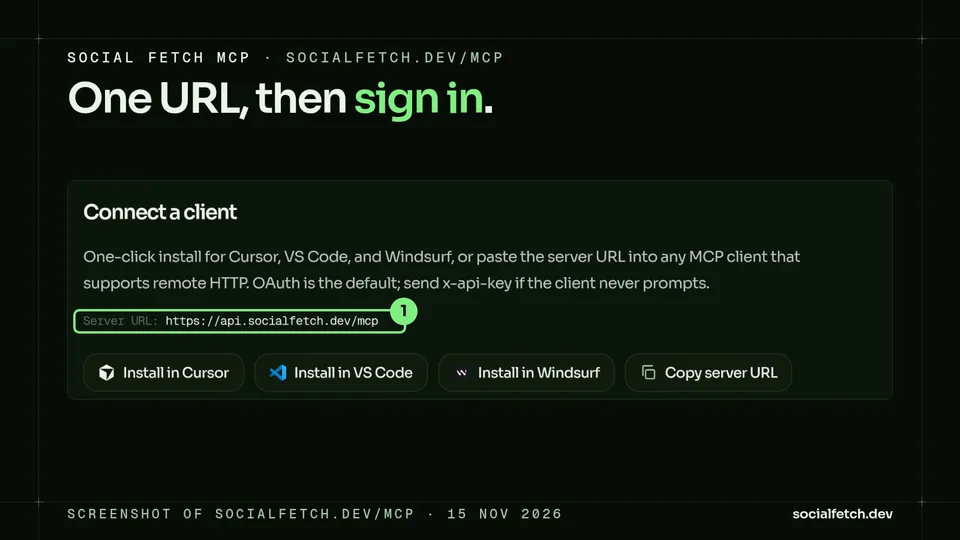
The server address is https://api.socialfetch.dev/mcp. You need a Social Fetch account with credits and an AI app that supports MCP, such as Claude, ChatGPT, Cursor, VS Code, Claude Code, Codex, Gemini CLI, Windsurf or Zed. The quickest route is the Connect page in the Social Fetch app, which has steps for each app and, for Claude, Cursor and VS Code, a button that adds Social Fetch for you. The MCP page also has one-click installs for Cursor, VS Code and Windsurf.
Claude
In Claude (web, Desktop and mobile), add a custom connector under Settings, Connectors, with https://api.socialfetch.dev/mcp as the address. From the Connect page, the Add in Claude button opens Claude's Add custom connector window with the name and link filled in. Leave Advanced settings empty, click Add, then sign in to Social Fetch and click Allow access. Connectors you add on claude.ai also appear in Claude Desktop and the mobile apps.
ChatGPT
ChatGPT can add Social Fetch as a custom MCP connector on Plus or Pro with Developer Mode. ChatGPT Free can't add custom connectors. Follow the ChatGPT steps on the Connect page.
Cursor
Add this to ~/.cursor/mcp.json, or to .cursor/mcp.json in a project:
Then open Cursor Settings, go to the MCP section and click the sign-in prompt next to socialfetch.
VS Code
Add this to .vscode/mcp.json in your project, or run MCP: Add Server from the Command Palette:
Claude Code
Run this, then type /mcp in Claude Code and sign in to Social Fetch. Add --scope user to use it in every project.
Clients that only run stdio
Use mcp-remote as a bridge:
When the client never opens a sign-in window
Most apps sign in with OAuth. If yours never prompts, create a key on the API Keys page in the Social Fetch app, store it in an environment variable such as SOCIALFETCH_API_KEY, and send it in the x-api-key header. This example uses Cursor's environment-variable syntax, so check your client's syntax before you copy it:
Don't put the key in the URL or in an Authorization: Bearer header. Bearer is only for OAuth tokens, so a key there is rejected, and a key in the URL ends up in logs. Keep real keys out of shared config files, source control, chats and screenshots.
One server, one platform at a time
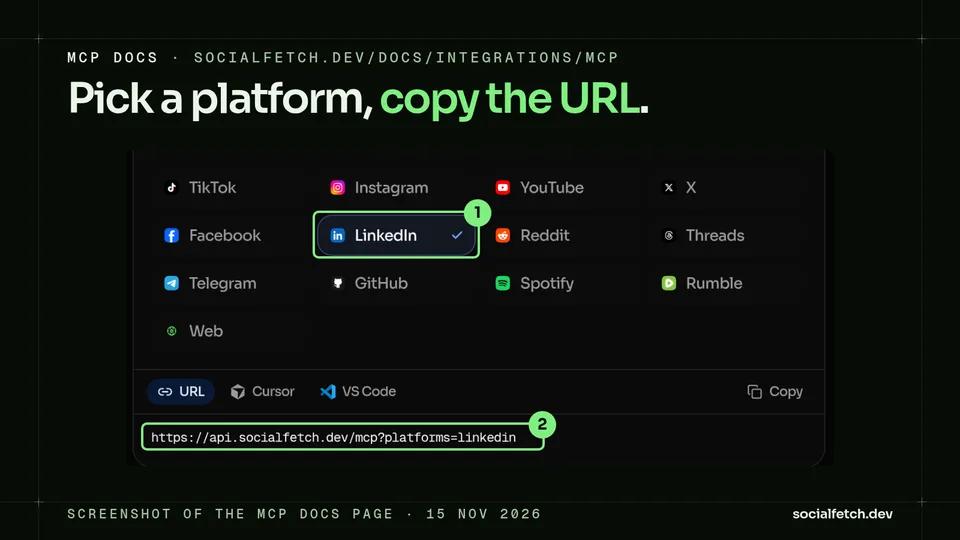
The full server lists every available API tool, and each tool description takes up room in your AI's context. If you only need some platforms, give your app a smaller list. Add ?platforms= with one or more tool-name prefixes, name single tools with ?tools=, or use a preset. Every scoped list still includes auth_whoami, billing_balance_get, docs_search, docs_read and nl_ask_post, and a tool that isn't listed still works if it's called by name. Connect with the plain address first, because one-click installs and the OAuth sign-in use it, then switch your app to the scoped URL.
The MCP docs page has a builder for this: pick platforms, then copy the URL or a Cursor or VS Code snippet.
LinkedIn MCP
URL:https://api.socialfetch.dev/mcp?platforms=linkedin
Try asking: "Get the latest posts from this company page, then find who reacted to the top one." The LinkedIn tools cover person profiles, company pages and their posts, a person's posts and comments, comment threads and reactions on a post, people, company, post and job search, job details and hiring teams, and the Ad Library. Some LinkedIn routes cost more than 1 credit, and each tool reports its charge in meta.creditsCharged.
Instagram MCP
URL:https://api.socialfetch.dev/mcp?platforms=instagram
Try asking: "Pull this creator's last 12 reels and summarise the comments on the top three." The Instagram tools cover profiles, posts and reels, comments and replies, current stories and highlights, followers and following lists, profile, hashtag, location and audio search, trending reels and transcripts.
TikTok MCP
URL:https://api.socialfetch.dev/mcp?platforms=tiktok
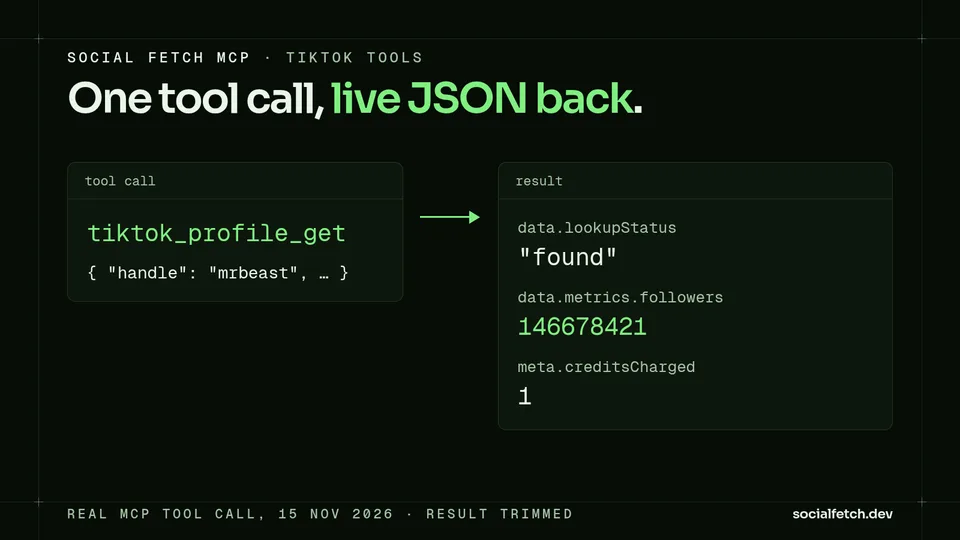
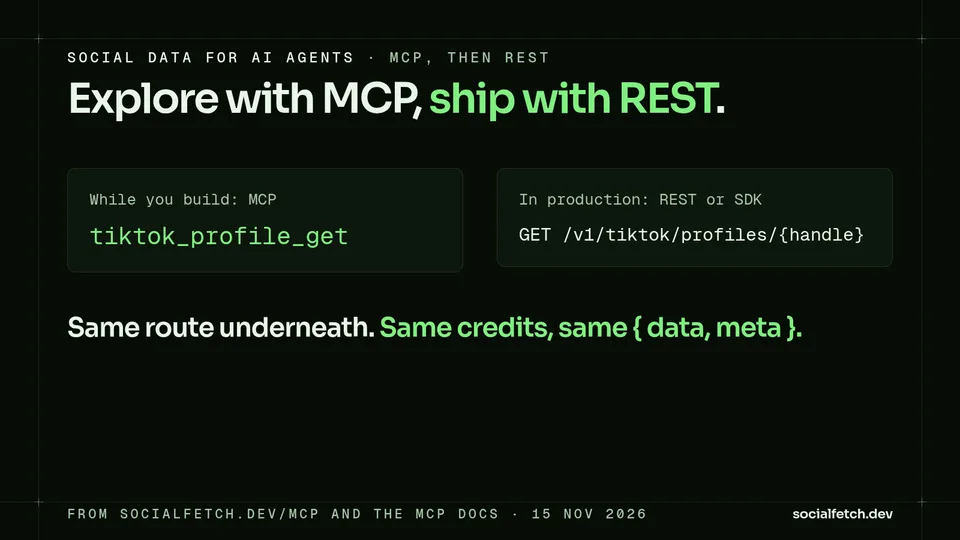
Try asking: "How many TikTok followers does MrBeast have?" The TikTok tools cover profiles, videos, comments and replies, keyword and hashtag search, TikTok Shop products, transcripts, the trending feed and the Ad Library. tiktok_profile_get is the tool behind GET /v1/tiktok/profiles/{handle}.
X (Twitter) MCP
URL:https://api.socialfetch.dev/mcp?platforms=twitter
The prefix for X is twitter. Try asking: "List the quote tweets on this post and summarise how people reacted." The X tools cover profiles and tweets, replies, quotes and retweets, followers and following, keyword search, communities, lists and Spaces.
YouTube MCP
URL:https://api.socialfetch.dev/mcp?platforms=youtube
Transcripts are a common agent job here. Try asking: "Get the transcript of this video and list every sponsor mentioned." The YouTube tools cover channels, videos and Shorts, comments and replies, search and hashtag search, community posts, playlists and transcripts.
Reddit MCP
URL:https://api.socialfetch.dev/mcp?platforms=reddit
Try asking: "Search Reddit for threads comparing these two tools and summarise the complaints." The Reddit tools cover subreddits and their posts, single posts and their comments, and subreddit and keyword search.
Combining platforms and presets
Prefixes combine: ?platforms=twitter,tiktok lists every tool for both. ?preset=starter lists TikTok, Instagram, YouTube, X, Reddit and LinkedIn tools, which our docs suggest as a good start for Claude or ChatGPT. There are also job presets named leads, creators and transcripts.
How MCP tool calls are billed
Endpoint tools bill exactly like the matching REST route, usually 1 credit on a completed standard lookup, and each result carries meta.creditsCharged. docs_search and docs_read are free, and so are auth_whoami and billing_balance_get. nl_ask_post lets your AI ask in plain words: the routing is free, and the lookup it chooses is billed at that operation's normal rate.
A completed lookup with lookupStatus set to not_found or private is still a successful result and uses the normal lookup credits. A failed tool call returns isError: true with an error code. You start with 100 free credits and no card (pricing).
If an agent needs to pay without an account, a separate server at https://api.socialfetch.dev/x402/mcp takes payment per tool call in USDC on Base with x402. The account tools (auth_whoami, billing_balance_get, nl_ask_post, monitors and webhooks) still need OAuth or an API key.
Social data API for AI agents: MCP, REST or Skills?
Use MCP while you build. Your agent can inspect real JSON, try nl_ask_post, and then pin the typed tool it found. For headless cron jobs and production pipelines, REST or the official TypeScript SDK is simpler, and it bills the same way. Agent Skills fill a different gap: a skill is a set of instructions your coding agent keeps on hand, telling it to read our /llms.txt and docs first and to call only routes that exist. So MCP gives the agent live tools, the skill gives it standing instructions, and most Cursor and Claude setups use both. Our AI agents use case walks through the full workflow.
To add the skill by hand in Claude Code, from your project folder:
For Cursor and other agents that read .agents/skills, use that folder instead (Agent Skills docs).
How the other servers compare
Apify MCP server
The Apify MCP server exposes Apify Actors as tools that outside AI clients can discover and run. You can use Apify's hosted service or run it locally over stdio. Because it wraps the Actor marketplace, coverage, output format and price depend on which Actors you choose. Apify excludes full-permission Actors from MCP search and execution for security reasons.
Bright Data MCP
Bright Data offers an MCP server for social media as part of its web data platform. Its page describes extracting public posts, comments, profiles, engagement and trends from major social networks, and says it never logs in or collects private data. Its GitHub repo offers a hosted server or a local install. It suits teams that already use Bright Data's platform.
Open-source servers on Glama
Glama's social media category lists many community servers. Most are built for one platform or one job, and many of them are publishing and scheduling tools rather than data lookups. Check each one's hosting, authentication and maintenance before you depend on it. Social Fetch is listed there too, as a remotely hosted server (listing).
Publer (publishing)
Publer's MCP connection lets ChatGPT work with your Publer workspace: your content, calendar and analytics, plus tools to create and schedule posts. It's built around the accounts you manage in Publer, so it fits a social team's publishing workflow.
FAQ
What is the best MCP server for social media data?
For reading public data, Social Fetch. One hosted URL covers 57 platforms, including LinkedIn, Instagram, TikTok, X, YouTube and Reddit, it signs in with OAuth, and tool calls bill the same credits as the REST API.
Is there a LinkedIn, Instagram, TikTok or X MCP server?
Yes. Social Fetch's hosted server scopes to one platform with a query string: ?platforms=linkedin, ?platforms=instagram, ?platforms=tiktok or ?platforms=twitter for X, added to https://api.socialfetch.dev/mcp.
Which social media API works best with AI agents?
Social Fetch is built for it: typed MCP tools with OAuth, nl_ask_post for plain-English exploration with free routing, the same { data, meta } envelope over REST and the TypeScript SDK, and /llms.txt plus Agent Skills so agents call real routes.
How do I connect Claude to social media data?
Add a custom connector in Claude under Settings, Connectors, with https://api.socialfetch.dev/mcp, then sign in to Social Fetch and click Allow access. In Claude Code, run claude mcp add --transport http socialfetch https://api.socialfetch.dev/mcp, then /mcp.
How much do MCP tool calls cost?
The same as the matching REST call, usually 1 credit for a completed standard lookup. docs_search, docs_read, auth_whoami and billing_balance_get are free, and new accounts get 100 free credits with no card.
Do I put my API key in mcp.json?
Prefer OAuth. If your client never prompts, set the x-api-key header from an environment variable. Never put the key in the URL or in an Authorization header.
Connect Social Fetch to your AI
Get 100 free credits, no card needed, then add https://api.socialfetch.dev/mcp to Claude, ChatGPT or Cursor. Not a developer? Try a live lookup on For AI first. For TikTok specifically, see our guide to the best TikTok scraper APIs, and for the wider market, the best social media scraping APIs in 2026.
Sources, checked 15 Nov 2026
Social Fetch: MCP page; MCP docs; Agent Skills; x402; For AI; AI agents use case; pricing; credits; operation inventory; Glama listing
Apify: MCP server docs
Bright Data: social media MCP; GitHub repo
Glama: social media MCP servers
Publer: ChatGPT MCP integration

The Social Fetch team publishes shipping notes, API design essays, and production post-mortems for developers who need live social and web data without running scrapers.
Related articles
Compare
X API Pricing 2026: Pay-Per-Use Costs for Tweet Search
 Luke Askew
Compare
Pinterest API pricing in 2026 (what you pay)
Luke AskewCompare
Reddit API pricing in 2026: free tier, paid access and costs
Luke AskewCompare
Best ScrapeCreators Alternatives (2026): 6 APIs Compared
Luke AskewCompare
Talkwalker alternative: public social data as an API, not another listening suite
Luke Askew
Questions about this post? Contact us.