"The Instagram API" is more of a family of Meta APIs, and most of it does one thing: it lets your app manage professional Instagram accounts that have logged in to it. It's how scheduling apps post on your behalf, and how analytics dashboards read your insights. What it won't do is let you view Instagram the way you do in a browser. This guide goes over what each official option offers in 2026, how to get an access token, the limits you'll hit, and where to get the public data Meta's API won't give you.
Need data from accounts you don't own? Skip to getting public Instagram data.
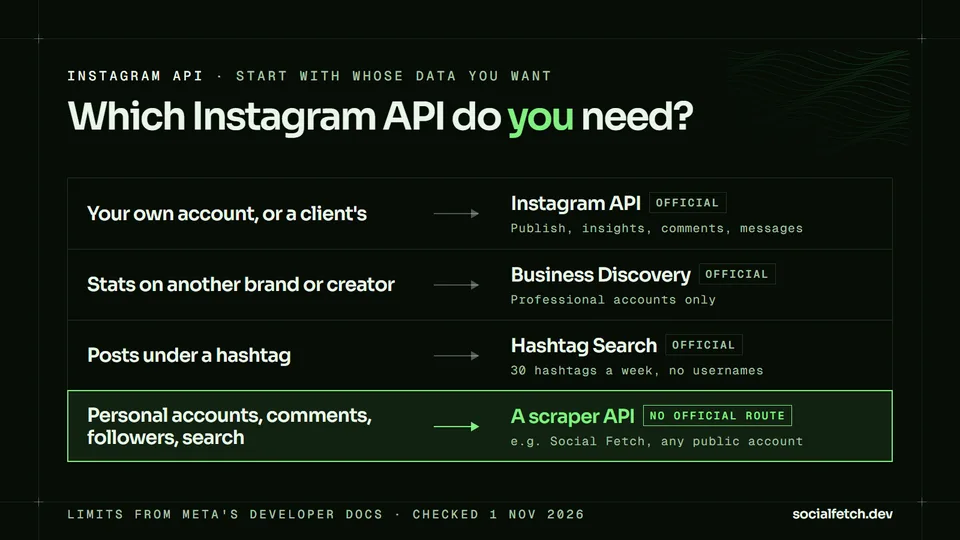
The three official Instagram APIs
Meta's Instagram Platform overview gives three options for setting up the same API. They vary in how your users log in, which host you call, and whether a Facebook Page is involved:
| Unified Login | Instagram Login | Facebook Login | |
|---|---|---|---|
| Meta's recommendation | New integrations | Existing Instagram Login apps | Existing Page-linked apps |
| User signs in with | Instagram or Facebook | ||
| API host | graph.facebook.com | graph.instagram.com | graph.facebook.com |
| Facebook Page needed | No | No | Yes |
| Business portfolio needed | Yes | No | Depends on setup |
| Permissions | instagram_* | instagram_business_* | instagram_* plus Page permissions |
| Hashtag Search | Yes | No | Yes |
| Publishing, insights, comments, mentions, messaging | Yes | Yes | Yes |
All three need an Instagram professional account on the other end, meaning a business or creator account.
Instagram Login came out in July 2024 as the first setup that didn't require a Facebook Page. Unified Login is the latest. It lets people log in with either set of credentials and it's what Meta recommends for new apps, though it requires a business portfolio. If your users are businesses already on Meta Business Suite, start with Unified Login. If they're solo creators without a business portfolio, Instagram Login is easier. One more thing: Hashtag Search doesn't work with Instagram Login, and Meta documents Business Discovery under the Facebook Login setup, so choose Unified Login or Facebook Login if you need either.
Instagram Graph API vs Instagram API
Same thing, different names. "Instagram Graph API" is what Meta called it back when it only ran on top of the Facebook Graph API (graph.facebook.com) and needed a linked Facebook Page. Meta's docs now call that setup the Instagram API with Facebook Login and group it with the two newer setups under one name: the Instagram API. All three share the same endpoints, field names and version numbers, so plenty of guides mix the two names freely.
What's genuinely different is the old Instagram Basic Display API, and that one doesn't exist anymore.
What changed, and why old tutorials break
A lot of what you'll read about the Instagram API is out of date. These changes are the main reasons you see "this endpoint doesn't work anymore" errors:
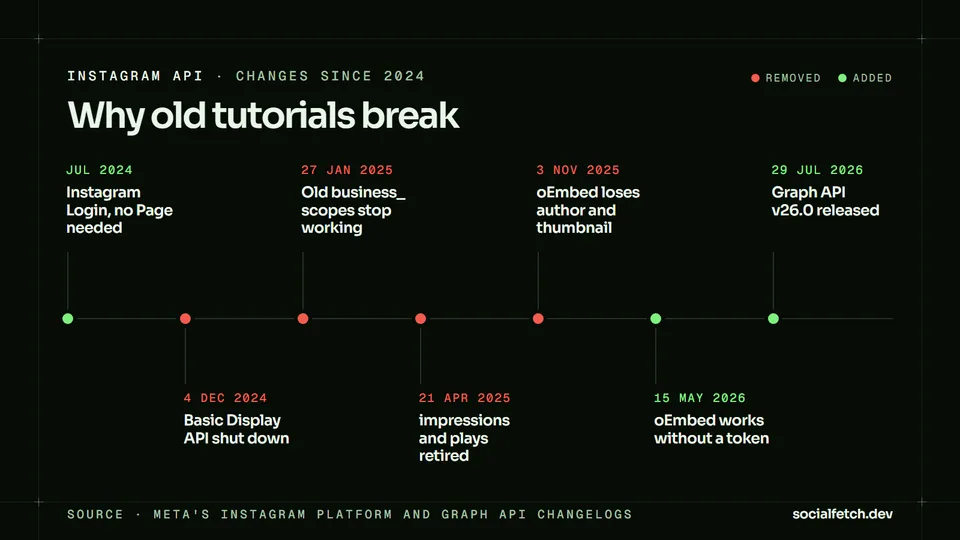
The Basic Display API is gone. It was the only API that let your app read someone's personal account, using their own login. Meta switched it off on 4 December 2024, and every request to it now fails. If a tutorial begins with "create a Basic Display app", it's dead in the water. There's no official replacement for personal accounts.
Scope names changed. Instagram Login apps were forced to migrate from
business_basicand friends toinstagram_business_basic,instagram_business_content_publish,instagram_business_manage_commentsandinstagram_business_manage_messages. The old names stopped working on 27 January 2025.Impressions and plays were retired. Meta added a new
viewsmetric in January 2025 and deprecatedimpressionsandplays. Since 21 April 2025, requesting them fails on every API version, with a narrow exception for older posts.video_viewswent the same way in January 2025.oEmbed got thinner. Since 3 November 2025, Instagram oEmbed no longer returns
author_name,thumbnail_urlor any of the other author and thumbnail fields. You get the embed HTML and that's it. In May 2026 Meta made it callable without an access token.Graph API v26.0 is current. Meta released it on 29 July 2026. Code examples pinned to v12 or v15 are calling versions that expired long ago.
What the official API can do with your own accounts
If an account logs in to your app, the official API is powerful and free. This is what it's for:
| Feature | What you can do | Worth knowing |
|---|---|---|
| Content publishing | Post images, videos, Reels, Stories and carousels of up to 20 items, plus trial Reels shown only to non-followers | Images must be JPEG. Media has to sit at a public URL, because Meta downloads it from there. No filters or shopping tags |
| Insights | Account metrics such as reach, views and profile views, follower and engaged-audience demographics, and per-post metrics | Demographics need 100+ followers and return only the top 45 values. Account metrics are kept for 90 days |
| Comment moderation | Read, reply to, hide and delete comments on the account's own posts, and turn comments off | Own media only |
| Mentions | Read posts and comments that @mention or tag the account, and reply to mentions | You can't comment on posts the account is only tagged in |
| Messaging | Receive and answer direct messages | New messages arrive by webhook |
| Webhooks | Get notified of new comments, mentions and messages | Needs a public HTTPS endpoint |
Each feature needs its own permission, and the names vary with your setup:
| To do this | Instagram Login | Facebook Login or Unified Login |
|---|---|---|
| Read the profile and its media | instagram_business_basic | instagram_basic |
| Publish | instagram_business_content_publish | instagram_content_publish |
| Read insights | instagram_business_manage_insights | instagram_manage_insights |
| Moderate comments | instagram_business_manage_comments | instagram_manage_comments |
| Send and receive messages | instagram_business_manage_messages | instagram_manage_messages |
| Search hashtags | Not available | instagram_basic plus the Instagram Public Content Access feature |
Facebook Login tacks Page permissions on top, usually pages_show_list and pages_read_engagement.
Publishing is two calls. The first builds a media container from your image URL and caption, and the second publishes it.
Reels work the same way with media_type=REELS and a video_url, but the video takes a while to process. Poll the container until its status_code comes back FINISHED, then publish. If you don't publish within 24 hours, the container expires.
There's a catch even with your own posts. If a video uses copyrighted or licensed audio, including tracks from Instagram's own audio library, media_url is missing. So if you're archiving Reels through the API, expect gaps.
How to get an Instagram API key (access token)
There's no single Instagram API key. You always call the API with an access token that belongs to one professional account and carries the permissions that account gave your app. The fastest way to get one for your own account is Instagram Login plus the App Dashboard:
- Switch the account to professional
In the Instagram app, switch from a personal account to a business or creator account.
- Create a Business app
Go to developers.facebook.com/apps and create an app with the Business app type. Meta's docs say any other app type has to be recreated.
- Add Instagram to the app
In your app dashboard, add Instagram, open API setup with Instagram business login and add your Instagram account.
- Generate a token
Click Generate token next to the account, log in to Instagram and copy the token. Tokens from the dashboard are long-lived and valid for 60 days.
- Make your first call
Get your user ID and username from
/me, as in the example below.
That's all you need to read and publish on your own account. Building for other people adds two things.
A real login flow. Your user signs in through Business Login for Instagram, and your redirect URL receives a one-time code. You exchange it for a short-lived token (one hour), then for a long-lived one (60 days). Both exchanges use your app secret, so do them on your server:
Once a long-lived token is at least 24 hours old, you can refresh it for another 60 days. If you don't refresh it within 60 days it expires for good, so put the refresh on a schedule. Here's how that looks in Python:
App Review. Standard Access only covers accounts with a role on your app. To serve any account you don't own or manage, you need Advanced Access, which means App Review plus Business Verification. For each permission, you explain how your app uses it and provide a screencast showing it in use. Plan the review before you plan the launch date.
Instagram API rate limits
Different parts of the API have different limits. These are the ones that will bite you first:
| What | Limit | Source |
|---|---|---|
| Most endpoints (Business Use Case) | Calls in 24 hours = 4,800 × the account's impressions, per app and account pair | Rate limiting |
| Business Discovery and Hashtag Search | Calls per hour = 200 × number of users, across your whole app | Rate limiting |
| Hashtag Search | 30 unique hashtags per account per rolling 7 days | Hashtag Search |
| Content publishing | 100 API-published posts per 24 hours on the publishing guide; parts of the reference still say 50 | Content publishing |
| oEmbed | Up to 1,000 requests per hour | oEmbed |
Because the main budget scales with impressions, small accounts get small budgets. A new test account with little reach can run out of calls far faster than a big one, which surprises a lot of people during development. Publishing is messier, because Meta's own pages disagree. Don't hard-code either number: fetch the current quota from the content_publishing_limit edge before you schedule posts.
Is the Instagram API free?
Yes. Meta doesn't bill you for calls and lists no price for the Instagram API. The costs come from elsewhere:
Approval time. You need App Review and Business Verification before you can serve other people's accounts, and again every time you add a permission.
Coverage. No personal accounts, no follower lists, no comments on other people's posts and no usernames from Hashtag Search. If your product needs those, the official API won't give them to you for any amount of money.
Maintenance. Token refreshes, a new API version every few months, and metrics that disappear, like the ones above.
That's a great deal if you're managing accounts that use your product. For research, monitoring, lead generation or finding creators, though, you mostly can't use the official API, which brings us to accounts you don't control.
What the official API can read about accounts you don't own
Outside the accounts that have authorized your app, the official API can't do much:
| You want | Official route | What you actually get |
|---|---|---|
| Another business or creator's profile | Business Discovery | Username, bio, website, follower and media counts, and recent media with like, comment and view counts. Professional accounts only, and not age-gated ones |
| Posts under a hashtag | Hashtag Search | Top posts, or posts from the last 24 hours. No usernames. 30 unique hashtags per account per rolling 7 days |
| Posts that mention or tag you | Mentions | Media and comments where your account is @mentioned or tagged |
| An embed of a public post | oEmbed | Embed HTML only. No author name, no thumbnail |
| A personal account's profile or posts | None | Not available since Basic Display shut down |
| Who follows an account | None | Only followers_count. There's no follower-list edge |
| Comments on someone else's post | None | Comment endpoints cover media owned by your app's users |
| Someone else's Stories | None | The Stories edge only covers your own account |
| Search users or Reels by keyword | None | No endpoint |
A Business Discovery call goes through your own account's ID on graph.facebook.com, with a field expansion naming the account you want:
Ask for a personal account's username and you get no data. You also can't fetch the returned media IDs on their own: Meta's docs say a GET on them fails for lack of permission.
Hashtag Search takes two calls, and both count against your limit of 30 hashtags a week:
Hashtag Search sounds handy, but it's less useful than it looks. You can't see who posted what, because there are no usernames, just the caption, counts, media URL and permalink. Every hashtag you touch spends budget, so a campaign tag and a few variations can use up a week's allowance fast. It also needs the Instagram Public Content Access feature, which means another round of App Review.
The closest you can get to "look up any account" is Business Discovery. But it only works on professional accounts, and most people on Instagram don't have one.
How much of Instagram can Business Discovery see?
We wanted to put a number on that gap, so we measured it. On 1 November 2026 we grabbed a recent Reel from three public accounts in different niches: Glossier (a beauty brand), Pinch of Yum (a food creator with 1.9 million followers) and Katz's Delicatessen (a New York deli). For each Reel we gathered the 40 newest unique commenters and looked up every one of them with Social Fetch. One lookup failed, which left 119 accounts.
Only 19 of the 119 commenters (16%) had business or creator accounts, the only kind Business Discovery can look up. Per post, it ranged from 8% to 31%. The other 100 were personal accounts: 26 public and 74 private.
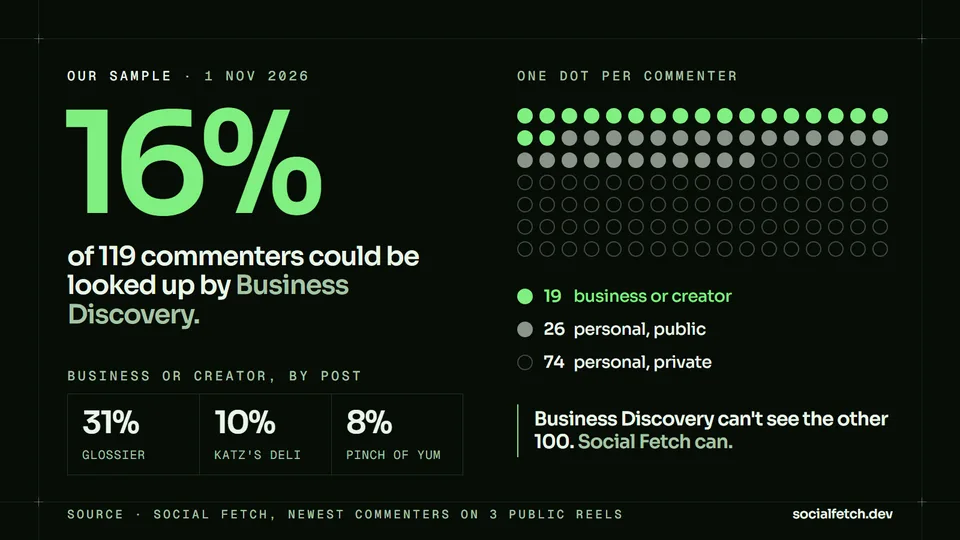
| Post | Commenters | Business or creator | Personal, public | Personal, private |
|---|---|---|---|---|
| Glossier | 39 | 12 (31%) | 9 (23%) | 18 (46%) |
| Katz's Delicatessen | 40 | 4 (10%) | 12 (30%) | 24 (60%) |
| Pinch of Yum | 40 | 3 (8%) | 5 (13%) | 32 (80%) |
| Total | 119 | 19 (16%) | 26 (22%) | 74 (62%) |
A few things stood out:
Brands attract creators. 11 of Glossier's 12 professional commenters were creators, which makes sense for a beauty brand. The deli and the recipe account drew mostly regular customers and home cooks.
Most commenters are small and private. The median commenter had 270 followers. Social Fetch classified all 74 private accounts as personal, which fits Instagram's rule that business and creator accounts can't be made private.
The prompt shapes the crowd. Pinch of Yum's Reel asks people to comment "save" if they want the recipe, so it pulls in casual fans. Its 80% private share is probably higher than you'd see on an average post.
Three posts is a small sample, not a census, but the point is clear. Through the official API you can read the comments on your own posts and get each commenter's username. What you can't do is learn who most of them are. For audience research, influencer vetting or spam detection, you're left with little more than a name for most of your commenters.
The Instagram private API and scraping libraries
When people say "Instagram private API", they usually mean the undocumented API the Instagram mobile app uses. Open-source libraries like instagrapi and Instaloader wrap it, or Instagram's web endpoints, so you can log in with an account and access whatever that account can see.
They work for a bit. Instagram rate-limits and flags automated logins, so accounts used like this get challenged, locked or banned, and the libraries break whenever Instagram changes something internally. The terms are explicit too. Instagram's Terms of Use ban collecting information in an automated way without Meta's permission, and say that applies "regardless of whether" you're logged in.
Whether those terms can be enforced against someone who never accepted them is another question. In January 2024 a US federal judge ruled in Bright Data's favour in Meta v. Bright Data, finding that Meta's terms didn't prohibit logged-out scraping of public data. The following month, Meta withdrew its remaining claims. That's no free pass: copyright and privacy laws, including GDPR, still apply to what you collect and how you use it. This is general information, not legal advice.
Most teams care more about the practical side. Running your own Instagram scraper means keeping logins, proxies and parsers alive on a site that tries to shut you out, and updating them every time something changes.
Getting public Instagram data with an API
If you only post to, or read insights for, accounts that log in to your app, use the official API. It's free, and it's the only way to post. For anything outside those accounts, a scraper API makes more sense.
Social Fetch is ours. It takes public Instagram data and gives it back to you as JSON. There's no Meta app, no App Review and no Instagram login on your side: you send an API key and we run the scrapers. It covers what the official API doesn't:
| You want | Social Fetch endpoint |
|---|---|
| Any public profile, personal or professional | GET /v2/instagram/profiles/{profile} |
| A profile's posts, Reels or tagged posts | GET /v2/instagram/profiles/{profile}/media |
| Comments and replies on any public post | GET /v2/instagram/media/{media}/comments |
| Stories and highlights | GET /v2/instagram/profiles/{profile}/stories |
| Who an account follows | GET /v2/instagram/profiles/{profile}/following |
| Search profiles, Reels, hashtags, places and audio | GET /v2/instagram/profiles/search and siblings |
| Hashtag and location feeds, with usernames | GET /v2/instagram/hashtags/{hashtag}/media |
| Spoken words in a Reel | GET /v2/instagram/media/{media}/transcript |
It has limits too. It can't post or read private insights, it can't see posts from private accounts, and it doesn't return follower lists.
Here's the equivalent of the Business Discovery lookup from earlier, for any public account and without a Meta app:
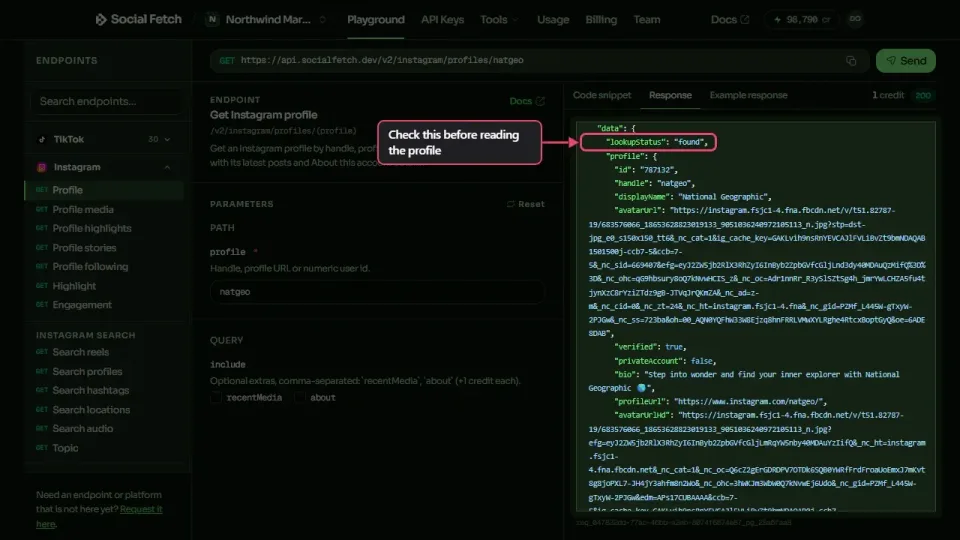
The response includes accountType (personal, business or creator). This Python reproduces the commenter sample above: it grabs the newest commenters on a post and looks each one up.
And a Node.js profile lookup, with the most recent grid posts:
Most requests cost 1 credit, failed requests are free, and new accounts get 100 free credits with no card required. After that it goes as low as $1.35 per 1,000 credits, and pay-as-you-go credits never expire. The same key also gets you TikTok, YouTube, X, LinkedIn, Reddit and 20 more platforms, all in one response format.
The Instagram platform page lists every endpoint, how to scrape Instagram data covers pagination and errors, and Social Fetch vs the Instagram Graph API compares the two side by side. Other providers are covered in the best Instagram data APIs in 2026.
Instagram API documentation: where to look
Meta likes to shuffle its docs around, so bookmark these:
Instagram Platform overview compares the three setups and lists every feature.
Changelog is where Meta announces deprecations, often months in advance.
Graph API versions shows which versions are live and when each one expires.
App Dashboard is where you build your app, generate tokens and submit for App Review.
Graph API Explorer lets you test Facebook Login calls in your browser before writing any code.
FAQ
Is there a public Instagram API?
Not in the way most people mean. Meta's Instagram API only covers professional accounts that grant your app access, plus a few limited lookups on other accounts (Business Discovery, Hashtag Search and mentions). There's no official API for reading any public profile, post or comment. Third-party scraper APIs such as Social Fetch fill that gap.
How do I get an Instagram API key?
No single key exists. You create a Business app at developers.facebook.com, add Instagram, connect your business or creator account and get an access token from the App Dashboard. It's valid for 60 days. Serving other people's accounts takes a login flow plus App Review.
Is the Instagram API free?
Yes. Meta charges nothing for calls and lists no price. The cost is setup time: a Business app, App Review and Business Verification before you can serve accounts you don't own.
Can I post to Instagram with the API?
Yes, for business and creator accounts. Publishing images, videos, Reels, Stories or carousels takes two steps: create a media container, then publish it. Meta's publishing guide limits each account to 100 API-published posts in 24 hours.
Do I need App Review to use the Instagram API?
Not for accounts you own or manage that have a role on your app. To serve accounts that aren't yours, you need App Review and Business Verification, and each permission gets its own review.
Is the Instagram Basic Display API still available?
No. Meta shut it down on 4 December 2024, and every request to it fails. It was the only official way to read a personal account, and nothing official replaced it.
Do I need a Facebook Page to use the Instagram API?
No longer. Instagram Login (since July 2024) and Unified Login work without a Page. Only Facebook Login needs your Instagram account connected to a Page.
Can I get a list of an account's followers with the Instagram API?
No. The official API gives you followers_count but not a list of followers, not even your own. Social Fetch can list the accounts a public profile follows, but not its followers.
How long does an Instagram access token last?
Tokens from the login flow last an hour. Exchange them for a long-lived token (60 days), and refresh that once it's more than a day old. Tokens you generate in the App Dashboard are long-lived from the start.
Is it legal to scrape Instagram?
Instagram's Terms of Use prohibit unauthorized automated collection. In the US, Meta v. Bright Data (2024) found those terms didn't stop logged-out scraping of public data, but copyright and privacy laws such as GDPR still apply to what you collect and how you use it. Talk to a lawyer about your own use case.

Founder of Social Fetch. Writes about social-data APIs, reliability, and the production incidents that forced better timeouts, envelopes, and billing.
Related articles
Questions about this post? Contact us.