TikTok has no "Show transcript" button — auto-captions are for watching, not exporting, and many videos have none. For a one-off paste, use the free TikTok transcript generator — no API key, copy or download TXT / SRT / VTT. To get spoken text in a product (hook research, repurposing, search, AI pipelines), use an API with AI fallback when there is no caption track.
The shortest path is one request:
curl -sS \
  -H "x-api-key: $SOCIALFETCH_API_KEY" \
  -G "https://api.socialfetch.dev/v1/tiktok/videos/transcript" \
  --data-urlencode "url=https://www.tiktok.com/@mrbeast/video/7596844935442189598"
You'll need an API key and curl or the TypeScript SDK. New here? Start with the Quickstart.
Why TikTok transcripts are hard to get
YouTube has a transcript panel; TikTok does not. The gaps:
- No export — auto-captions exist but there is no copy-all or download.
- Captions are optional — many videos have none, so caption scrapers return nothing unless you transcribe the audio.
- Quality — inconsistent punctuation and broken sentence boundaries are normal.
Most free tools only handle the "captions exist" case. DIY caption scrapers carry the same maintenance as any TikTok scraper — see how to scrape TikTok data. This guide focuses on getting clean text out fast.
Transcript vs captions vs subtitles
| Term | Typical format | What it is | Best for |
|---|---|---|---|
| Transcript | Plain text (often untimed) | Spoken audio as readable text | Repurposing, SEO, search, quoting |
| Captions | SRT / VTT | Time-synced text matching the audio | Accessibility, on-video text |
| Subtitles | SRT / VTT | Captions, often translated | Multilingual publishing |
The endpoint returns WebVTT — keep timings for captions, or strip them for plain text (below). It is the spoken words, not on-screen overlays, hashtags, or the description.
Get a transcript
Pass a TikTok video URL, get the spoken transcript back in the same data + meta envelope as the rest of the API:
Hover underlined tokens for details.
The same lookup across cURL, the TypeScript SDK, Python, and more:
const videoUrl = "https://www.tiktok.com/@mrbeast/video/7596844935442189598";

const response = await fetch(
  `https://api.socialfetch.dev/v1/tiktok/videos/transcript?url=${encodeURIComponent(videoUrl)}`,
  {
    headers: {
      "x-api-key": process.env.SOCIALFETCH_API_KEY,
    },
  }
);

const body = await response.json();

console.log(response.status, body);
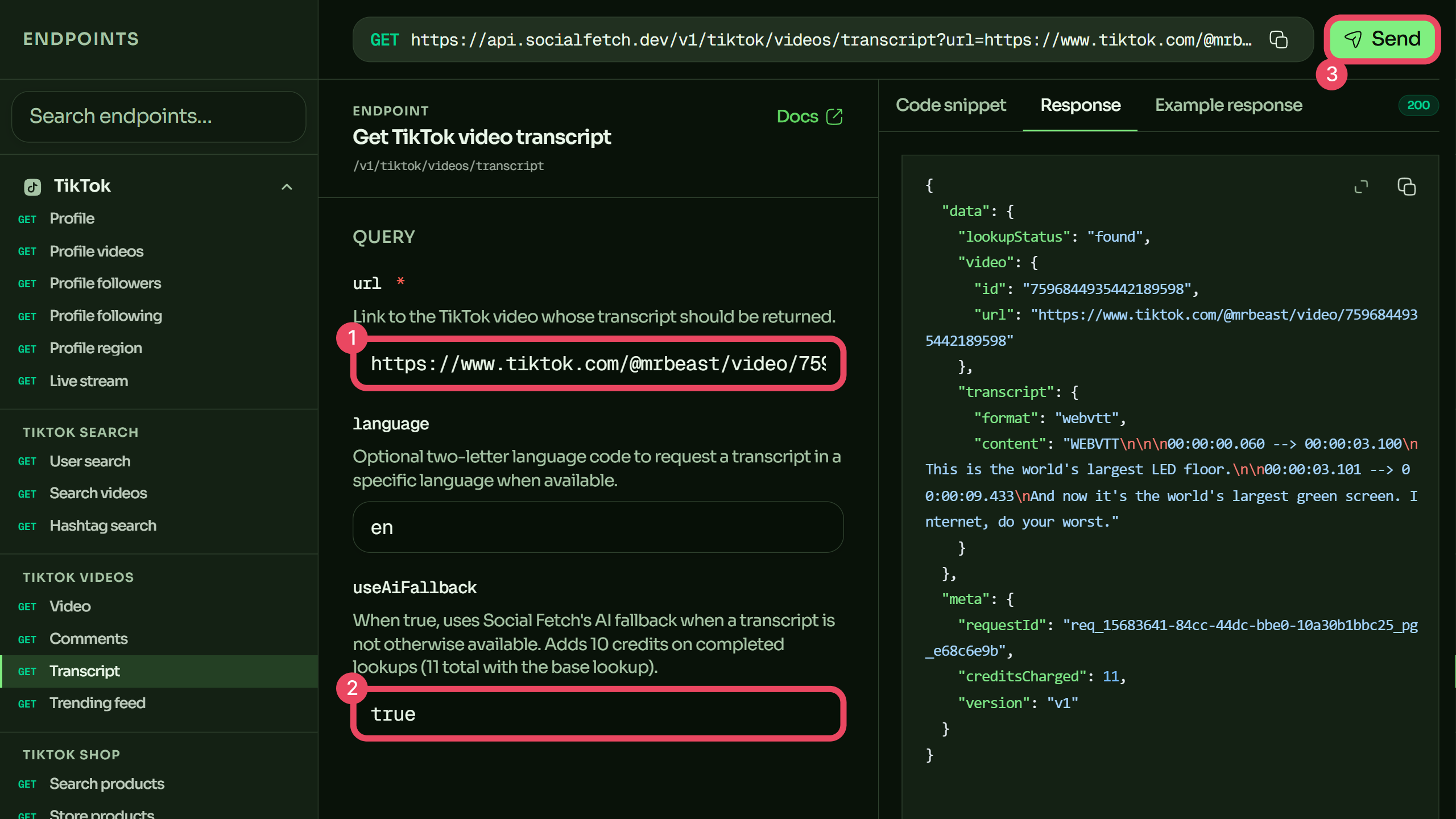
The only required parameter is url — the full link to a public video. Both the long share URL and vm.tiktok.com short links work. Full details are in the endpoint reference.
| What | Cost |
|---|---|
| Base transcript lookup | 1 credit |
With useAiFallback=true (AI transcribes audio when no caption exists) | +10 credits (11 total on a completed lookup) |
When a video has no captions
This is the case the manual and DIY routes can't handle: if a creator never enabled captions, there's nothing to scrape. Set useAiFallback=true and the audio is transcribed with speech-to-text instead, so you get text either way:
const videoUrl = "https://www.tiktok.com/@mrbeast/video/7596844935442189598";

const response = await fetch(
  `https://api.socialfetch.dev/v1/tiktok/videos/transcript?url=${encodeURIComponent(videoUrl)}&useAiFallback=true`,
  {
    headers: {
      "x-api-key": process.env.SOCIALFETCH_API_KEY,
    },
  }
);

const body = await response.json();

console.log(response.status, body);
The fallback adds 10 credits and only charges on a completed lookup. Leave it off when you only want existing captions and would rather skip videos without them; turn it on when you need a transcript for every video regardless of whether the creator captioned it — usually the case for research and repurposing pipelines.
Requesting a specific language
Pass an optional two-letter language code to request a specific language when one is available:
const videoUrl = "https://www.tiktok.com/@mrbeast/video/7596844935442189598";

const response = await fetch(
  `https://api.socialfetch.dev/v1/tiktok/videos/transcript?url=${encodeURIComponent(videoUrl)}&language=en`,
  {
    headers: {
      "x-api-key": process.env.SOCIALFETCH_API_KEY,
    },
  }
);

const body = await response.json();

console.log(response.status, body);
If the requested language isn't available, the lookup resolves to what TikTok has. Check data.transcript to see what came back.
Reading the response
A successful response wraps the transcript alongside the video identity and billing metadata:
{
  "data": {
    "lookupStatus": "found",
    "video": {
      "id": "7596844935442189598",
      "url": "https://www.tiktok.com/@mrbeast/video/7596844935442189598"
    },
    "transcript": {
      "format": "webvtt",
      "content": "WEBVTT\n\n00:00:00.060 --> 00:00:03.100\nThis is the world's largest LED floor.\n\n00:00:03.101 --> 00:00:09.433\nAnd now it's the world's largest green screen."
    }
  },
  "meta": {
    "requestId": "req_01example",
    "creditsCharged": 1,
    "version": "v1"
  }
}
The fields that matter:
data.lookupStatus—foundornot_found. A200does not guaranteefound; a missing or private video returns200withnot_found. Handle it in application logic.data.video— the resolved video'sidand canonicalurl, so you can reconcile the transcript to its source.data.transcript.content— the raw WebVTT text (data.transcript.formatiswebvtt).meta.creditsCharged— exactly what this call cost (1, or 11 with the AI fallback), so you can budget batch jobs.meta.requestId— trace identifier if a transcript ever looks wrong.
From WebVTT to plain text
data.transcript.content is WebVTT, which keeps the timestamps. Use it as-is for captions; for a clean plain-text transcript — blog drafts, prompts, search indexing — strip the timing cues:
import { SocialFetchClient } from "@socialfetch/sdk";

const client = new SocialFetchClient({
  apiKey: process.env.SOCIALFETCH_API_KEY!,
});

const result = await client.tiktok.getVideoTranscript({
  url: "https://www.tiktok.com/@mrbeast/video/7596844935442189598",
});

if (!result.ok) {
  console.error(result.error.code, result.error.requestId);
  process.exit(1);
}

const vtt = result.value.data.transcript?.content ?? "";

const plainText = vtt
  .replace(/\r\n/g, "\n")
  .split("\n")
  .map((line) => line.trim())
  .filter(
    (line) =>
      line &&
      line !== "WEBVTT" &&
      !line.includes("-->") &&
      !/^\d+$/.test(line),
  )
  .join(" ");

console.log(plainText);
That gives you both outputs from a single request: the timed version for video, the flat text for everything else.
What you can build
- Hook research — transcribe a set of viral videos in a niche, pull the first line of each, and study what's actually getting watched.
- Content repurposing — turn one TikTok into a thread, newsletter section, or blog draft without rewatching it, as a "video → text → distribution" pipeline.
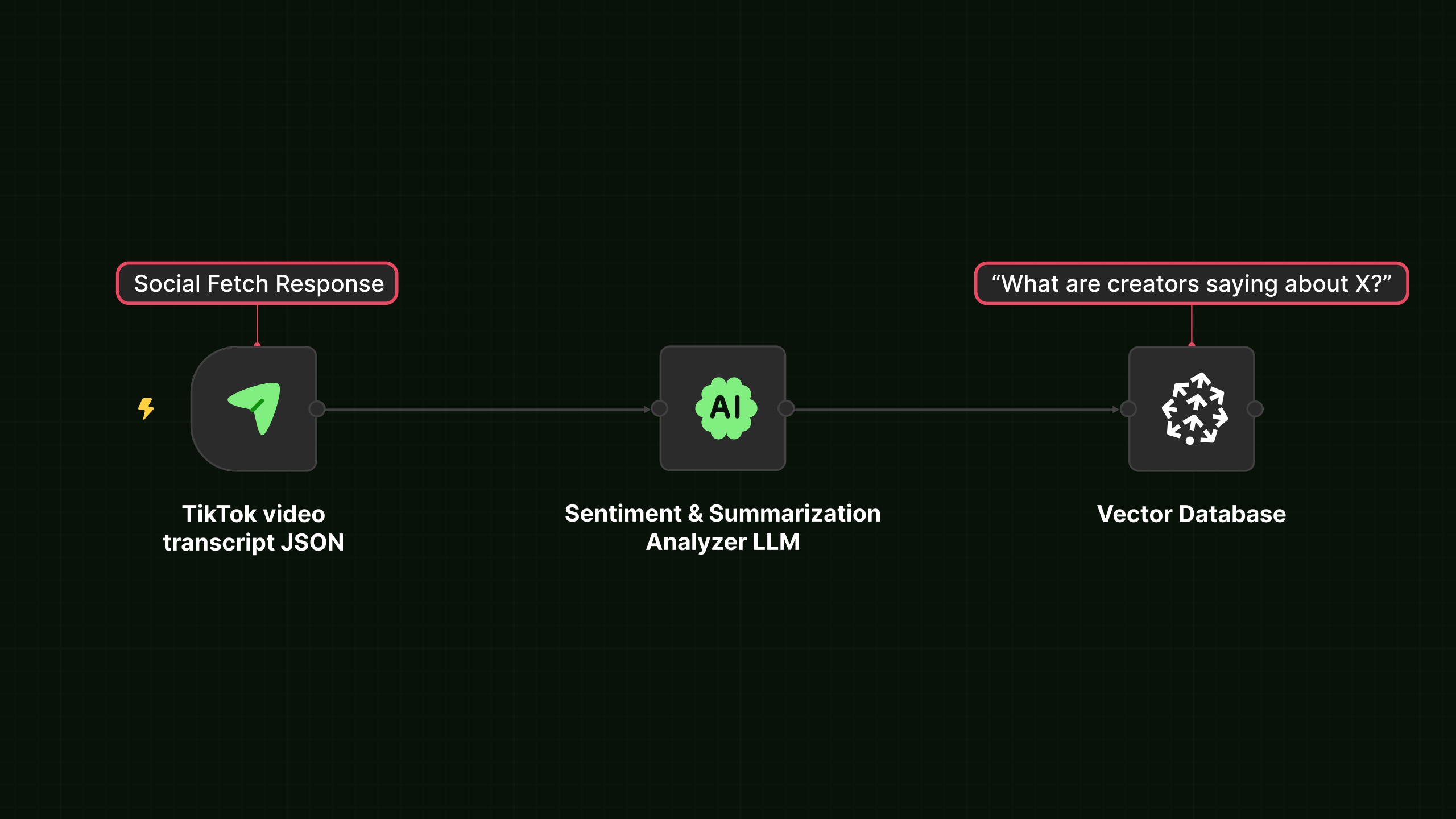
- AI and RAG pipelines — feed transcripts into summarization, sentiment, or retrieval. Text is searchable and composable in ways raw video never is.
- Accessibility and indexing — generate captions for your own reposts, or index spoken content so it's findable in a knowledge base.
FAQ
Does TikTok have a built-in transcript feature?
Not for export. TikTok shows auto-generated captions on screen during playback (mobile, and only if the creator enabled them), but there's no copy-all, no download, and no transcript panel like YouTube's. To get reusable text you need a tool or an API.
What if the video has no captions?
Set useAiFallback=true. The audio is transcribed with speech-to-text and you get text even when no caption track exists — the main reason an API beats DIY caption scrapers, which return nothing for uncaptioned videos. The fallback adds 10 credits on a completed lookup.
What format is the transcript returned in?
WebVTT — timestamped text. Use it directly as captions, or strip the timing cues for plain text. See From WebVTT to plain text.
Can I get transcripts in other languages?
Pass the optional two-letter language parameter when a specific language is available. If it isn't, the lookup resolves to what TikTok has — check data.transcript.
Is getting TikTok transcripts legal?
Transcribing publicly available video for analysis and repurposing is a common, widely-practiced pattern, and courts (e.g. hiQ v. LinkedIn) have generally treated public-web data as fair game in several jurisdictions. You remain responsible for TikTok's terms, copyright and privacy law, and your own contracts — a transcript is the creator's spoken words, so attribution and fair-use considerations apply when you republish. This is a technical guide, not legal advice.
How does this compare to other providers?
See the side-by-side comparisons: vs Apify, vs Bright Data, vs EnsembleData, and the full compare hub.
Next steps: Transcript endpoint reference · Scrape TikTok profiles & videos · Quickstart · Pricing