Social Fetch Trigger: run n8n workflows on new posts
Start an n8n workflow when a TikTok, Instagram, YouTube, X, LinkedIn or Reddit account or search has a new post, with the Social Fetch Trigger. Setup, testing, costs and a no-webhook alternative.
The Social Fetch Trigger starts your workflow when something new is posted: a creator's next TikTok, a brand's new Instagram post, a YouTube upload, a tweet from an account you follow, or a Reddit post that mentions your product. Each new post becomes one item, so the next node can send it to Slack, email, a sheet or an AI agent.
Behind the scenes, the trigger creates a monitor in your Social Fetch account. Social Fetch checks the source on your schedule and calls your workflow when a check finds new posts. When you unpublish the workflow or delete the trigger, the monitor is deleted too.
What it can watch
Pick one of these in the Watch field. The node shows only the fields that option needs.
| Platform | Watch | Fill in |
|---|---|---|
| TikTok | New videos from a profile | Handle |
| TikTok | New videos matching a search, or a Top search | Search Query |
| New posts, or new reels, from a profile | Handle | |
| New tagged posts from a profile | Instagram User ID (from the Social Fetch node's Instagram profile lookup) | |
| New posts for a hashtag | Search Query (the hashtag, without #) | |
| YouTube | New videos from a channel | Handle or YouTube Channel ID |
| X (Twitter) | New tweets from a profile | Handle |
| X (Twitter) | New tweets matching a search | Search Query |
| New posts from a person, or an organisation | LinkedIn Person Entity ID or LinkedIn Organisation ID (from the Social Fetch node's LinkedIn Profile or Organization lookup) | |
| New posts in a subreddit | Subreddit | |
| New posts matching a search across Reddit | Search Query | |
| New posts matching a search in a subreddit | Subreddit, and optionally Search Query |
The operation catalog lists the same options with the fastest schedule for each.
Before you start: n8n must be reachable
Social Fetch delivers new posts to your workflow over the internet, so it needs to reach your n8n:
- n8n Cloud works as it is.
- Self-hosted n8n needs a public
https://address on the standard port (443), set asN8N_WEBHOOK_URL(orWEBHOOK_URLon older versions). An address likehttps://n8n.example.com:5678won't work; put n8n behind a reverse proxy on port 443. - n8n on your own computer (for example
http://localhost:5678) can't receive new posts. The trigger tells you so when you test it. Use the schedule-based version instead.
Set up the trigger
- In a new workflow, click Add first step, search for Social Fetch and choose Social Fetch Trigger.
- Pick your Social Fetch credential.
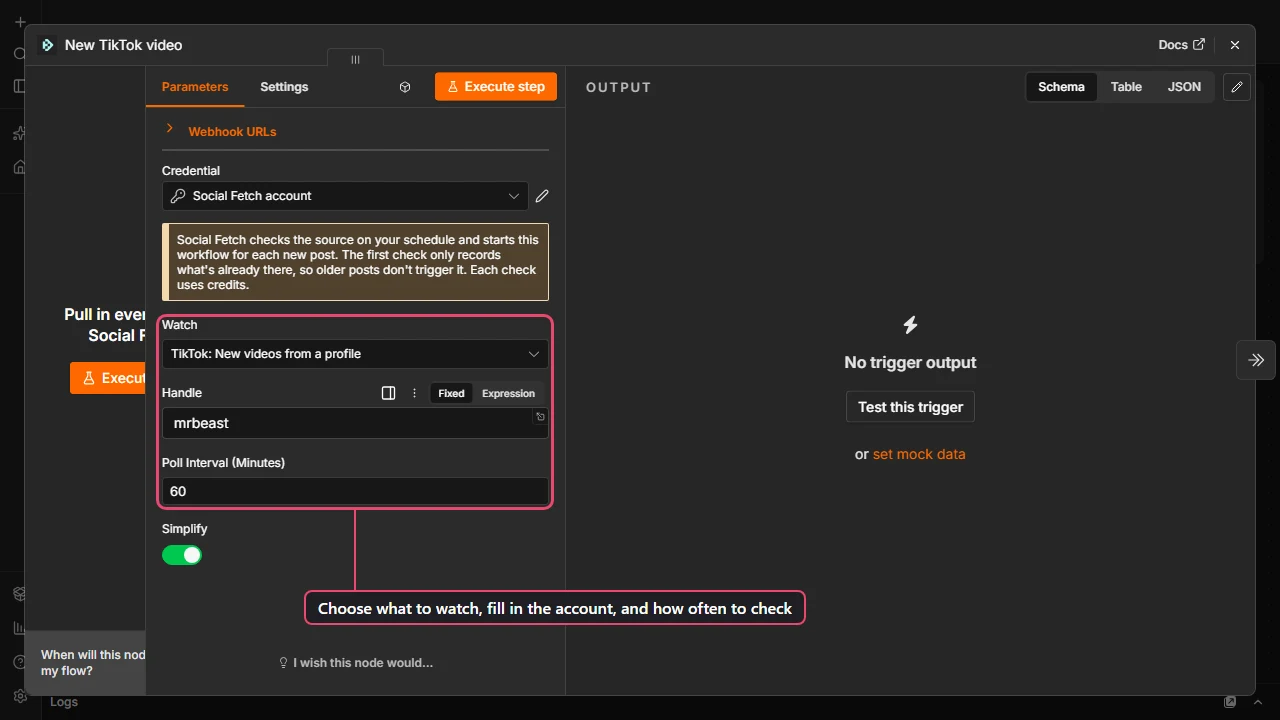
- In Watch, choose what to watch, for example TikTok: New videos from a profile.
- Fill in the field that appears, for example Handle
nasa. - Set Poll Interval (Minutes): how often Social Fetch checks. Every check uses credits, so check as often as you need and no more. It starts at 60 (once an hour), which suits most accounts; X sources need at least 5 minutes.
Test it with a sample post
Click Execute step (or Test this trigger). Social Fetch sets up the check and sends a sample post within a few seconds, so you can build the rest of the workflow without waiting for a real one.
The sample has the post ID and time but not the full post, so map fields like the caption or URL using the API reference example for that source, then check them on the first real post. If the node panel still says Listening for test event after the sample arrives, click Stop Listening: the sample stays in the output.
Each test runs one real check, which uses credits like a scheduled one.
Build the rest and publish
Add the nodes that should run for each new post, for example Slack → Send message with the text New TikTok: {{ $json.caption }} {{ $json.url }}.
Then click Publish (in older n8n versions, flip the toggle to Active). From now on:
- The first check only records what's already there, so posts from before you published don't start the workflow. (Searches are the exception: an older post that newly shows up in the search results counts as new.)
- Each later check that finds new posts starts the workflow once, with one item per new post (when Simplify is on, the default).
- A check that finds nothing doesn't start the workflow, but it still uses credits.
- Unpublishing the workflow deletes the check, so it stops using credits.
What it costs
Each check costs the same as calling that operation once, whether or not it finds anything. That makes the cost easy to predict:
| Poll Interval | Checks per day | Checks per month |
|---|---|---|
| 15 minutes | 96 | about 2,880 |
| 60 minutes | 24 | about 720 |
| 6 hours (360) | 4 | about 120 |
| 24 hours (1440) | 1 | about 30 |
Multiply by the operation's price on its API reference page. See Billing for monitors for the details, including what happens when you run low on credits and how many monitors each plan can run.
No public address? Use a schedule instead
If your n8n can't be reached from the internet, you can get the same result with three nodes. Import the ready-made version, or build it:
- Schedule Trigger, set to the interval you want, for example every hour.
- Social Fetch → TikTok → Profile Videos with your handle.
- Remove Duplicates with Operation set to Remove Items Processed in Previous Executions and Value to Dedupe On set to
{{ $json.id }}. Only videos the workflow hasn't seen before pass through.
Then add your Slack, email or sheet node. Before you publish, turn off the last node (select it and press D) and run the workflow once: that records the videos already up, so they aren't all sent on the first scheduled run. Turn the node back on and publish.
This works on any n8n, but it runs a request on every schedule tick, and your n8n does the comparing. The Social Fetch Trigger only starts your workflow when there's something new.
Troubleshooting
- "Social Fetch can't reach this n8n to deliver new posts." Your n8n's webhook address isn't public. See Before you start.
- "…can be checked every 5 minutes at most." Raise Poll Interval to the number in the message.
- "Fill in Handle…" The field for the source you picked is empty.
- The workflow never runs. Check it's published, and that the account has posted since then: the first check only records what's already there. You can see every check, including ones that found nothing, under Monitors in your Social Fetch account.
- Too many monitors. Each published trigger is one monitor, and plans have a limit on active monitors. Unpublish workflows you no longer need.
More in Troubleshooting.
Next steps
Working with results
How Social Fetch results become n8n items, when to use Simplify and Return All, how to loop over a list of handles or URLs (one run per row), and how to keep credit use predictable.
Use with the AI Agent
Give an n8n AI Agent live social media data: add Social Fetch as a tool, let the model fill in handles and searches, and keep tool calls and credits under control.