Use Social Fetch with the n8n AI Agent
Give an n8n AI Agent live social media data: add Social Fetch as a tool, let the model fill in handles and searches, and keep tool calls and credits under control.
n8n's AI Agent can call other nodes as tools while it answers. Add Social Fetch as a tool and the agent can look up live profiles, posts, comments and search results instead of guessing, for example "How many followers does @nasa have on TikTok and Instagram?" or "What are people saying on Reddit about our launch?"
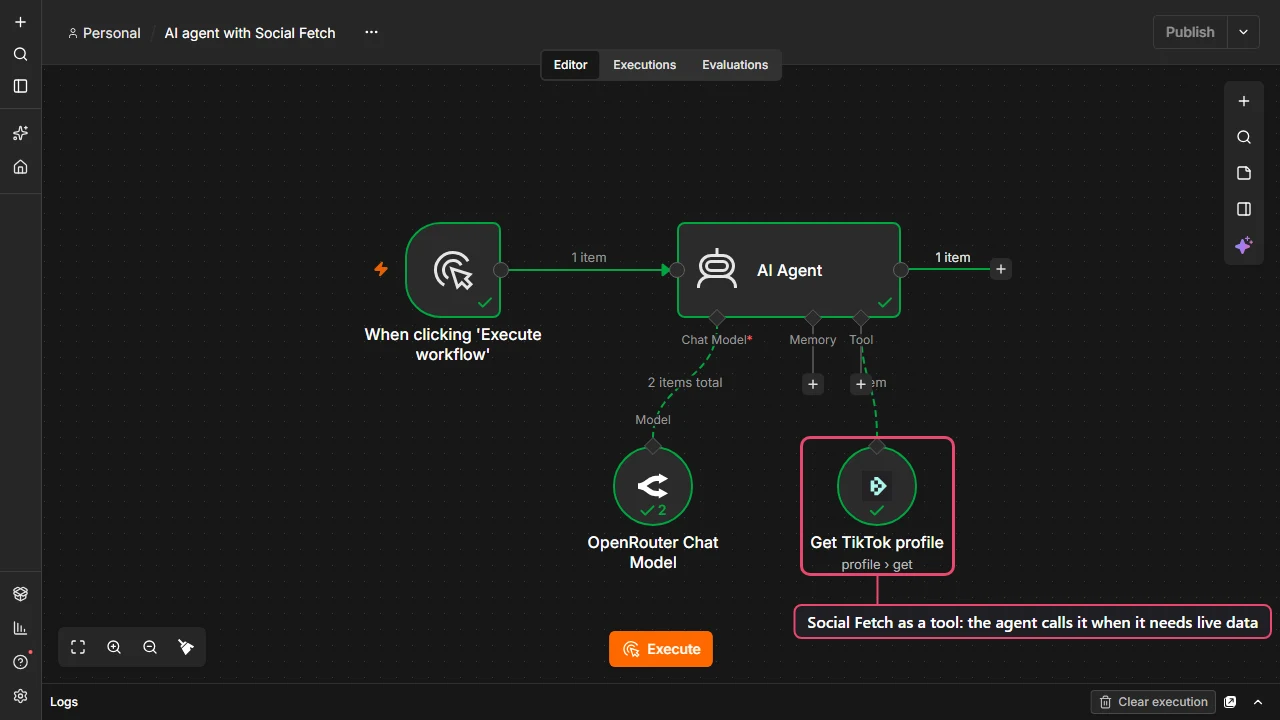
Add Social Fetch as a tool
- Add an AI Agent node and connect a chat model to it, for example OpenAI Chat Model.
- Click the + under the agent's Tool input, search for Social Fetch and choose an action, for example Get TikTok profile.
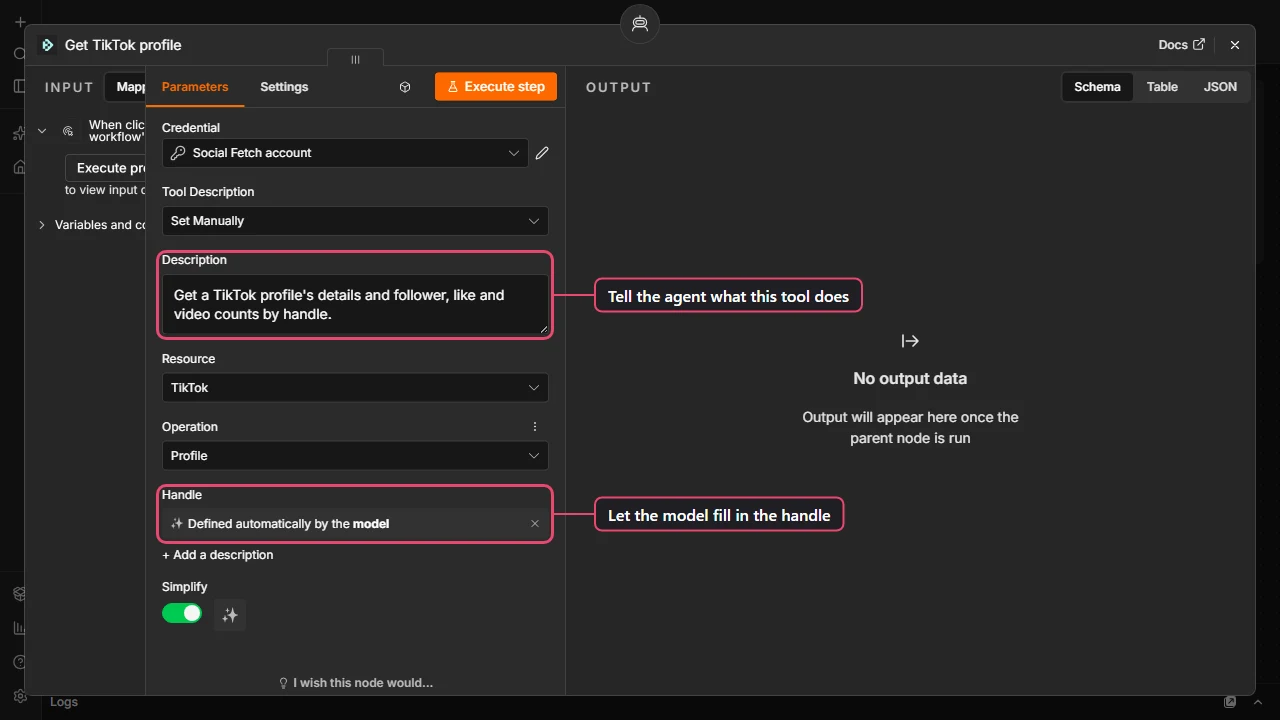
- Pick your Social Fetch credential.
- Under Tool Description, choose Set Manually and say in plain words what the tool does and when to use it, for example Get a TikTok profile by handle: bio, followers, likes and video count. The agent reads this to decide when to call the tool.
- Next to Handle, click the sparkle button, Let the model define this parameter. The field changes to Defined automatically by the model: the agent fills in the handle from the conversation.
Add one Social Fetch tool per job you want the agent to do: one for TikTok profiles, one for Instagram profiles, one for YouTube channel videos, and so on. Each tool does one thing, which keeps the agent's choices clear.
The AI research agent template has three tools set up already.
Tips for good answers
- Keep Simplify on. The agent gets the results without page and billing details, which means fewer tokens and fewer mistakes.
- Fix what doesn't need to change. If the agent should always look at your own brand, type the handle into the field instead of letting the model define it.
- Say what the fields mean in the system prompt, for example Handles are usernames without the @. Agents often add an @ or paste a full URL otherwise.
- Prefer specific tools over general ones. "Get TikTok profile" is easier for a model to use well than one tool that can do anything.
- Lists can be long. Tools that list posts or comments return a page of results. Leave Return All off for agents, so one question can't fetch up to 100 pages in a single tool call.
Credits and limits
Every tool call is a real Social Fetch request and uses credits, the same as running the node in a workflow. An agent may call a tool several times for one question (for example once per account it compares). To keep usage predictable:
- Give the agent only the tools it needs.
- Under the agent's Options, set Max Iterations to cap how many steps it takes per question.
- Watch usage in your request log; each tool call appears there like any other request.
Self-hosted n8n
On some self-hosted versions, community nodes only appear as agent tools when the environment variable N8N_COMMUNITY_PACKAGES_ALLOW_TOOL_USAGE is true. If Social Fetch is missing from the agent's tool list, set it and restart n8n.
Prefer to connect an AI app directly?
If you use Claude, ChatGPT, Cursor or another AI app rather than n8n, connect it to Social Fetch's hosted MCP server instead. Every Social Fetch operation becomes a tool, with no workflow to build.
Next steps
Watch for new posts
Start an n8n workflow when a TikTok, Instagram, YouTube, X, LinkedIn or Reddit account or search has a new post, with the Social Fetch Trigger. Setup, testing, costs and a no-webhook alternative.
Workflow templates
Ready-made n8n workflows to import: TikTok videos to Google Sheets, new posts to Slack, enriching a list of creators, and an AI research agent.