Working with results in n8n
How Social Fetch results become n8n items, when to use Simplify and Return All, how to loop over a list of handles or URLs (one run per row), and how to keep credit use predictable.
n8n passes data between nodes as items. Each item is one record, like one row in a spreadsheet. When a node gets five items, the next node runs five times, once per item. Most of what follows comes back to that one idea.
What the Social Fetch node outputs
With Simplify on (the default for new nodes):
- Lists come out as one item per result. TikTok → Profile Videos for a creator gives one item per video, each with fields like
id,caption,urlandstats.views. A few searches return several kinds of result at once (YouTube and Rumble search return videos, channels and more); those come out as one item per page, with each kind under its own field. - Single lookups come out as one item. TikTok → Profile gives one item with
profile(the handle, name and bio),metrics(followers, likes, post count) andlookupStatus, which says whether the account was found.
That's the shape Google Sheets, Airtable, Notion, Filter and IF nodes expect, so you can connect them straight after Social Fetch.
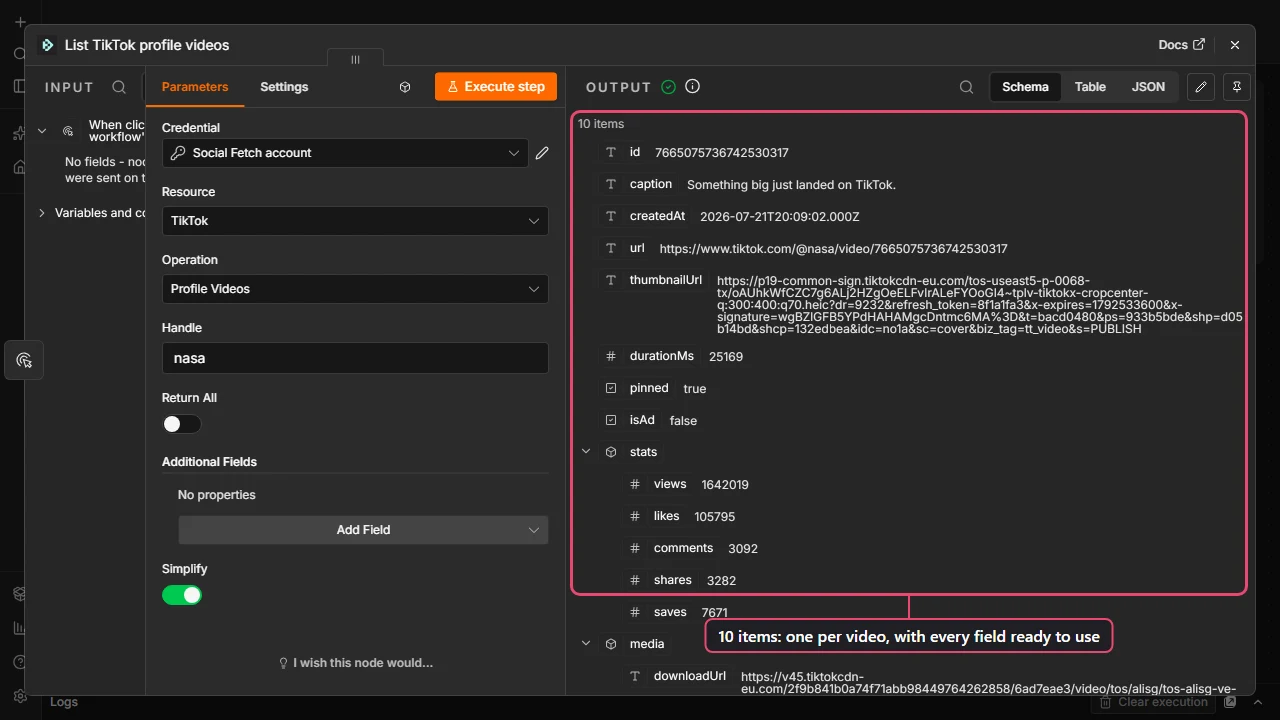
Turn Simplify off to get the full response instead: one item per page, with the results under data, the next-page details under data.page, and billing details under meta, including meta.creditsCharged. You rarely need this in a workflow. It's handy for checking what a call cost.
Using a node from before version 2?
Older Social Fetch nodes always return the full response. To get one item per result, add a Split Out node after it and set Fields To Split Out to the list, for example data.videos. The field name for each operation is in its API reference example response.
Using results in the next node
Drag a field from the input panel into any field of the next node, or type an expression. For a video from Profile Videos:
| You want | Expression |
|---|---|
| The video link | {{ $json.url }} |
| The caption | {{ $json.caption }} |
| The view count | {{ $json.stats.views }} |
| When it was posted | {{ $json.createdAt }} |
And for TikTok → Profile, the follower count is {{ $json.metrics.followers }} and the bio is {{ $json.profile.bio }}.
Different operations return different fields. Run the node once and look at the output in Schema view to see what's there; the API reference has an example response for every operation.
Running the node for every row of a list
When the node's input has several items, Social Fetch runs once per item. You don't need a loop. To look up a list of creators kept in Google Sheets:
- Google Sheets → Get row(s) in sheet reads your list. Each row becomes an item.
- Social Fetch → TikTok → Profile with Handle set to an expression: drag the
handlecolumn from the input panel, or type{{ $json.handle }}. - Google Sheets → Update row in sheet writes the follower count back next to each handle. Set Column to match on to
handle, and its value to{{ $('Get row(s) in sheet').item.json.handle }}, which picks the handle from the row this profile came from.
Each lookup uses credits, so a 500-row sheet makes 500 requests. Try it on a few rows first: add n8n's Limit node after Get row(s) in sheet and set it to 3. The enrich a list template is this workflow, ready to import.
For long lists, add a Loop Over Items node with a batch size of 10 to 25, and a Wait node of a few seconds inside the loop. It spreads the requests out, and if the Google Sheets node is inside the loop too, the rows already done are saved even if something fails halfway.
Getting every page
List operations return one page of results per request: a page of videos, comments or search results. Turn on Return All to keep fetching pages until there are no more. Each page is a separate request and uses credits, and the node stops after 100 pages.
| You want | Setting |
|---|---|
| The latest posts, for a daily check | Return All off |
| Every comment on a post | Return All on |
| A creator's whole back catalogue | Return All on, and check your credits first |
Some operations take a Limit or Count under Additional Fields that sets the page size. The operation's API reference says how its pages work.
Operations without Return All return everything in one response. Operations that page by number also have a Page field under Additional Fields, to start from a later page.
Keeping credit use predictable
Every successful request uses credits, whether it runs on a schedule, from a test click in the editor, or from an AI agent. A few habits keep the numbers predictable:
- Pin data while you build. Run the Social Fetch node once, then click the pin icon in its output panel. While pinned, the node reuses that output instead of calling Social Fetch, so you can try out the rest of the workflow for free. Unpin it before you activate the workflow.
- Test with a small list. Limit the rows you read while you get a workflow right.
- Prefer the trigger for "has anything new been posted?" The Social Fetch Trigger checks one source on a schedule and only starts your workflow when there's something new, instead of fetching a list and comparing it yourself.
- Check your balance from the workflow. Resource: Account → Operation: Balance is free. Add an IF node after it to stop a big run when the balance is low.
Prices per operation are on each API reference page. Lookups that fail on our side aren't charged; lookups that find nothing (a deleted or private account) are. See Credits and billing.
Next steps
Your first workflow
A step-by-step n8n tutorial for beginners: fetch a TikTok creator's latest videos with Social Fetch and save them to Google Sheets, then run it every day.
Watch for new posts
Start an n8n workflow when a TikTok, Instagram, YouTube, X, LinkedIn or Reddit account or search has a new post, with the Social Fetch Trigger. Setup, testing, costs and a no-webhook alternative.