n8n workflow templates for Social Fetch
Ready-made n8n workflows to import: TikTok videos to Google Sheets, new posts to Slack, enriching a list of creators, and an AI research agent.
Each template is a working n8n workflow. Import it, connect your accounts, change the handle and run it. Every template opens with a Start here note on the canvas that lists what to set up.
How to import a template
- Copy the template's link below.
- In n8n, create a new workflow, open the ⋯ menu next to its name and choose Import → From URL.
- Paste the link and click Import.
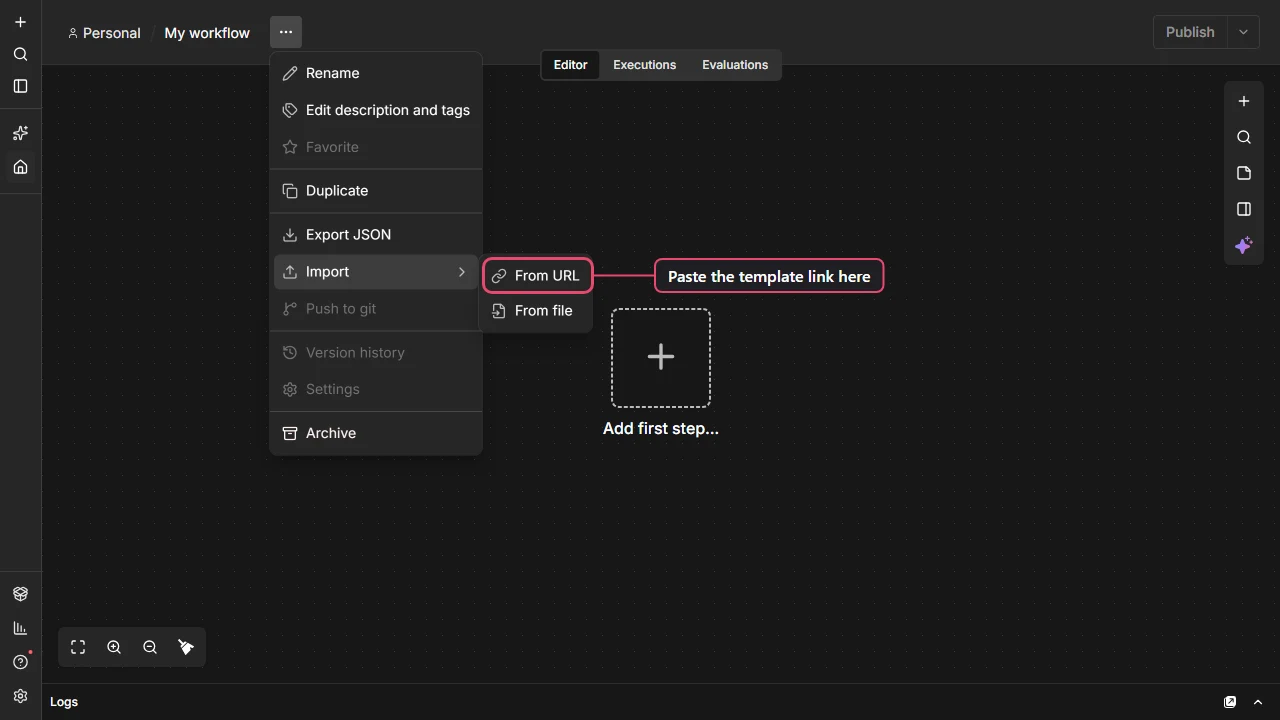
You can also download the file and use Import → From file, or open the link, copy everything and paste it onto an empty canvas.
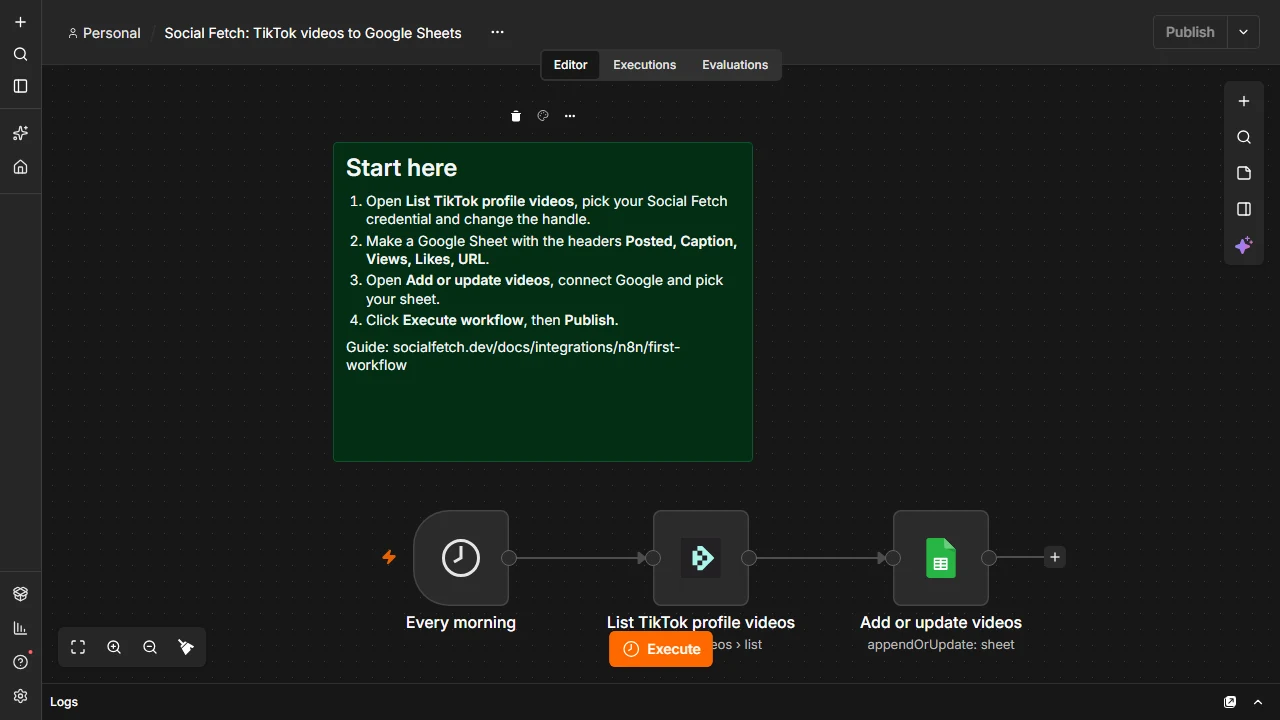
After importing, n8n marks the nodes that still need an account. Open each one, pick or create the credential, and the warning goes away. Templates use the newest Social Fetch node, so update the node first if n8n says it doesn't recognise it.
TikTok videos to Google Sheets
Every morning, add a creator's latest TikTok videos to a Google Sheet, and update the views and likes of videos already there. It runs a Schedule Trigger, then Social Fetch (List TikTok profile videos), then Google Sheets (Append or Update Row). You'll need a Google Sheet with the headers Posted, Caption, Views, Likes and URL.
https://www.socialfetch.dev/integrations/n8n/workflows/tiktok-videos-to-google-sheets.jsonThe first workflow tutorial builds this one step by step.
New posts to Slack
Post a message in Slack whenever an account has a new post. It uses the Social Fetch Trigger (TikTok: New videos from a profile) and a Slack node, so it only runs when there's something new. It needs n8n Cloud, or a self-hosted n8n with a public https address on port 443.
https://www.socialfetch.dev/integrations/n8n/workflows/new-posts-to-slack.jsonTo watch Instagram, YouTube, X, LinkedIn or Reddit instead, change the trigger's Watch field.
New posts to Slack (any n8n)
The same result without the trigger, for an n8n that isn't reachable from the internet, like one on your own computer. A Schedule Trigger runs Social Fetch (List TikTok profile videos), and n8n's Remove Duplicates node drops the videos the workflow has already seen before the Slack node.
https://www.socialfetch.dev/integrations/n8n/workflows/new-posts-to-slack-scheduled.jsonBefore you publish it, run it once with the Slack node turned off, as the Start here note explains, so the videos already up aren't all sent at once.
Enrich a list of creators
Read TikTok usernames from a Google Sheet, look up each profile with Social Fetch (Get TikTok profile), and write followers, likes, video count and bio back to the same row. You'll need a Google Sheet with the headers handle, followers, likes, videos and bio, with usernames in the handle column.
https://www.socialfetch.dev/integrations/n8n/workflows/enrich-creator-list.jsonEach row is one request. Try it on a few rows first; see Running the node for every row of a list.
AI research agent
Chat with an agent that looks up TikTok and Instagram profiles and YouTube channel videos as it answers. It has a Chat Trigger, an AI Agent with an OpenAI chat model (swap in another model if you prefer), and three Social Fetch tools.
https://www.socialfetch.dev/integrations/n8n/workflows/ai-social-research-agent.jsonClick Open chat and ask, for example, How many followers does @nasa have on TikTok and Instagram? See Use with the AI Agent to add more tools.
Next steps
Use with the AI Agent
Give an n8n AI Agent live social media data: add Social Fetch as a tool, let the model fill in handles and searches, and keep tool calls and credits under control.
Troubleshooting
Fix Social Fetch errors in n8n: install problems, API key and credit errors, busy or failed lookups, empty results, and updating the node.