X Follower Tracker costs and limits
What the X Follower Tracker spends credits on, how to read its estimates, the limits on each check, a monthly cap, and what to do when a check stops.
The tracker runs on your Social Fetch credits, at the normal price of each lookup it makes. Nothing is charged for opening the tracker, browsing results, filtering, exporting or using AI insights.
What uses credits
| What | Credits | When |
|---|---|---|
| Looking up an account to track | 1 | Each time you click Preview or Look up |
| The account's profile and follower count | 1 | Every check |
| The follower list | 1 for every 500 or so followers | Every check, with Full audience |
| The following list | 1 for every 500 or so accounts it follows | Every check, if Following list is on |
| Confirming that someone left | 1 per person | When a follower is missing from a check |
| Profile details | 1 for every 50 people | First check, then for new followers and every 30 days, up to the Profile details limit |
| Recent posts | 1 for each page of up to 40 posts | Every check, if Post context is on, up to the Posts limit |
| Look deeper in a profile | 1 per click | Only when you click Account history or Recent posts |
A follower count only check costs 1 credit, plus recent posts if Post context is on.
Example: an account with 10,000 followers that follows a few dozen accounts costs about 22 credits a check: 1 for the profile, about 20 for the follower list and 1 for the following list. Checked daily, that's about 665 credits a month, plus a few credits for confirmations, new followers' profile details and posts.
Read the estimates
When you set up an account, the panel on the right shows two estimates:
- First check is the most the first check can cost. It's the biggest, because it fills in profile details for the whole audience up to your limit. It says Up to when post context is on.
- Each month estimates the regular checks: the profile, the follower list and the following list, at your chosen frequency. Confirmations, profile details for new followers and posts come on top.
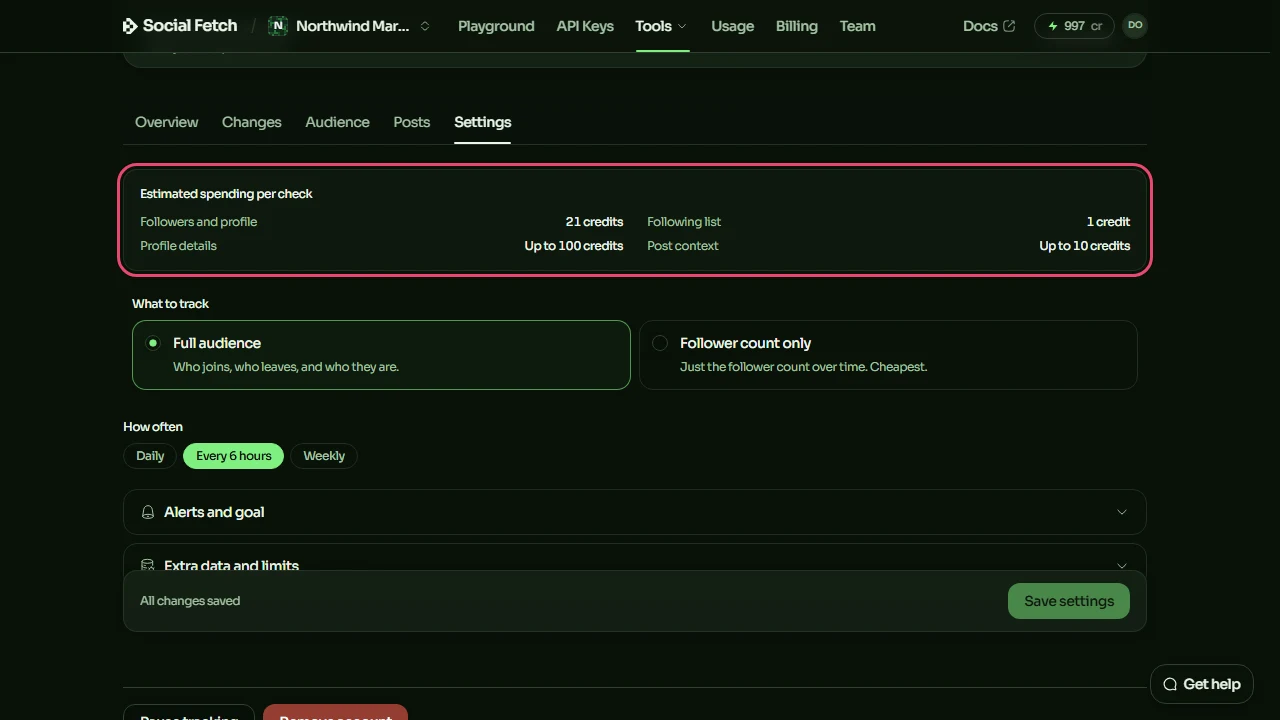
After you start, the account's Settings tab shows Estimated spending per check, broken down into followers and profile, following list, profile details and post context.
The tracker home page shows Credits this month across all your tracked accounts.
Set a limit for each check
Every account has three limits under Extra data and limits, in Most credits one check can use:
- Follower lists covers the profile, the follower and following lists, and confirming departures. If a check reaches it, the check stops. When it's lower than a check is expected to need, the section shows Limit below estimate.
- Profile details caps how many profiles a check fills in. When it's reached, the check carries on without filling in more.
- Posts caps how many pages of posts a check collects. When it's reached, the Posts tab says only the most recent posts fit.
Whenever a check stops early, it keeps everything it had already finished. Your earlier results are never replaced by a partial check.
Set a monthly cap
To cap what all your tracked accounts can spend together in a month, click the gear button on the tracker home page, next to Track an account. In Tracker spending, enter a number of credits and click Save limit. Leave it blank for no limit.
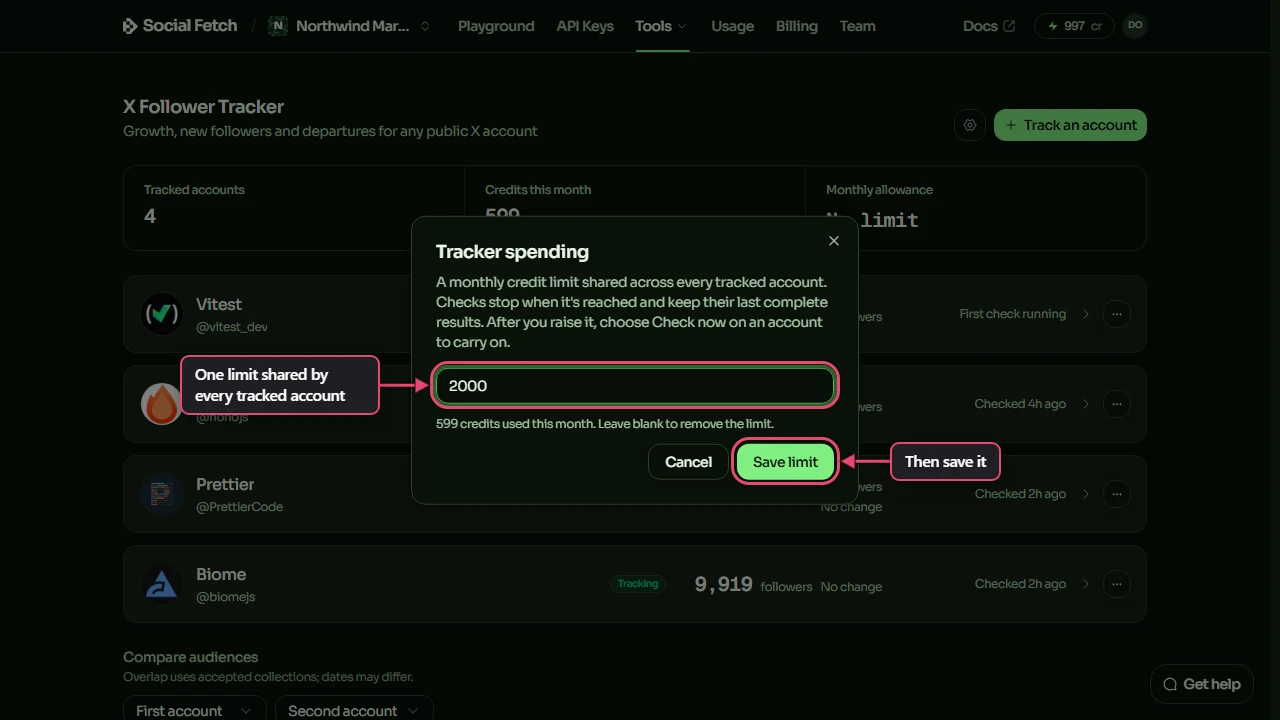
The month runs from the 1st to the end of the month, in UTC (Coordinated Universal Time, the same as London time in winter). Only workspace owners and admins can set the cap, and the gear button is available once you track at least one account.
When a check stops
A check stops early when it reaches its Follower lists limit, when the workspace reaches its monthly cap, or when your balance runs out. The account page then shows a message, and the account's card on the home page shows Limit reached or Needs credits.
| Message | What to do |
|---|---|
| This check hit its credit limit | Click Raise the limit, increase Follower lists, save, then click Check now. |
| This month's tracker limit was reached | Raise the cap in Tracker spending on the home page, then click Check now. |
| More credits are needed | Click Add credits to top up, then come back and click Check now. |
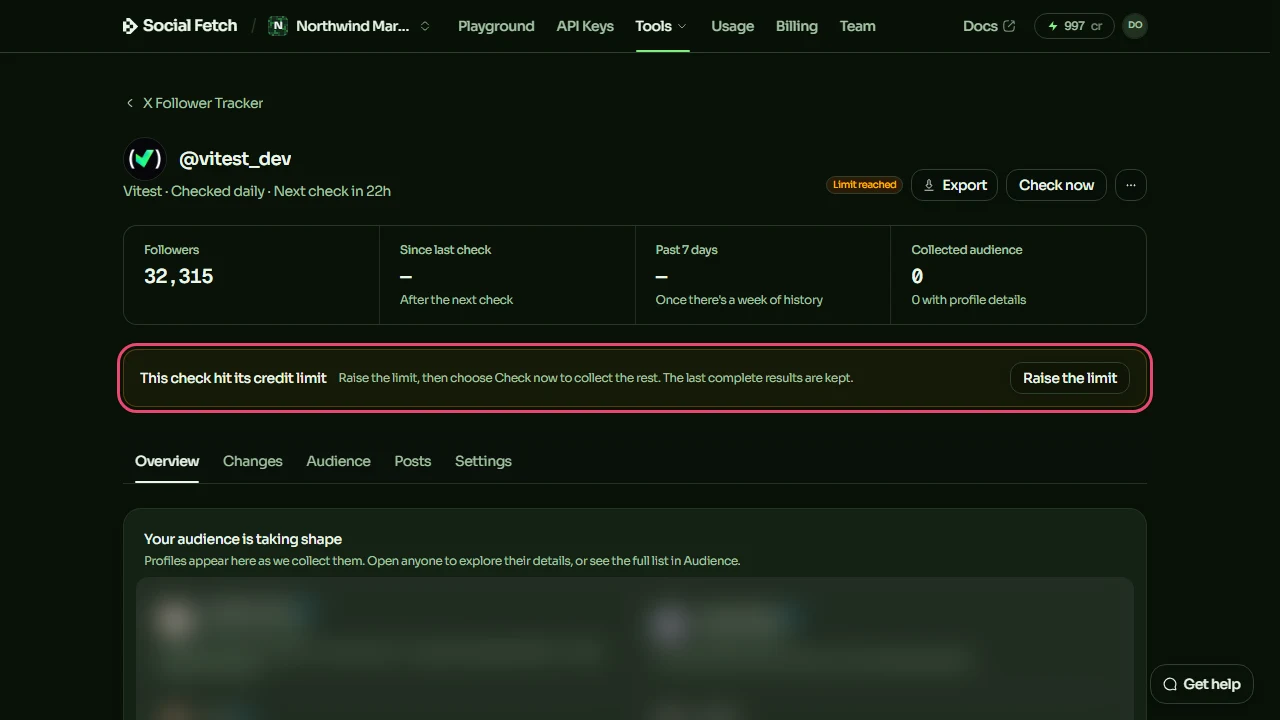
Click Check now to carry on
A stopped check doesn't restart on its own, even after you add credits or a new month starts, and scheduled checks for that account wait until it's done. After you fix the cause, click Check now at the top of the account page. It picks up where the check stopped.
Credits spent before a check stopped still count towards that check's limit when you carry on, so raise the limit enough to cover the rest.
Spend less
- Choose Weekly, or Daily instead of Every 6 hours.
- Choose Follower count only and switch off Post context if you only need the number. That's 1 credit a check.
- Switch off Following list if you don't need mutuals and follow-backs.
- Lower the Profile details limit. The first check fills in fewer profiles, and later checks fill in the rest bit by bit.
- Pause accounts you don't need for a while. Paused accounts don't use credits and keep their history.
Explore the audience
Search and filter everyone who follows a tracked X account, describe who you want in plain English, keep a watchlist, save segments and find mutual follows.
Alerts and exports
Get email digests and alerts when a tracked X account gains or loses followers or someone on your watchlist changes, set a follower goal, and download CSV files.