Facebook Ad Library aggregation
Search Meta's Ad Library by keyword, find an advertiser's page and list its ads, page through results and fetch one ad, with the Playground and the TypeScript SDK.
Meta's Ad Library is a public list of the ads shown on Facebook, Instagram and Meta's other apps, including ones that have stopped running. Social Fetch gives you the same data as JSON, so you can pull it into a spreadsheet, a dashboard or your own code. This recipe covers the two ways in: search every advertiser's ads by keyword, or find one advertiser and list theirs.
Want to follow a competitor's ads without code?
The Ad Tracker in the Social Fetch app does this for you: type a brand's name and it saves every ad they run on Meta, LinkedIn, Google and TikTok, and checks for new ones on a schedule. Use this recipe when you want the raw data in your own code, or to search by keyword across advertisers.
What you'll need
- A Social Fetch account with some credits. The Playground runs requests from your browser, so you can try everything on this page before writing code.
- For code, an API key and the TypeScript SDK. Any language works with the raw API; the SDK just adds types.
What it costs
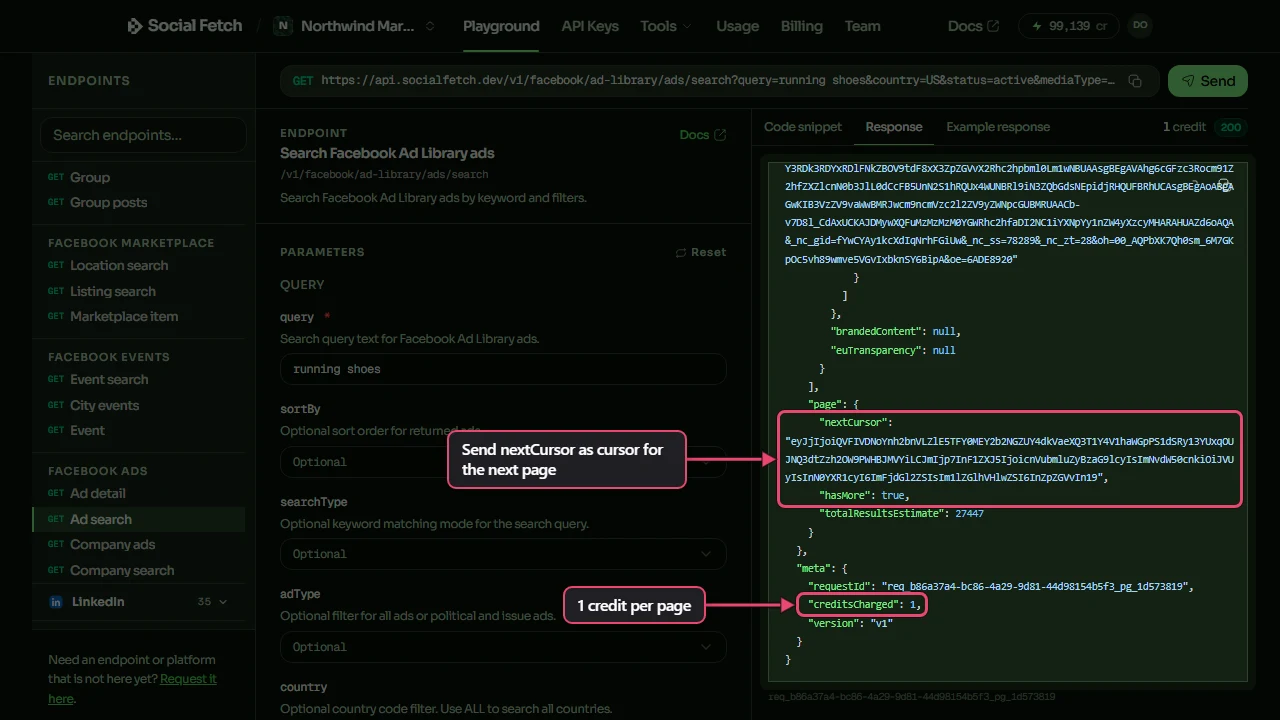
1 credit per request
Each of the four requests below costs 1 credit, and each page of results is a separate request. A search that finds nothing, or an advertiser lookup that comes back not_found, still costs its credit. Failed requests (errors) are free. Every response says what it cost in meta.creditsCharged. See Credits.
The four requests
| To | Request | SDK method |
|---|---|---|
| Search all ads by keyword | GET /v1/facebook/ad-library/ads/search | client.facebook.searchAdLibraryAds() |
| Find an advertiser's page | GET /v1/facebook/ad-library/companies/search | client.facebook.searchAdLibraryCompanies() |
| List one advertiser's ads | GET /v1/facebook/ad-library/companies/ads | client.facebook.listCompanyAds() |
| Get one ad by its ID or link | GET /v1/facebook/ad-library/ads | client.facebook.getAdLibraryAd() |
Search ads by keyword
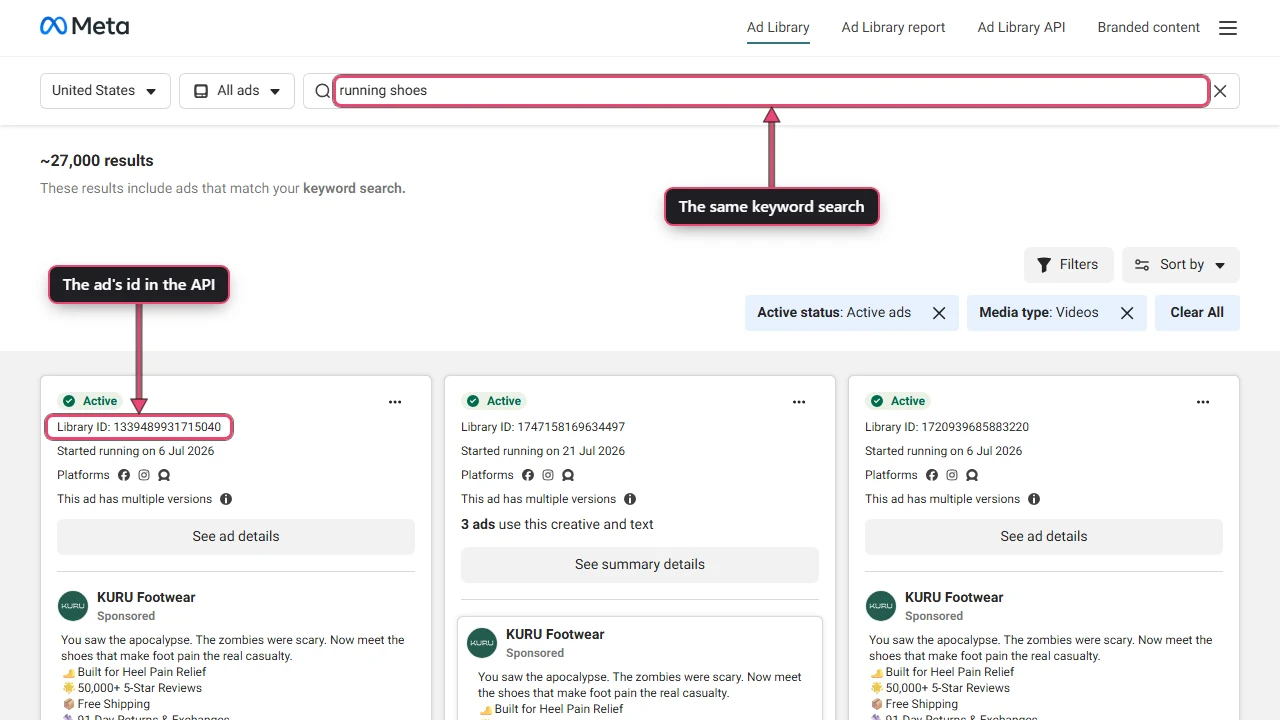
Keyword search finds ads from any advertiser whose text matches your words, the same as typing in the Ad Library's search box.
- Open the Ad search endpoint in the Playground. The link fills in query with
running shoesand sets country toUS, status toactiveand mediaType tovideo. - Click Send.
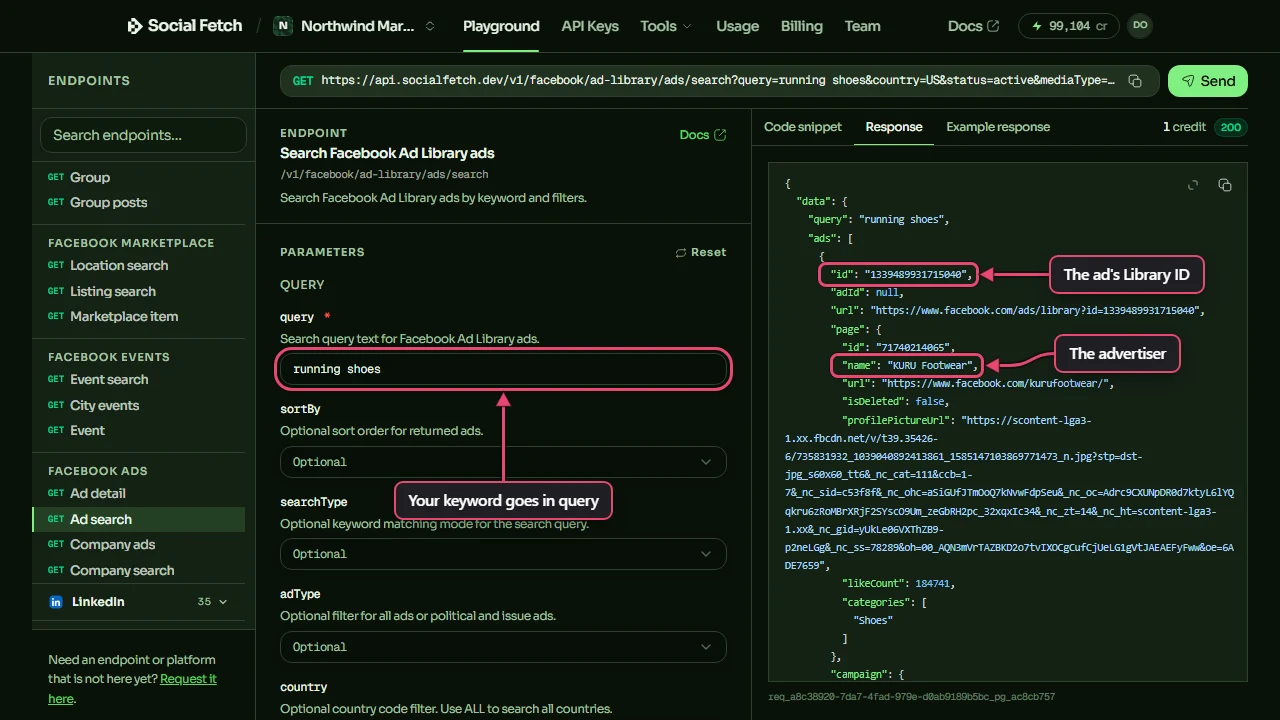
The same search in code:
import { SocialFetchClient } from "@socialfetch/sdk";

const client = new SocialFetchClient({
  apiKey: process.env.SOCIALFETCH_API_KEY!,
});

const result = await client.facebook.searchAdLibraryAds({
  query: "running shoes",
  country: "US",
  status: "active",
  mediaType: "video",
});

if (!result.ok) {
  console.error(result.error.code, result.error.requestId);
} else {
  for (const ad of result.value.data.ads) {
    console.log(ad.id, ad.page?.name, ad.startedAt, ad.url);
  }
  console.log("Credits:", result.value.meta.creditsCharged);
}
The filters you can add:
| Filter | Values |
|---|---|
country | A two-letter country code such as US or GB, or ALL |
status | active, inactive or all |
mediaType | all, image, video, meme, image-and-meme or none |
sortBy | impressions or most-recent |
searchType | keyword-unordered (all the words, in any order) or exact-phrase |
adType | all or political-and-issue |
language | A two-letter language code such as EN or ES |
startDate, endDate | Dates as YYYY-MM-DD |
Each ad's text, link and call to action are in creative. Its pictures and videos are in creative.images and creative.videos, but some ads keep theirs in creative.cards instead, so check both.
Get the next page
A search returns one page of ads. When there are more, data.page.hasMore is true and data.page.nextCursor holds a cursor. Send it back as cursor, with the same filters, to get the next page.
const filters = {
  query: "running shoes",
  country: "US",
  status: "active",
  mediaType: "video",
} as const;

const ads = [];
let cursor: string | undefined;

// Stop after 3 pages (3 credits), or sooner if there are no more.
for (let page = 1; page <= 3; page++) {
  const result = await client.facebook.searchAdLibraryAds({ ...filters, cursor });
  if (!result.ok) {
    console.error(result.error.code, result.error.requestId);
    break;
  }

  ads.push(...result.value.data.ads);

  const { hasMore, nextCursor } = result.value.data.page;
  if (!hasMore || !nextCursor) break;
  cursor = nextCursor;
}

console.log(`Collected ${ads.length} ads`);
A popular keyword can match tens of thousands of ads, so always set a page limit. If you change a filter but keep an old cursor, the search returns an error saying the cursor doesn't match the current filters.
List one advertiser's ads
To see everything one brand runs, find its Facebook page first, then list that page's ads.
- Open Company search in the Playground, type the brand's name in query (here
Saucony) and click Send. - Find the right page in
data.companiesand copy itspageId.
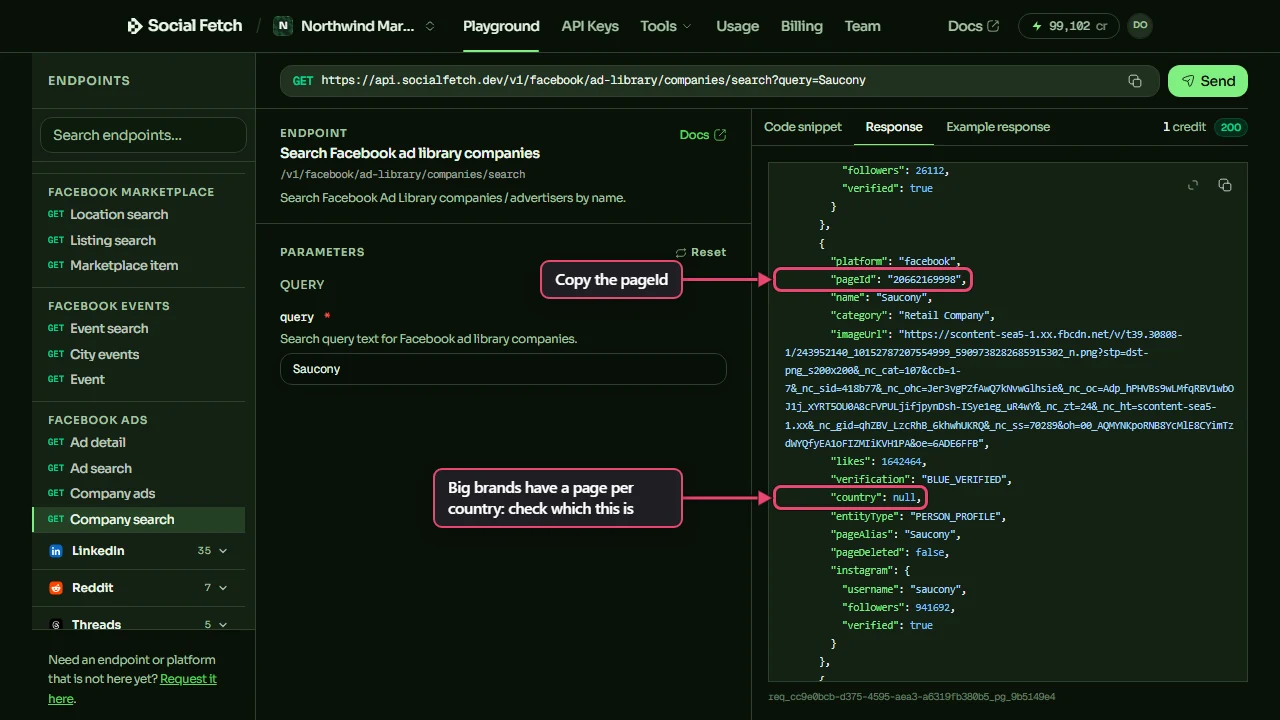
- Open Company ads, paste the ID into pageId and click Send.
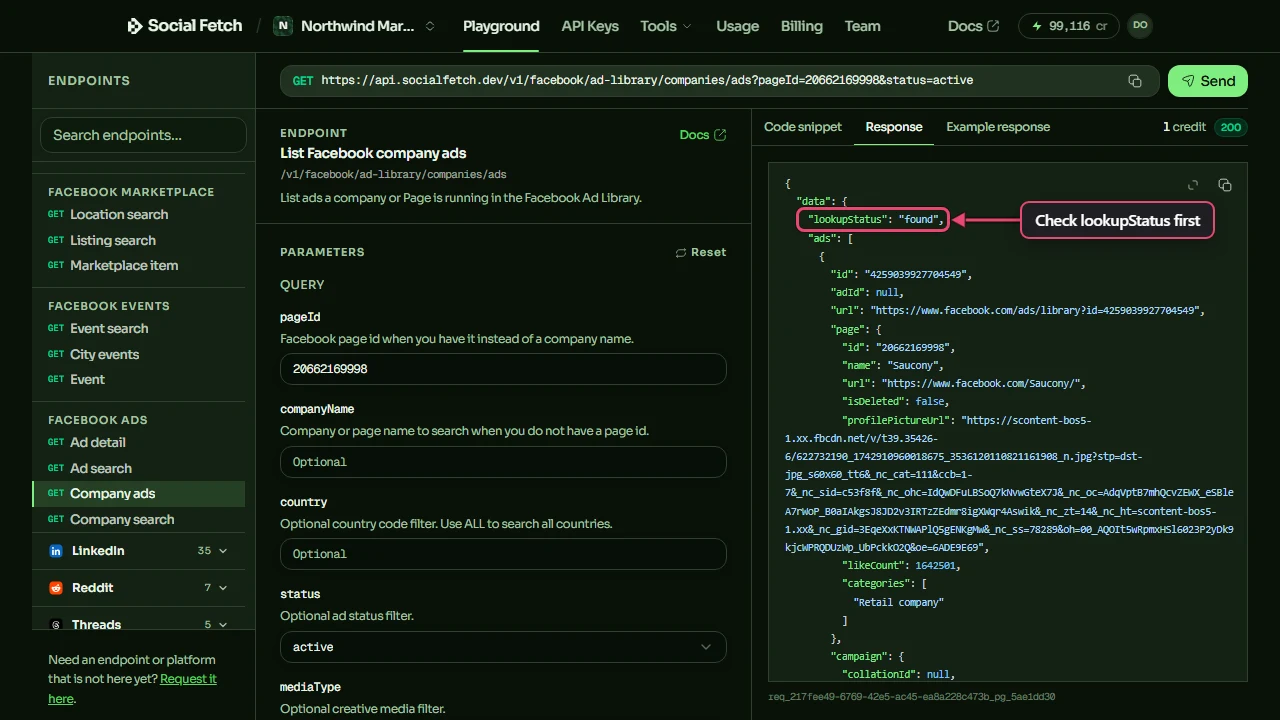
In code:
const companies = await client.facebook.searchAdLibraryCompanies({
  query: "Saucony",
});

if (!companies.ok) {
  throw new Error(`${companies.error.code} (${companies.error.requestId})`);
}

// Look through the matches and pick the page you mean.
for (const company of companies.value.data.companies) {
  console.log(company.pageId, company.name, company.country, company.likes);
}

const result = await client.facebook.listCompanyAds({
  pageId: "20662169998",
  status: "active",
});

if (!result.ok) {
  console.error(result.error.code, result.error.requestId);
} else if (result.value.data.lookupStatus === "not_found") {
  console.log("No Ad Library page matched that pageId or name.");
} else {
  for (const ad of result.value.data.ads) {
    console.log(ad.id, ad.startedAt, ad.creative?.bodyText);
  }
}
listCompanyAds also takes companyName instead of pageId, which saves the company search. You don't choose the page, though: for Saucony it listed the ads of one of its country pages rather than its main one. Use pageId when it matters which page you get. It takes the same country, status, mediaType, language, sortBy, startDate, endDate and cursor as keyword search, and pages the same way.
Get one ad
When you already have an ad's Library ID, or its link from the Ad Library website, fetch just that ad:
const result = await client.facebook.getAdLibraryAd({
  url: "https://www.facebook.com/ads/library/?id=1339489931715040",
  // or: adId: "1339489931715040",
});

if (result.ok && result.value.data.lookupStatus === "found") {
  console.log(result.value.data.ad);
}
Add includeTranscript: true to get the words spoken in a video ad as text in data.transcript, when there's speech to transcribe. It's still 1 credit.
Without code: the Ad Tracker
If what you want is to keep an eye on a few competitors, the Ad Tracker does the whole job in the app. You type a brand's name, check the account it found on each ad library, and it collects their ads and checks for new ones from then on, saving each ad's images and video so they stay after the brand takes the ad down.
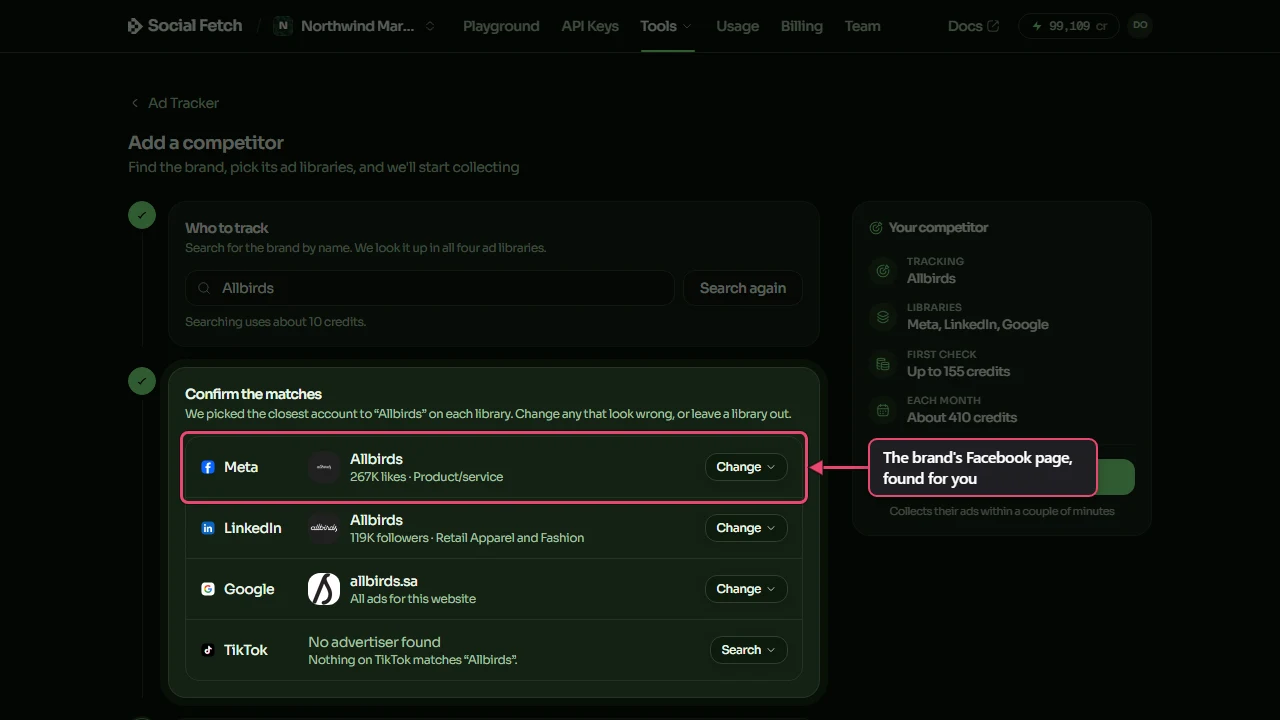
It runs on the same credits. Track your first competitor walks through it.
Other ad libraries
The same kind of search works on other platforms' ad libraries:
- TikTok Ad Library search
- LinkedIn Ad Library search
- Google Ad Library company ads, which costs more per request than the others (see its page)
Video transcription pipeline
Turn YouTube, TikTok and Instagram video links into plain-text transcripts with one function, and know what each one costs
Creator engagement scoring
Score creators by how their recent posts perform, with the ready-made engagement audit or your own formula built from profiles and recent posts